VI User Manual.pdf - 第335页
Optimization Vision 2007 4.10 User Manua l Rev 01 12 - 17 12.3.6.2 Interpretation In Customer libr ary , tick the check boxes of th e Remove ( A ) column to remove unused links. In Standard library , tick the check boxes…
Optimization
12 - 16 Vision 2007 4.10 User Manual Rev 01
12.3.5 ADC in production
When you start the ADC mode, some messages tell you which step is running:
Load empty panel,
Load full panel,
ADC finished.
If you want to check how many boards you still need to run, do a Ctrl+Shift+A to see the ADC
parameters window.
12.3.6 Results
After recording boards, press Show results button to access to the calculated values.
You have the list and the status of each model used from the customer and the standard library.
Seeing the results, you can:
Remove some models from the customer library.
Or add some from the standard library.
12.3.6.1 Display
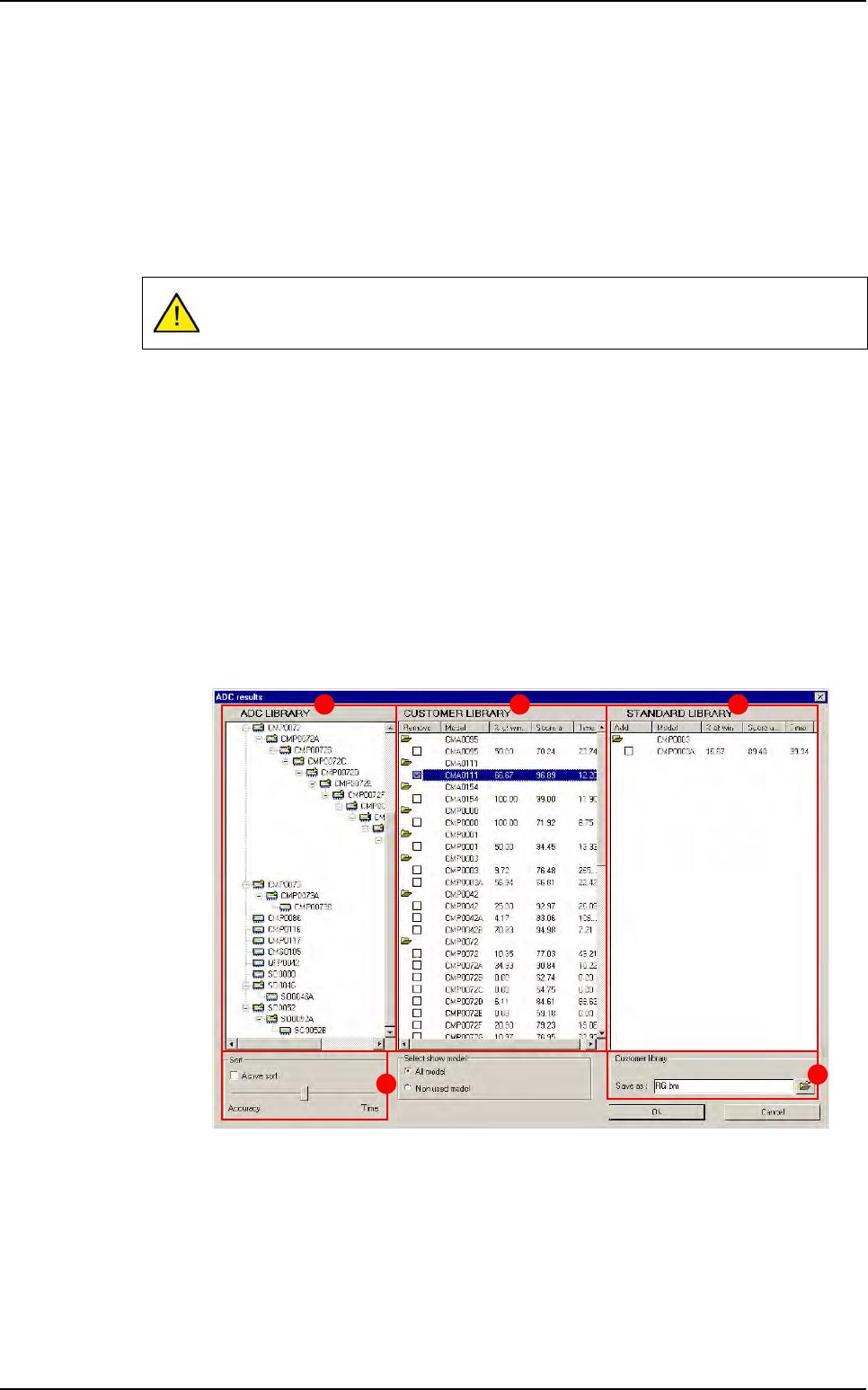
The results are displayed in 3 columns:
ADC library (A) is the list of the models of the final library. (The base of the ADC
library is the customer library and you can add or remove some models inside.)
Customer library (B) is the list of the customer models and the results from ADC.
Standard library (C) is the list of the standard models which have validated any
components and the results.
In
Sort (D) section tick Active sort to change the links arrangement on the ADC
library according to the accuracy or the execution time.
In
Customer library (E) section, you can save the ADC library and rename it.
When ADC is running, we execute every link, so, it can increase your cycle time.
A B C
D
E
Auto Defect Correction (ADC)
Optimization
Vision 2007 4.10 User Manual Rev 01 12 - 17
12.3.6.2 Interpretation
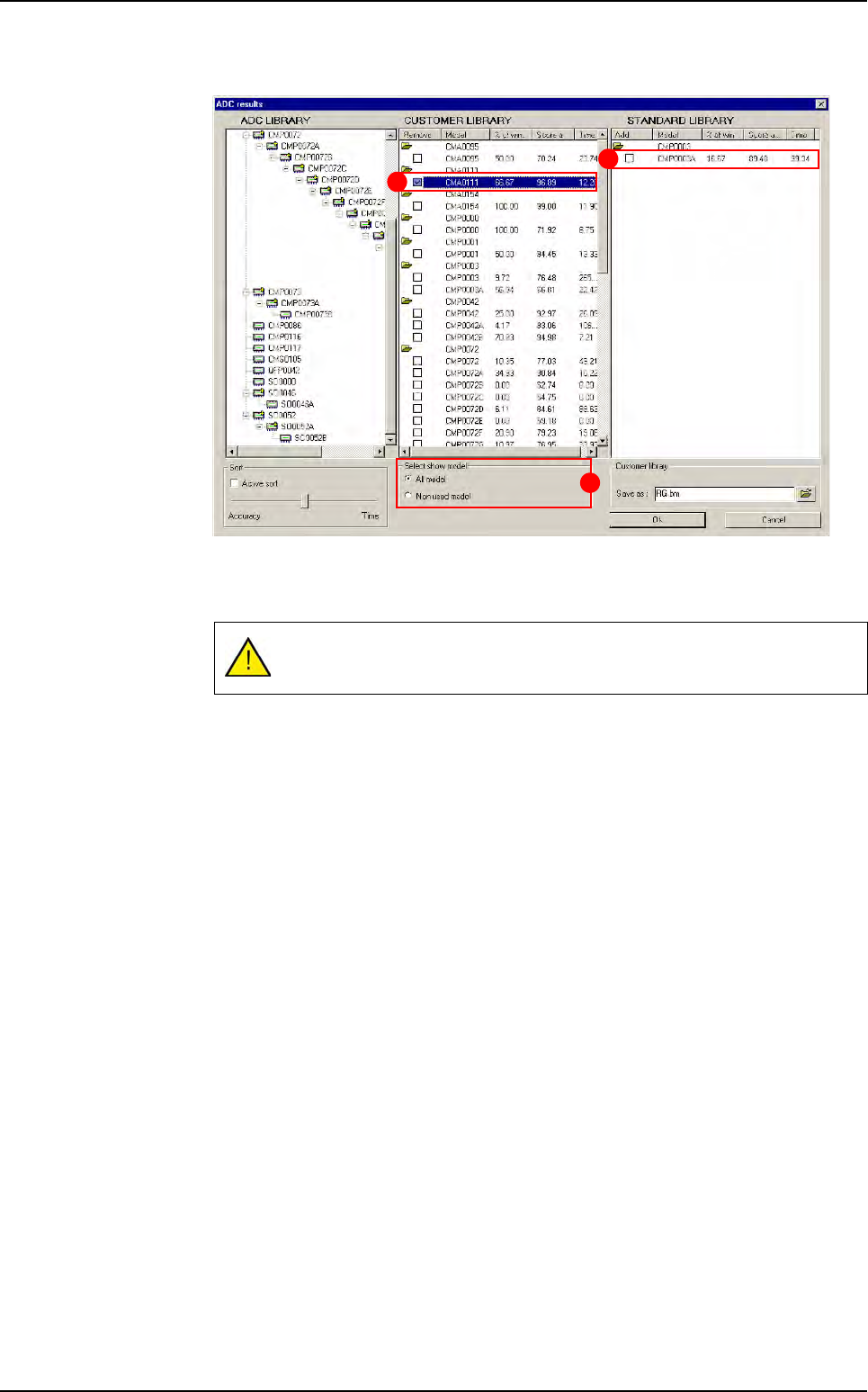
In Customer library, tick the check boxes of the Remove (A) column to remove
unused links.
In
Standard library, tick the check boxes of the Add (B) column to add models
which validate components. The model name will just change when you save the
library. (for this interface it will be the standard name)
You can access to more details if you double click on a model from the
Customer
or the Standard library.
In
Select show model (C) section, you can display all the models from the custom-
er library or only models which are never used: models which never pass any com-
ponents.
These modifications will modify the ADC library organization.
A
B
C
Auto Defect Correction (ADC)

Optimization
12 - 18 Vision 2007 4.10 User Manual Rev 01
Formulas
This time calculation takes in account the rate of success of the link.
It indicates fastest link which validate a component with the highest score.
It is used to sort links in the ADC library.
If you let the cursor in the center position, the sort is not a slower link but with a higher
occurrence will be in the 1st position.
Number of times this link was the best (higher score)
Number of components tested with the same Jedec
% of winner =
x 100
Nb winner % winner Nb pass Score average
C1005 20 4% 120
Σ
(scores) / 120
C1005A 300 60% 360
Σ
(scores) / 360
C1005B 180 36% 200
Σ
(scores) / 200
None 20 4 %
500 100 0<…<1500
120
360
200
Example: 500 components C1005 tested
Sum of the scores when a component passes with this link
Number of times the link passes
Score average =
Sum of the inspection times for this link
Number of times this link was the winner
Time =
Example: 500 components C1005 tested
Nb winner Time
C1005 20
Σ
(scores) / 20
C1005A 290
Σ
(scores) / 290
C1005B 170
Σ
(scores) / 170
None 20
500
500
500
500
Auto Defect Correction (ADC)