VI User Manual.pdf - 第351页
Superviseur Vision 2007 4.10 User Manua l Rev 01 13 - 7 13.3 Superviseur software initialization file Before starting, you can check the softwar e parameters in the files: Superviseu rConfig.ini . Open this text files wi…
Superviseur
13 - 6 Vision 2007 4.10 User Manual Rev 01
13.2.4 Archiving (only when using an Access database)
You can program the supervisor to archive the data-
base. The archive created is a .mdb file with a name
like Year_Day_Month.mdb. You can program the
archiving date by clicking on the icon.
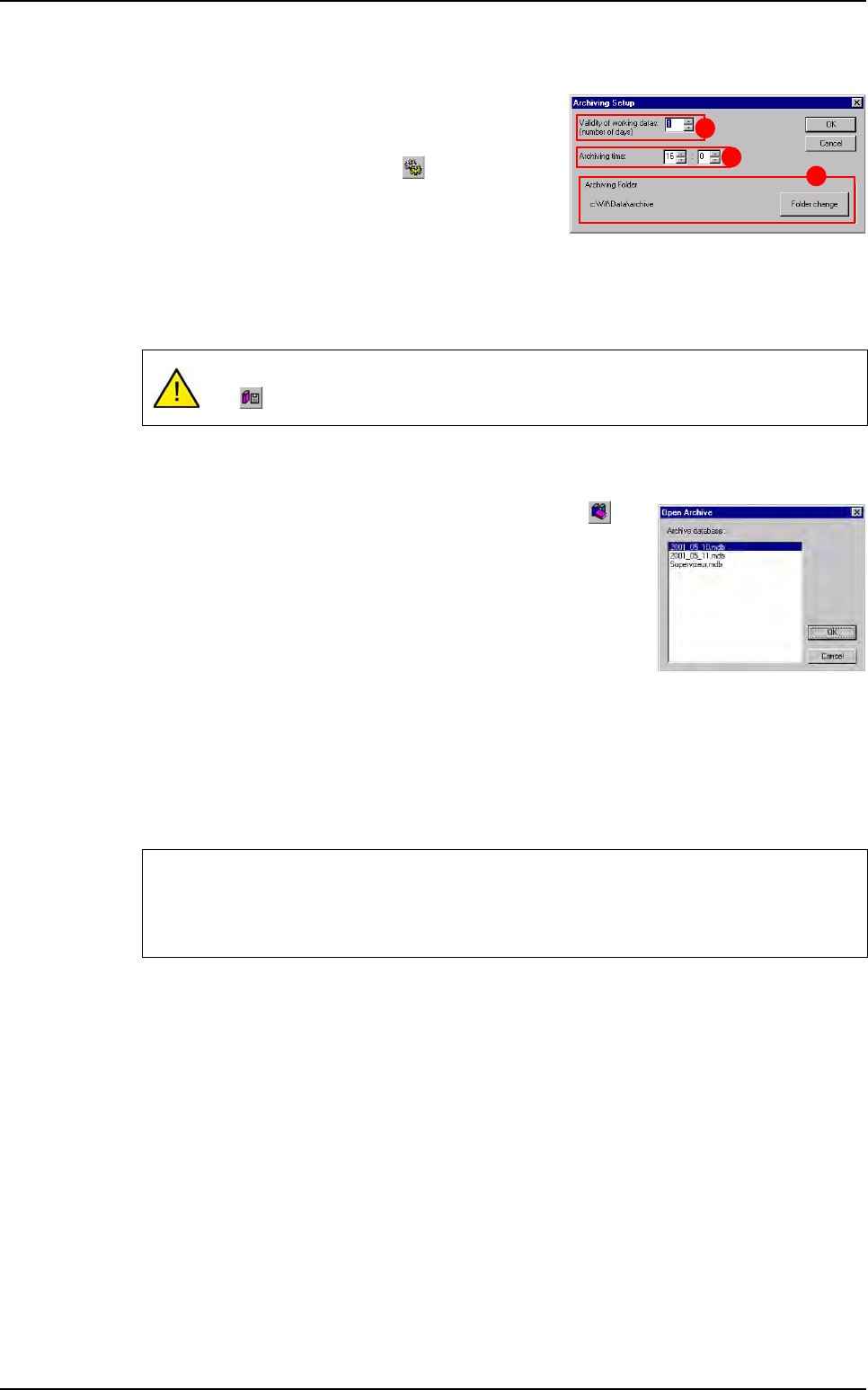
Validity of working datas (number of days) (A):
you can deactivate the every day auto archiving by
entering 0 in this field. Otherwise, the auto archiving
will start every day at the same time and remove all repaired and good boards older than the
specific number of days.
Archiving time (B): enter the hour to archive.
Archiving folder (C): by default, the data are stored and saved in C:\Vit\Data\archive. By
clicking Folder change button, it can be possible to change the archiving folder.
You can consult the archived database by clicking on the but-
ton and select one file from the current list.
When connecting to an archive the button is pressed.
To come back to the consultation of the working database, un-
check this button.
13.2.5 Parameters settings
From the Configuration menu you retrieve the settings you had when starting the software
for the 1st time (see upper section: 13.1 Superviseur configuration).
You also access to the settings for the MSA (Measurement System Analysis) database.
This window allows to define the database used for MSA data recording (refer to chapter
MSA for full description).
It is recommended to deactivate the auto archiving, and to archive manually using
the icon, when the production is not running.
We recommend to not use the production database for MSA data recording (create a
new supervisor database for MSA purpose).
If supervisor used with other AOI system, there is no interference using MSA mode.
A
B
C
Superviseur use

Superviseur
Vision 2007 4.10 User Manual Rev 01 13 - 7
13.3 Superviseur software initialization file
Before starting, you can check the software parameters in the files: SuperviseurConfig.ini.
Open this text files with an editor like Notepad.
The comments lines begin with #.
If you want the parameters to be relative to the Superviseur.exe location, do not specify the drive
and write: Unit =
Syntax example
To enter a path: Path = \VIT\DATA
To enter a disk unit: Unit = C:
For the .tst file information, you must enter the complete path because Vision 2007 uses it to copy
the .tst file when starting production.
[VERSION]
Number=2 File revision number
[PATH]
PicturePath=c:\ViT\Data Directory where Vision 2007 send pictures
ECLPath=c:\ViT\Data Directory to save supervisor clients files
[DATABASE]
DataBaseDSN=Supervisor_WorkDSN DSN: link to the database
DataBaseQueryTimeOut=600 Time out for request to the database
SaveAllResults=0 Save all results from AVision
(If Send all results to supervisor=1 in DefaultValue.ini
SaveSPCWarnings=0 Save SPC Warnings in the database
DataBaseDSN_MSA=Supervisor_WorkDSN_MSA DSN: link to the MSA database
[ARCHIVE]
ArchiveDataPath= c:\ Data\archive Directory to save archived databases
ArchiveValidityDays=0 Number of days of data validity in database
ArchiveSaveHour=0
ArchiveSaveMinute=0
Time of every day archiving
[Test_spécifique]
Base_MDT= Custom parameters
[Options]
Codage=1 Custom parameters
[External communication]
Prog_ID= ProgID of the chosen communication module
(see the corresponding documentation)

Superviseur
13 - 8 Vision 2007 4.10 User Manual Rev 01