VI User Manual.pdf - 第369页
Reparation Vision 2007 4.10 User Manua l Rev 01 14 - 17 14.4 Reparation so ftware initialization file Open the ConfigRepar ation.ini file to access the software param eters. [VERSION] Number=18 File revision number [P A …
Reparation
14 - 16 Vision 2007 4.10 User Manual Rev 01
Repair status signal option
The repair status signal enables to
guide not repaired PCB after the oper-
ator diagnostic on the repair station.
This option is used when a diagnostic
station is placed after the AOI system
and when boards which need to be re-
paired later on must be oriented.
The diagnostic station runs with the
repair software connected to the data-
base.
In the repair software, the operator
gives a status for each defect.
If the board can not be repaired at this
stage and needs to be oriented, the
NO GOOD signal is sent to the IO
card after the operator release the
PCB.
PCB with the Not repaired status in
the database will be oriented.
To activate this option set the following parameters in the C:\VIT\ConfigReparation.ini file:
This option requires to have an I/O card in the diagnostic PC. Contact support to check your
equipment compatibility.
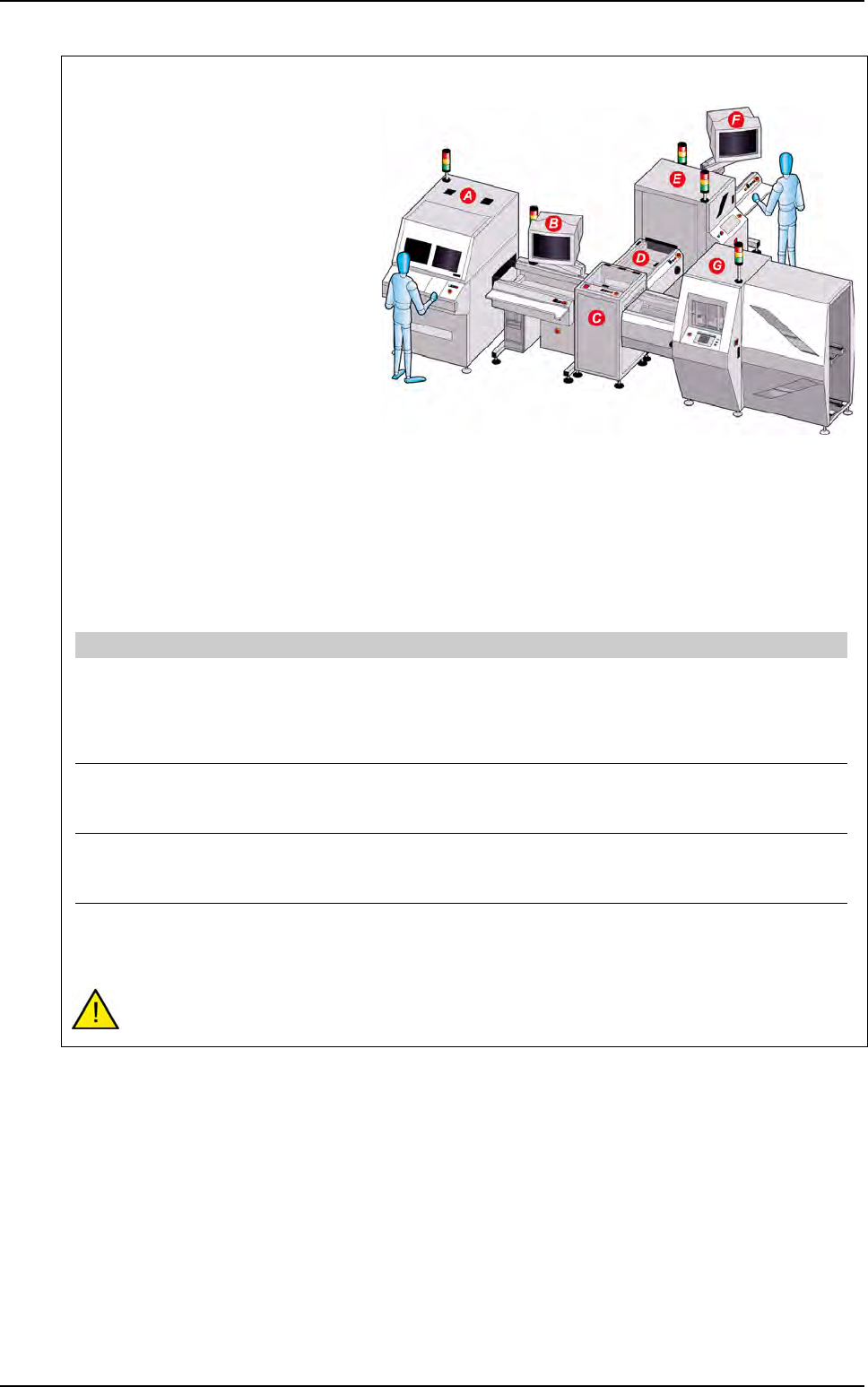
A AOI system
B Diagnostic station with Reparation software installed
C T conveyor
D Conveyor
E Buffer conveyor
F Repair station
G Downstream equipment
[Unloading board : Signal Cfg]
Send unloading signal state [0:1]=1 Unloading and state (optional) of the board
1: after repair diagnostic, the No good signal is sent on the B1 relay
of the I/O card i the PCB needs to be oriented.
0: will not send the No good signal after repair diagnostic even if the
PCB is still not repaired.
Start IO board driver [0:1]=1 Board driver activation
1: start the IO card driver
0: do not start the IO card driver
Reset state signal after unloading [0:1]=1 Signal reset
1: the No good signal come down after the specified signal time.
0: the No good signal stays ON until the next PCB.
Signal time (ms)=500 Signals activation time
Time to let the "acknowledge" and "No good" signal ON on the IO
card driver
Reparation use
Reparation
Vision 2007 4.10 User Manual Rev 01 14 - 17
14.4 Reparation software initialization file
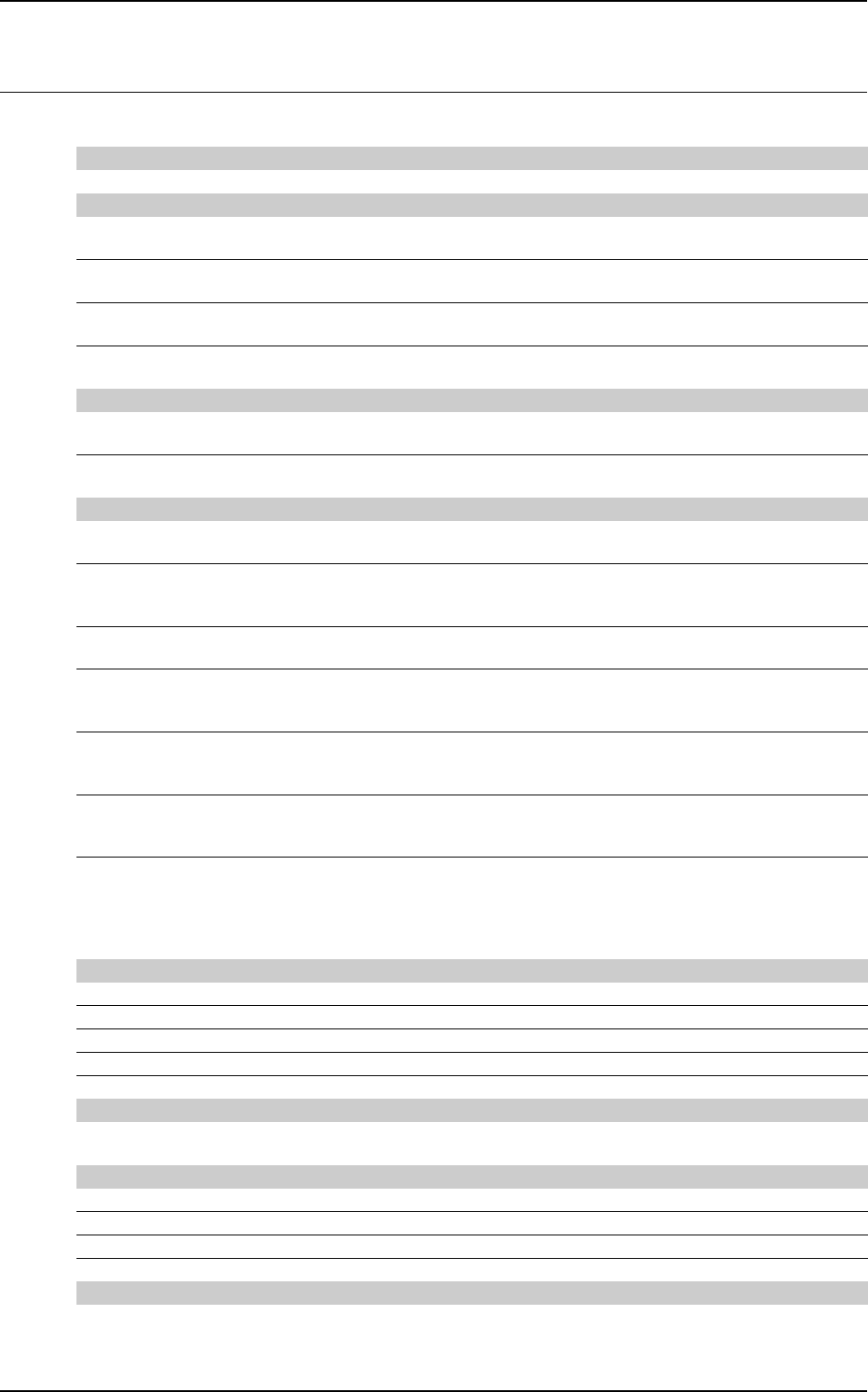
Open the ConfigReparation.ini file to access the software parameters.
[VERSION]
Number=18 File revision number
[PATH]
TstFilePath=\ViT\Data
TstFileUnit=c:
Directory to find the icons files
PrmFilePath=\ViT\Data
PrmFileUnit=c:
Directory to find the REPAR.PRM file
IconPath=\ViT\Icon
IconUnit=c:
Directory where Vision 2007 copies the .tst file
RealPicturePath=\ViT\Data
RealPictureUnit=c:
Directory to store the real picture
of the whole board for the board display
[ZOOM]
CompMin=1,000
CompMax=8,000
Size in mm
ZoomInf=20,000
ZoomSup=90,000
Size of the components in window (%)
[Message]
Confirmation message=0 Allow the operator to make another turn even
if all the errors are repaired
Escape [0: 1]=0 Corresponds to
1: Cancel
0: Stop&Save
Change CB=0 Allow to enter a barcode in case of reading
or root error on the vision machine
Always ask for panel code [0:1]=0 Ask for panel barcode
1: always ask
0: do not ask.
Always ask for subpanel codes [0:1]=0 Ask for subpanel barcode
1: always ask
0: do not ask.
Spread codes [0:1]=0 Propagate the barcode
1: the barcode panel is propagated on the board
0: the barcode panel is not propagated on the board.
Enable operator analysis [0:1]=0 Operator analysis
1: the operator can modify the error type and put in error
a component which does not have it
0: the operator can not modify the error type and put in error
a component which does not have it.
[Tempo]
Network query tempo init (s)=5 Time out for initialization query
Network query tempo init read panel (s)=5 Time out for reading initialization
Network time out query (s)=30 Time out for queries to database
Network time out panel (s)=300 Time out to send a panel
Number of connection retry when network failed=5
[FIFO]
Waiting Stop tempo (s)=5 Available time to press Alt+F4 after each required board
in order to load another product
[Unloading board : Signal Cfg]
Send unloading signal state [0:1]=0 Unloading and state (optional) of the board
Start IO board driver [0:1]=1 Board driver activation
Reset state signal after unloading [0:1]=0 Signal reset
Signal time (ms)=500 Signals activation time
[Machine Offline]
Type [(Standard: 0, FIFO: 1, TConveyor: 2)=0] Choice of the type of machine offline
0: Standard
1: FIFO
2: TConveyor.
Reparation
14 - 18 Vision 2007 4.10 User Manual Rev 01
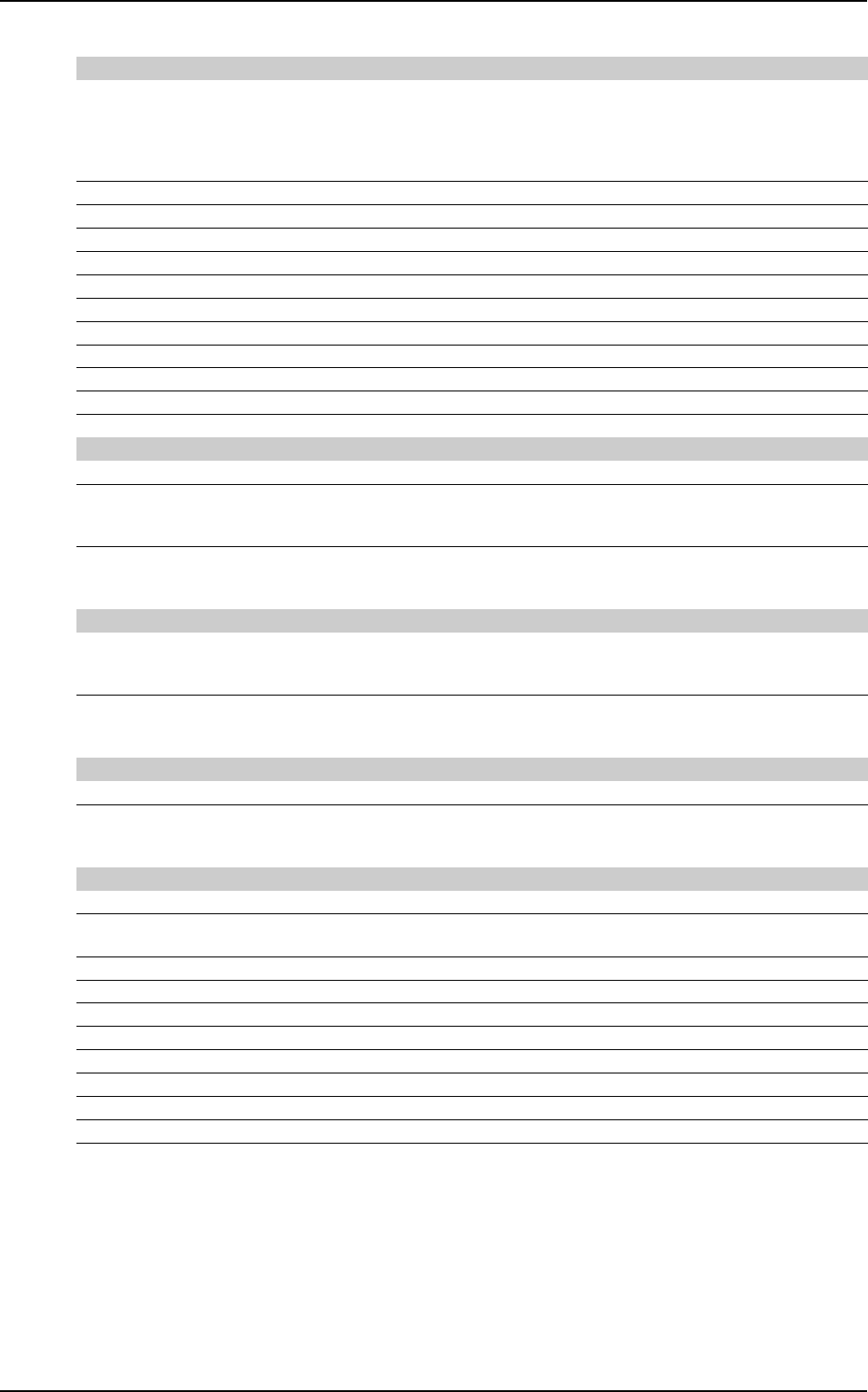
[TConveyor]
Barcode type [(K:0, R:1, S:2, D:3)=0] Choice of the barcode
0: Keyence
1: RVSI
2: Sick
3: Matrix 2000.
Barcode timeout (100 ms)=50 Time out to query barcode
Barcode port=1 Port of communication connected
Barcode lines number=100 Number of lines displayed on the screen
Board reading time (ms)= 10 Time between two examinations on presence or absence of board
Stay outputs time (100 ms)= 1 Time of maintains state of the outputs
Orientation board=1 If output of the board=1 with Standard errors: barcode=1
Level signal bad board=0 Signal status of output for bad boards
Output number barcode status=0 Output on which status of board signal transits
Output number barcode read=1 Output on which board read signal transits
Input number board present=0 Input on which board present signal transits
Tries number read barcode=1 Number of tries to read barcode
[Interface parameters]
Two lines of button=0 Lines of button in the Reparation detail screen
Board at 180° [0:1]=0 Position of the panel
1: the panel is displayed at 180°
0: the panel is displayed with its position.
All view at 180° [0:1]=0 Rotation of the panel (Conveyor VI245)
1: the panel turns at 180°
0: the panel remains with its position.
[Production parameters]
Accept subpanels [0:1]=1 Reparation of only one subpanel (reparation Offline not FIFO)
1: enable to repair a subpanel
0: impossible to repair a subpanel.
Transfer results before unload panel [0:1]=0 Transfer results
1: after unload panel
0: before unload panel.
[External communication]
Prog_ID= Identify the module of communication used
Activate [0:1]=1 Activation of the module: Prog_ID
1: the module is activated
0: the module is not activated.
[Barcode printer]
Use a barcode printer=0 to enable or disable the feature
Prompt for a barcode label when no default=0 1: possibility to print the label even for non defective boards;
0: possibility to print a label for defective boards only
X start position (dot)=10 start position in X
Y start position (dot)=10 start position in Y
rotation (0:0°,1:90°,2:180°,3:270°)=0 rotation angle
Format (see EPL language table)=3 The barcode format can be configured using EPL table
Narrow bar Width (dot)=3 Narrow bar width
Wide bar Width (dot, range 2-30)=5 Wide bar width
Barcode Height (dot)=300 Barcode height.
Print human readable code (B:yes N:no)=B Human readable codes selection
Reparation software initialization file