VI User Manual.pdf - 第42页
Maintenance mode 2 - 6 Vision 2007 4.10 User Manual Re v 01 2.1.3 Calibration Once you have adju sted camera focus and lens opening, you can calibra te the machine using the glass calibration tool . The Axes references (…
Maintenance mode
Vision 2007 4.10 User Manual Rev 01 2 - 5
2.1.2 Focus
The Focus function allows optimum adjustment of the camera focus and ensures homogeneity
between machines. Optimum focus is obtained when the absolute value of the test is at its high-
est.
1. Click on the Focus button for automatic adjustment of conveyor width.
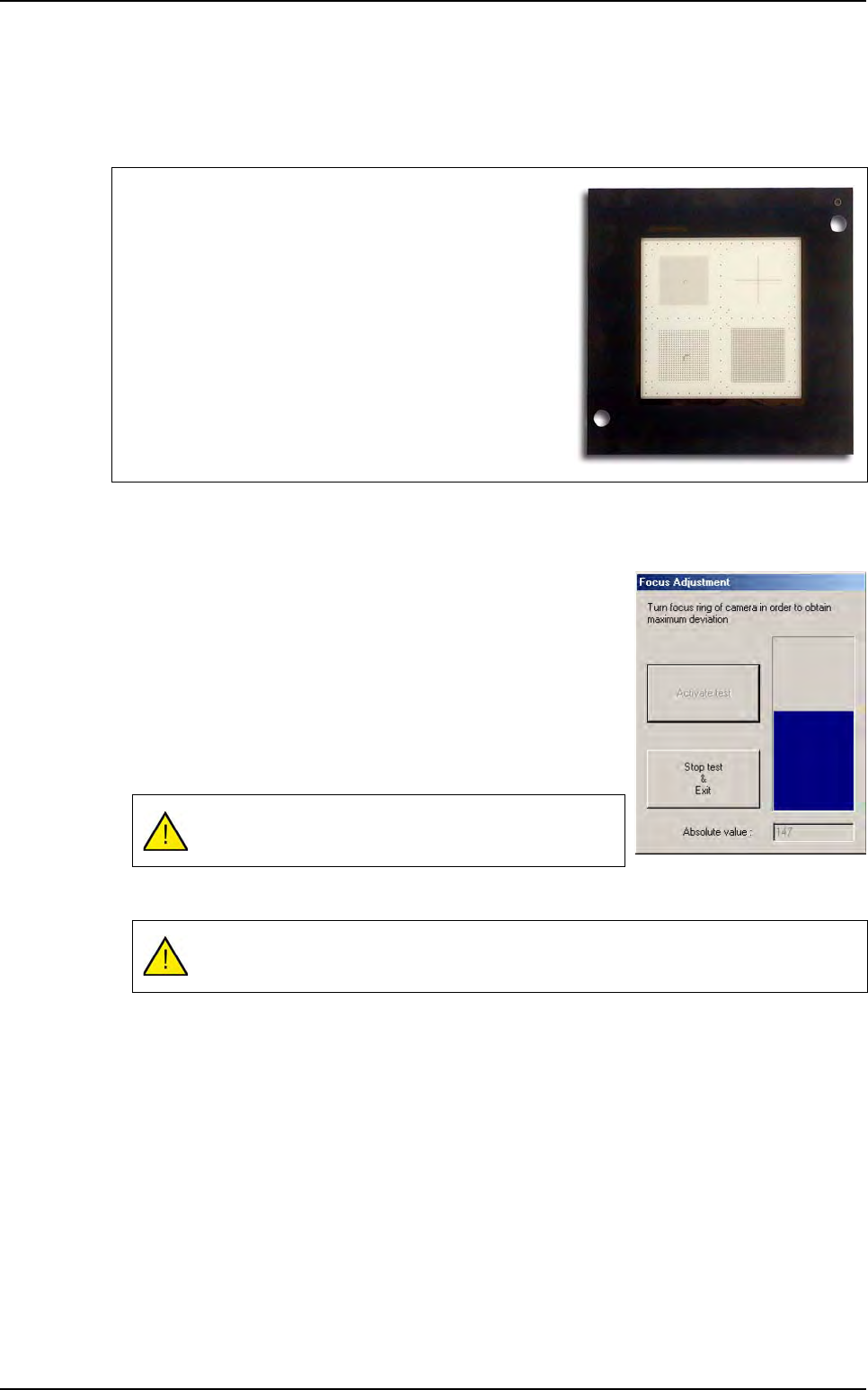
2. Insert the calibration tool in the machine, then adjust focus.
3. Once you have activated the test, adjust focus: the blue bar-
graph increases or decreases according to the Absolute val-
ue marked below:
32 µm camera: take up or down the focus ring (bottom ring
on the lens) until Absolute value reaches its maximum val-
ue.
26 µm camera: take up or down the camera (remove the
beamsplitter cover and loosen the 3 camera flanges) until
Absolute value reaches its maximum value.
4. Click Stop test & Exit when the operation is complete.
Focus is adjusted using the calibration tool supplied with the
machine.
Make a visual control of the calibration tool frequently, in or-
der to check that it is not scratched.
The Absolute value must be to the maximum.
This operation must be repeated each time the camera is modified.
Test machine
Maintenance mode
2 - 6 Vision 2007 4.10 User Manual Rev 01
2.1.3 Calibration
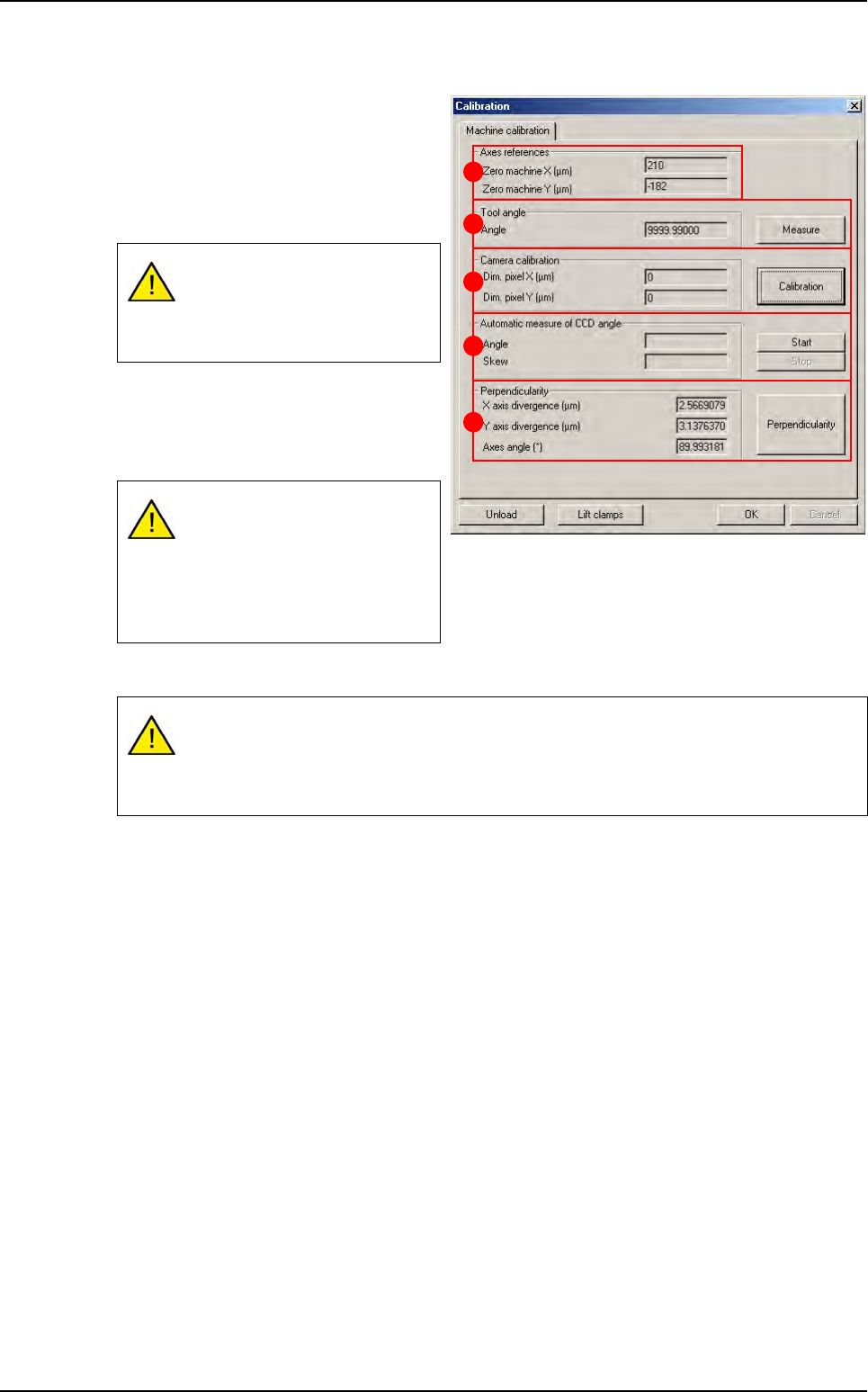
Once you have adjusted camera focus
and lens opening, you can calibrate the
machine using the glass calibration tool .
The Axes references (A) are the dis-
tances between the axis 0 (middle of the
axis) and the machine 0 (panel stop).
The Tool Angle (B) must be 0° to per-
form the calibration. Measure lets you
calculate the angle of the calibration tool
with respect to the axes.
The Camera calibration (C) measures the pixel size.
In Automatic measure of CCD angle (D) section, press Start to measure the angle of the CCD
with respect to the axes.
Perpendicularity (E) of axes and deviation.
Click OK to confirm the values entered by default or the changes made.
2.1.4 Auto check
The Auto check is a function used to verify proper operation of the optical and mechanical parts
of the machine by means of a glass plate calibration tool:
Pixel size,
Axes angle,
Axes pitch,
Machine accuracy,
Machine repeatability.
If you change the position of the
stop, these values must be
changed in the parameters
menu.
The tool angle must be zero to
perform the following measure-
ment.
The calibration tool must be
parallel to the axis (tool angle:
+/- 0.005°).
If the pixel size is too large, lower the camera.
If the pixel size is too small, raise the camera.
Any vertical movement of the camera will require adjustment of focus.
A
B
C
D
E
Test machine
Maintenance mode
Vision 2007 4.10 User Manual Rev 01 2 - 7
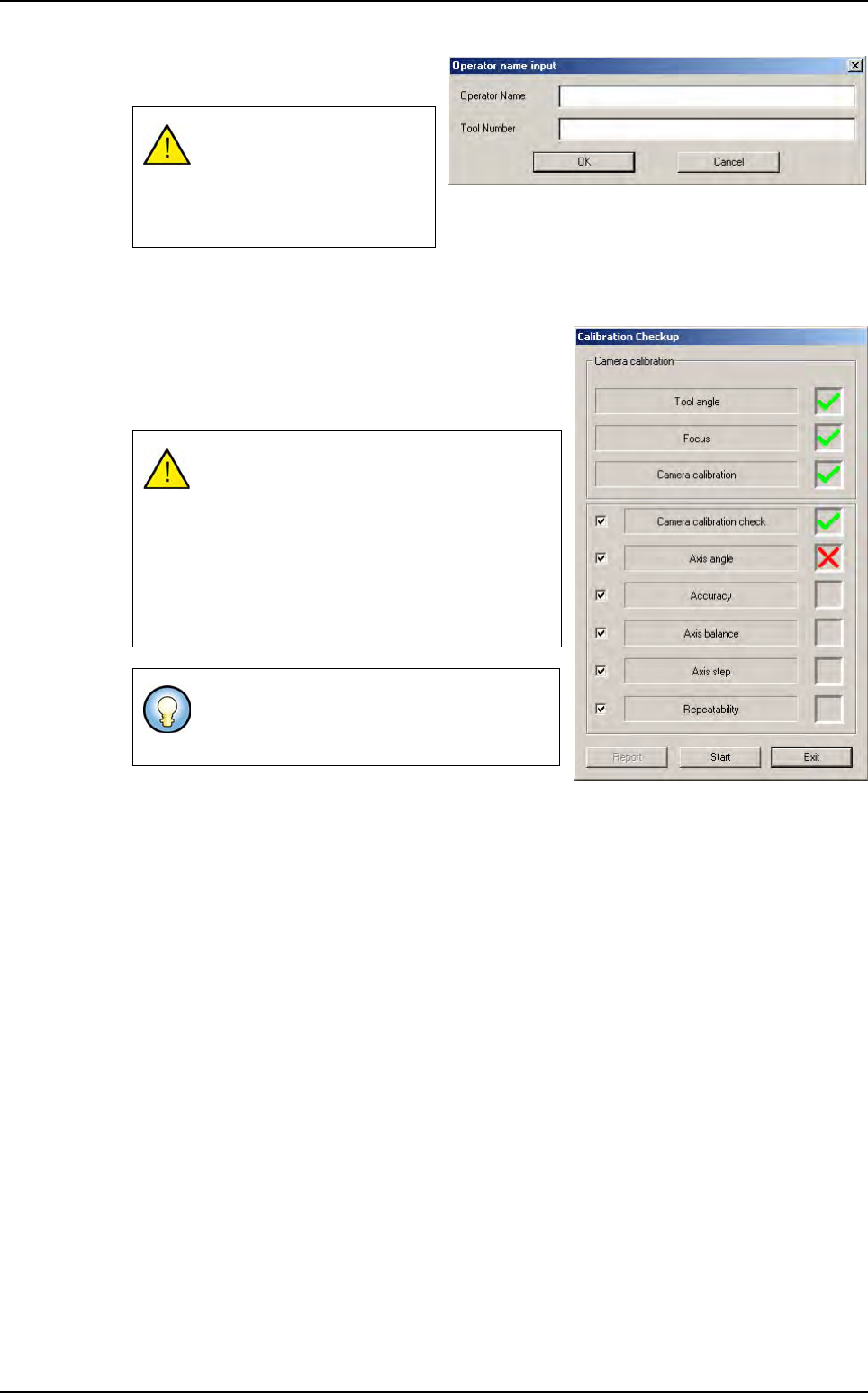
1.
Click on
Auto check
to bring up the
data input window.
2.
After the
CONVEYOR INITIALIZATION
message, you can install the calibration tool in the ma-
chine.
3.
Once the calibration tool has been installed in the ma-
chine, the opposite screen is brought up.
4. Press Start to measure the tool angle and run the auto
check.
Each test checks a specific part of the machine. During the auto check, a green tick appears if
the relevant test is correct. Otherwise, a red cross is displayed if the test results are incorrect.
The Report button open the report of the check that has just been carried out (see next page).
To validate OK, the text fields
must be filled in (at least 2
characters). All glass tools
have a specific serial num-
ber.
The Auto check can only be run when the an-
gle between the calibration tool and the axis
is zero (0 +/- 0.07 degrees).
Otherwise, the value of the auto specification
angle appears and the clamps release the
board. You must then adjust it manually and
restart measurement until the angle is OK
and the test can begin.
The tool must be adjusted manually. Turn the
calibration tool in a clockwise direction if the
tool angle is negative and vice versa.
Test machine