00198705-01_AI_Portalmodularität_SX12_V3_DE_EN.pdf - 第77页
2 Brief Description 2.1 Overview Assembly Instructions / Montageanleitung SIPLACE SX1/SX2 V3 Gantry Modularity Portalmodularität 05/2020 77 2 Brief Description These assembly instructions describe the installation and re…

1 Introduction
1.4 Abbreviations
76 Assembly Instructions / Montageanleitung SIPLACE SX1/SX2 V3 Gantry Modularity Portalmodularität 05/2020
Do not allow modules with chargeable and highly insulating materials to touch one another, e.g.
plastic films, insulating table surfaces or items of clothing made from synthetic fibers.
Always place the modules on a conductive surface (table with an ESD coating, conductive ESD
foam, ESD bag or container).
Do not move the assemblies near to data view devices, monitors or television units. Keep a min-
imum distance of 10 cm to monitors.
1.3.3.4 Measurements and modifications to ESD modules
Only perform measurements on modules if one of the following conditions is fulfilled:
●
You are using an earthed measuring device (e.g. via PE conductors).
●
You are using a potential-free measuring device and discharge the measuring head before
the measurement (e.g.by touching an unpainted metal part of the controller casing).
► Always use an earthed soldering iron if you carry out any soldering work.
1.3.3.5 Dispatching ESD modules
► Always store modules and components in conductive packaging (e.g. metallized plastic bags
or metal sleeves) and dispatch them in conductive packaging
► If the packaging is not conductive, place the modules in a conductive envelope before pack-
aging. Use conductive expanded rubber, ESD bags, domestic aluminum foil or paper, for
example. NEVER use plastic bags or film.
► If the module has integral batteries, ensure that the conductive packaging does not touch or
short circuit the battery terminals and, if necessary, first cover the terminals with insulating
tape or material.
1.3.4 Release History
Edition Amendments
05/2020 Initial release
1.4 Abbreviations
Abbreviation Description
PA Placement area
CO Component
COT Changeover table
COT-i Changeover table insert
C&P Collect&Place
C&P12, CP12 Collect&Place head with 12 segments
C&P20, CP20 Collect&Place head with 20 segments
C&P6, CP6 Collect&Place head with 6 segments
CoD Capacity on Demand
CPP Collect&Pick&Place head
CPx Collective term for CPP, CP20, CP12 and/or CP6
ESD Electrostatic sensitive device
EMC Electromagnetic compatibility
FHE Fast Hardware Exchange
LBO Long Board Option
PCB Board
P&P Pick&Place
TH TwinHead
2 Brief Description
2.1 Overview
Assembly Instructions / Montageanleitung SIPLACE SX1/SX2 V3 Gantry Modularity Portalmodularität 05/2020 77
2 Brief Description
These assembly instructions describe the installation and removal of a gantry as part of the gantry
modularity procedure for SIPLACE SX1/SX2 V3 machines.
2.1 Overview
This section provides an overview of the "Capacity on Demand" options for SIPLACE SX1/SX2
machines.
2.1.1 Machine Variants
SIPLACE Gantry configuration Description
SX+ Without gantry
"Add Feeder Slots"
The machine has been prepared for a gantry upgrade
(SX1), i.e. a trailing cable and one MGCU are prefitted for
one gantry.
SX+
prepared
Without gantry The machine has been prepared for a gantry upgrade
(SX1/2), i.e. two trailing cables and two MGCUs are prefit-
ted for two gantries.
SX1
unprepared
One gantry The machine has not been prepared for a gantry upgrade,
i.e. a trailing cable and one MGCU are prefitted for one
gantry. To upgrade to SX2, please contact your SIPLACE
Service team.
SX1
prepared
One gantry The machine has been prepared for a gantry upgrade
(SX2), i.e. two trailing cables and two MGCUs are prefitted
for two gantries.
SX2 Two gantries The machine can be downgraded to a SX1 prepared. It is
then prepared for a gantry upgrade to SX2, i.e. two trailing
cables and MGCUs are fitted.
2.1.2 Head Configuration
Various head configurations are possible. These vary according to the machine type used. Thereby
it is possible to fit the SIPLACE SX perfectly to the production requirements.
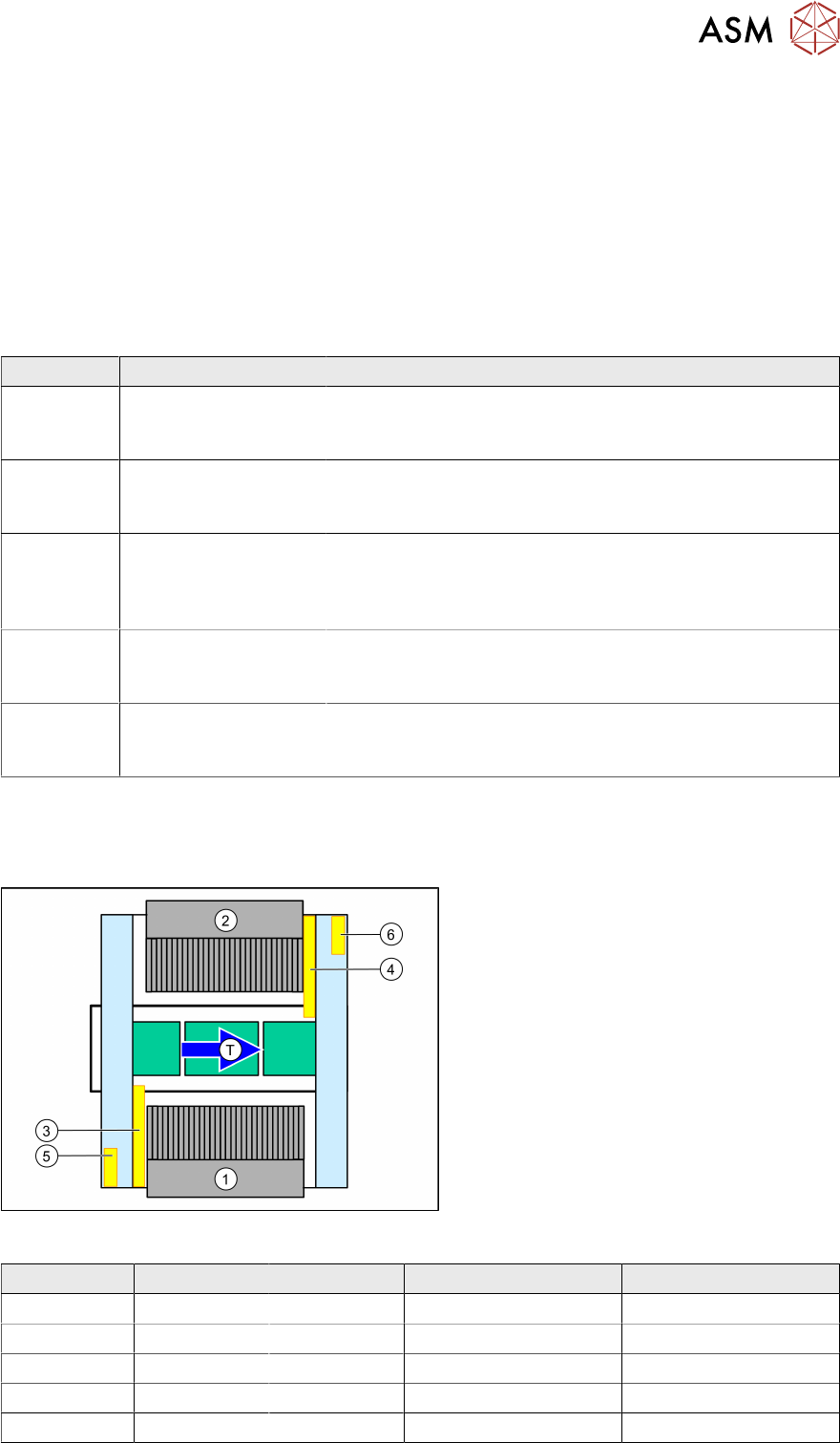
Fig.4: SIPLACE SX overview
1. Location 1 – inner position
2. Location 2 – inner position
3. Trailing cable gantry 1
4. Trailing cable gantry 2
5. MGCU 1
6. MGCU 2
T = transport direction
MGCU 1 MGCU 2 Trailing cable gantry 1 Trailing cable gantry 2
SX+ X - X -
SX+ prep. X X X X
SX1 X - X -
SX2 prep. X X X X
SX2 X X X X
2 Brief Description
2.1 Overview
78 Assembly Instructions / Montageanleitung SIPLACE SX1/SX2 V3 Gantry Modularity Portalmodularität 05/2020
SIPLACE SX+
●
Machine without gantry
●
Prepared for a gantry upgrade to a SX1
●
Can be operated in "Feed through" mode from SW704.xx
Head configuration SIPLACE SX+
Gantry 1 C&P20P2 CPP_L CPP_H with
1)
/
without stat. cam-
era
TH
2)
SIPLACE SX+ prepared
●
Machine without gantry
●
Prepared for a gantry upgrade to a SX1/SX2
●
Can be operated in "Feed through" mode from SW704.xx
Head configuration SIPLACE SX+ prepared
Gantry 1 C&P20
P2
CPP_L CPP_L C&P20
P2
CPP_H with
1)
stat. camera
CPP_H
with
1)
/
without stat.
camera
TH
2
TH
2
Gantry 2 C&P20
P2
CPP_L C&P20
P2
CPP_L CPP_H
with
1)
/
without stat.
camera
TH
2)
CPP_H TH
2
SIPLACE SX1
●
Machine with one gantry
●
Not prepared for a gantry upgrade to a SX2
●
Upgrade to SX2 by SIPLACE Service
Head configuration SIPLACE SX1
Gantry 1 C&P20
P2
CPP_L CPP_L C&P20
P2
CPP_H with
1)
stat. camera
CPP_H
with
1)
/
without stat.
camera
TH
2
TH
2
+ Upgrade kit by SIPLACE Service
Gantry 2 C&P20
P2
CPP_L C&P20
P2
CPP_L CPP_H
with
1)
/
without stat.
camera
TH
2)
CPP_H TH
2