YS12P_YS12F_Mainte_E.pdf - 第82页
3-17 3 Periodic maintenance items 5 Apply the new grease. Ball screw Apply as much as 2 cm of specified grease (NSL) to finger . Rub it evenly into the ball screw grooves. Ball guide Apply as much as 2 cm of specified gr…
3-16
3
Periodic maintenance items
3.2 Cleaning and greasing the push-up axis (PU axis)
The push-up axis prevents flexing or warping of the board during clamping. It is important as it prevents
depressing of the board during component mounting.
The push-up axis also prevents deviations in the component mounting accuracy due to the board depressing
during component mounting. Periodic cleaning and lubricating the push-up axis is required to ensure it
operates correctly.
c
CAUTION
If trouble occurs with the push-up axis, contact YAMAHA sales representative. Disassembly and cleaning of the
push-up axis by the user will void the warranty.
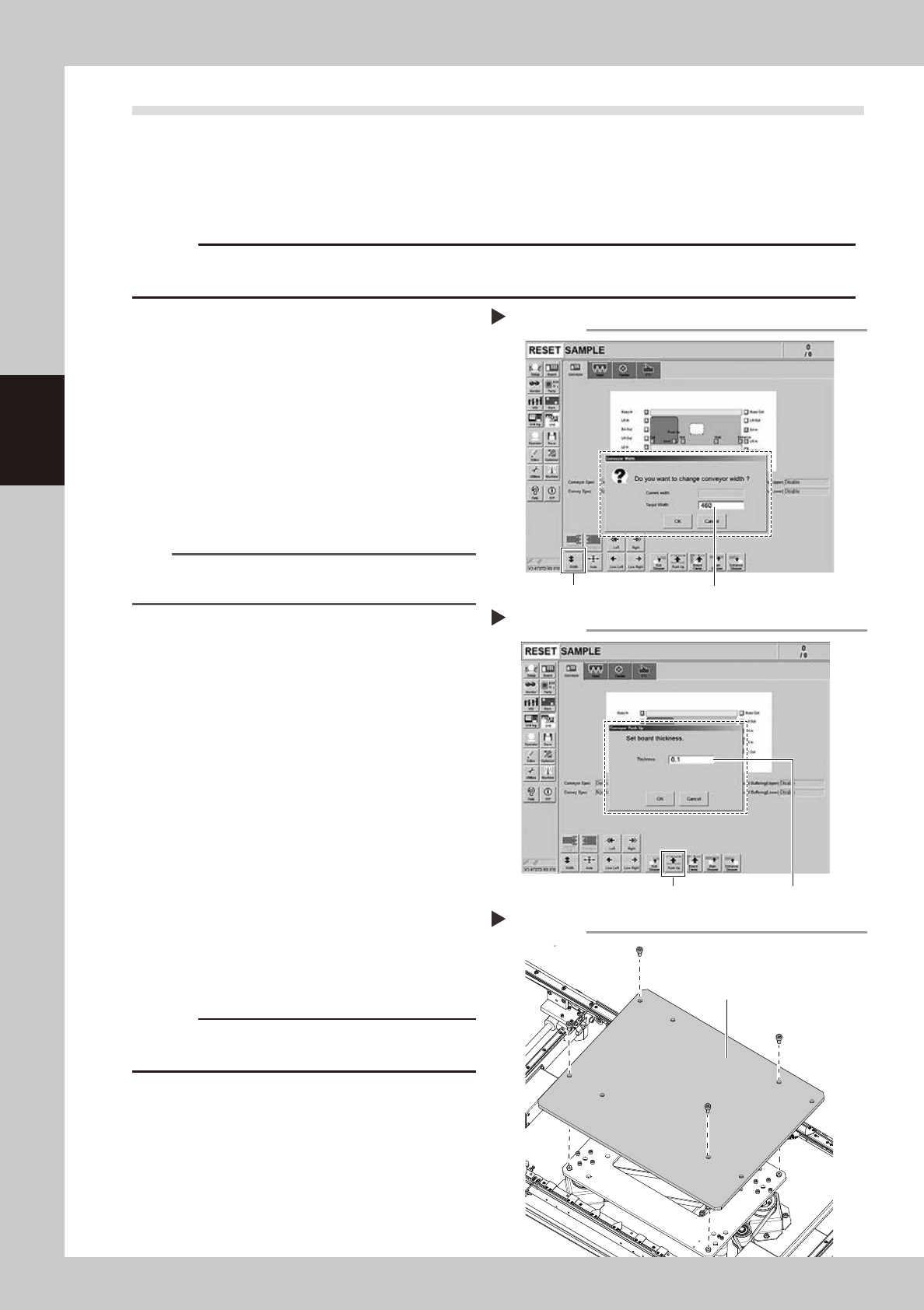
1
Change the conveyor width to its
maximum width.
1. Press the [Conveyor Width] button on the
[Unit] – [Conveyor] screen to display the
“Conveyor Width” screen.
2. Enter the maximum value of the
conveyor width in the “Changed
conveyor width”, press [OK]. The
conveyor is changed to the width that
was just entered.
54310-L6-10
TIP
The maximum conveyor width value is 460 mm or 410
mm in standard specification.
2
Raise the push-up unit.
1. Press the [Push-up] button to display the
“Conveyor Push-up” screen.
2. Enter “0.1 mm” in “Thickness”, and press
the [OK] button. The push-up unit moves
up.
54319-L6-00
e
3
Remove the push-up plate.
1. Press the emergency stop button and
then open the machine safety cover.
2. If the machine is equipped with a
carriage, remove the carriage to easily
access to the push-up axis.
3. Removed the fixed bolts (four locations)
on the push-up plate using the hex
wrench (4) to remove the push-up plate.
53354-L6-00
c
CAUTION
The push-up plate is heavy. Use plenty of caution when
handling.
4
Remove the old grease.
Remove the old grease from the 2 ball
screws and 2 ball guides with lint-free cloth
that does not raise dust.
Changing the conveyor width
Step 1
[width] button Enter the maximum conveyor value
Raise the push-up unit
Step 2
[Push Up] button Enter ”0.1 mm”
Removing the push-up plate
Step3
Push-up plate
3-17
3
Periodic maintenance items
5
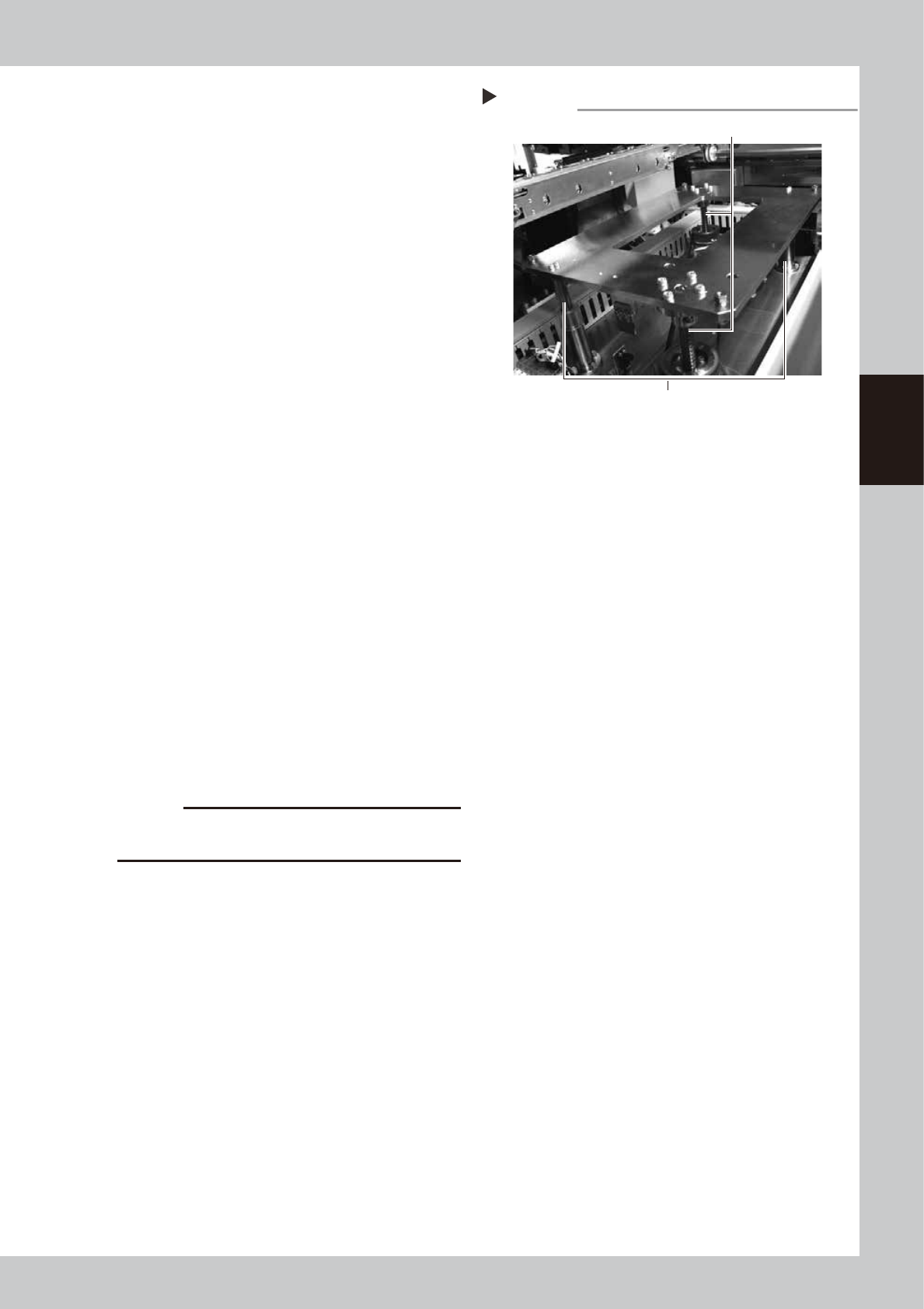
Apply the new grease.
Ball screw
Apply as much as 2 cm of specified grease
(NSL) to finger. Rub it evenly into the ball
screw grooves.
Ball guide
Apply as much as 2 cm of specified grease
(NSL) to finger. Coat it evenly on the ball
guides.
53331-L6-00
6
Set the applied grease.
1. Close the machine’s safety cover, and
cancel the emergency stop. In case the
specification has a carrier, set the carrier.
2. Press the [Push-up] button to lower the
push-up unit.
3. Follow the Step 2 procedure to raise the
push-up unit.
4. Repeat Step 2 and 3 several times to set
the grease. After setting the grease,
leave the push-up unit in the up state.
e
7
Wipe away excess grease.
1. Press the emergency stop button, and
open the machine’s safety cover. In case
the specification has a carrier, remove
the carrier.
2. Wipe the excess grease with lint-free
cloth that does not raise dust.
8
Attach the push-up plate to its
original position.
Attach the push-up plate in the reverse
procedure of step 3.
c
CAUTION
The push-up plate is heavy. Use plenty of caution when
handling.
Applying the grease
Step 5
Ball guides (2 places)
Ball screws (2 places)
3-18
3
Periodic maintenance items
3.3 Inspecting the board conveyor unit
3.3.1 Inspecting the conveyor belt and cleaning the guide pulley
As the belt wears away, slippages may occur that prevent securely conveying the boards. It is therefore
necessary to make periodic inspections for wear of the conveyor belt.
Belt wear may also cause trouble such as erroneous detection of the conveyor sensor due to dust from belt
wear accumulating on the sensor surface, or dust from belt wear accumulating in the belt guide grooves may
cause the belt to stick, etc.
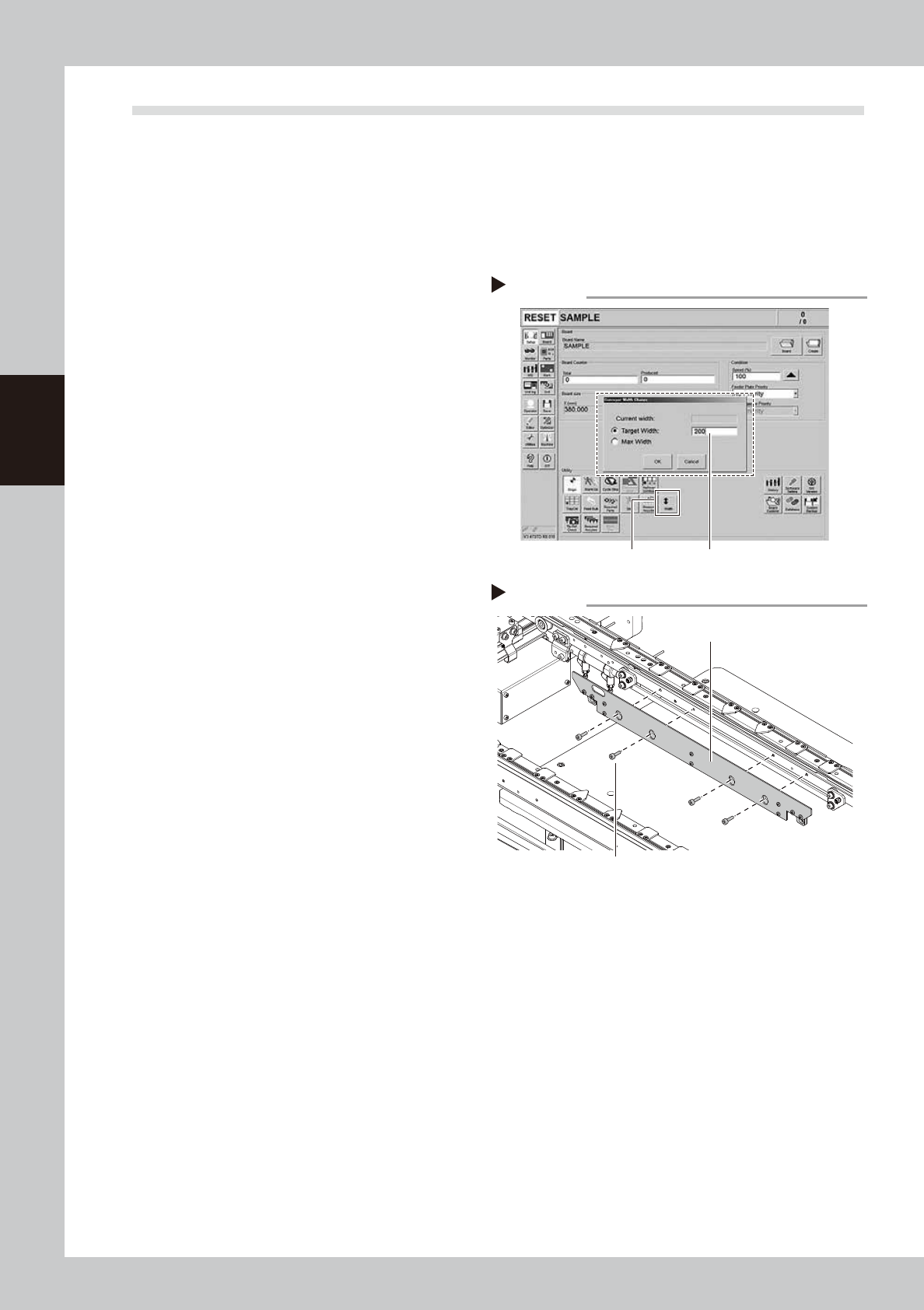
1
Change the conveyor width to a
convenient width for maintenance
work.
1. Press the [Width] button to display the
"Conveyor Width" screen.
2. Enter a width wide enough for a hex
wrench to be inserted (about 200 mm) in
the "Target Width" box and press the [OK]
button. The conveyor is changed to the
specified width.
54314-L6-10
e
2
Prepare for cleaning.
1. Press the emergency stop button and
then open the machine safety cover.
2. If the machine is equipped with a
carriage, remove the carriage to easily
access to the conveyor.
3. Place a square cloth on the push-up
plate.
3
Remove the board clamp plates.
Use a hex wrench (3) to remove the 4 board
mounting bolts shown in the figure on the
right. Then remove the board clamp plate.
53355-L6-00
Step 1
[Width] button
Enter conveyor width.
Changing the conveyor width
Step 3
Removing the board clamp plate
Board clamp plate
Board clamp plate mounting bolts