YS12P_YS12F_Mainte_E.pdf - 第84页
3-19 3 Periodic maintenance items 4 L oosen the belt. 1. Before loosening the conveyor belt, mark at the current position of pulley with a permanent marker . 2. Loosen the pulley mounting screws applying the tension with…
3-18
3
Periodic maintenance items
3.3 Inspecting the board conveyor unit
3.3.1 Inspecting the conveyor belt and cleaning the guide pulley
As the belt wears away, slippages may occur that prevent securely conveying the boards. It is therefore
necessary to make periodic inspections for wear of the conveyor belt.
Belt wear may also cause trouble such as erroneous detection of the conveyor sensor due to dust from belt
wear accumulating on the sensor surface, or dust from belt wear accumulating in the belt guide grooves may
cause the belt to stick, etc.
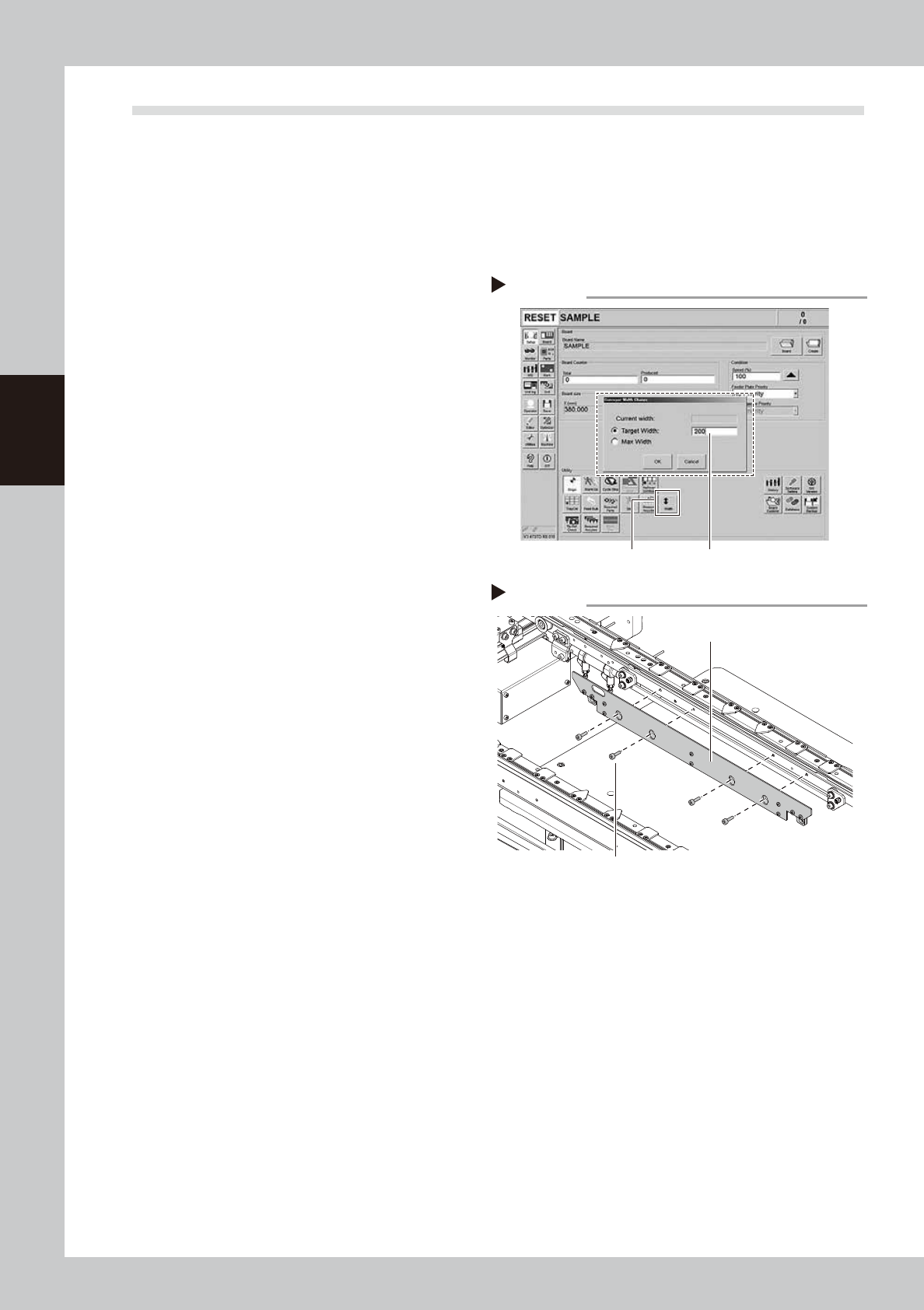
1
Change the conveyor width to a
convenient width for maintenance
work.
1. Press the [Width] button to display the
"Conveyor Width" screen.
2. Enter a width wide enough for a hex
wrench to be inserted (about 200 mm) in
the "Target Width" box and press the [OK]
button. The conveyor is changed to the
specified width.
54314-L6-10
e
2
Prepare for cleaning.
1. Press the emergency stop button and
then open the machine safety cover.
2. If the machine is equipped with a
carriage, remove the carriage to easily
access to the conveyor.
3. Place a square cloth on the push-up
plate.
3
Remove the board clamp plates.
Use a hex wrench (3) to remove the 4 board
mounting bolts shown in the figure on the
right. Then remove the board clamp plate.
53355-L6-00
Step 1
[Width] button
Enter conveyor width.
Changing the conveyor width
Step 3
Removing the board clamp plate
Board clamp plate
Board clamp plate mounting bolts
3-19
3
Periodic maintenance items
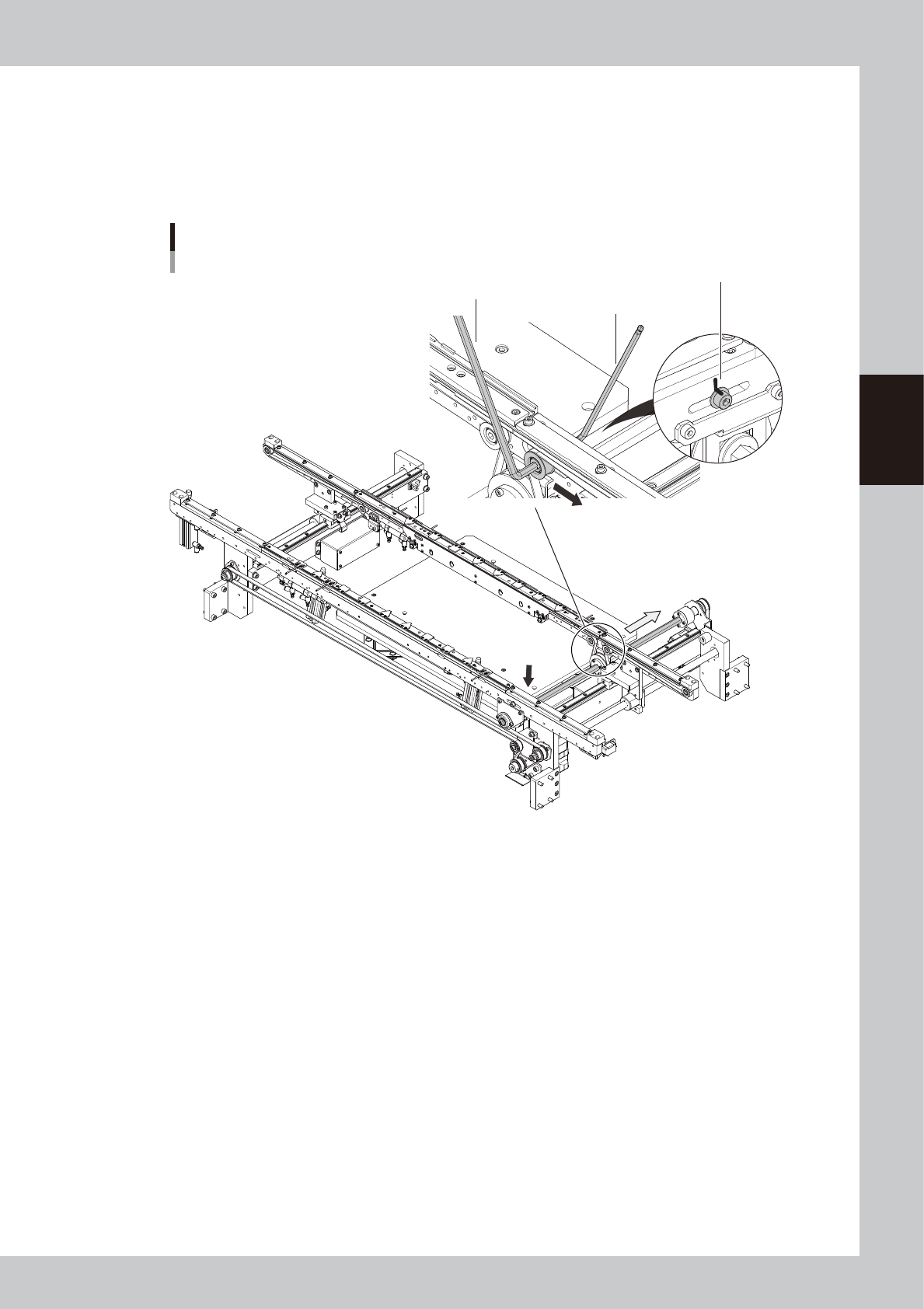
4
Loosen the belt.
1. Before loosening the conveyor belt, mark at the current position of pulley with a permanent marker.
2. Loosen the pulley mounting screws applying the tension with a hex wrenches (5 and 4) referring to
the figure below.
3. Move the pulley to the direction that the belt is loosened.
Loosening the belt
Hex wrench (4)
Hex wrench (5)
Mark pulley position.
Direction that belt is loosened
53356-L6-00
3-20
3
Periodic maintenance items
5
Remove the belt from the conveyor.
Remove the conveyor belt from the pulley
and conveyor guide groove.
6
Inspect the conveyor belt.
Check the transfer surface of the detached
belt for worn-out or scuffing. If the belt worn-
out amount or scuffing is large, replace the
conveyor belt referring to chapter 4,"4.
Replacing the conveyor belts" .
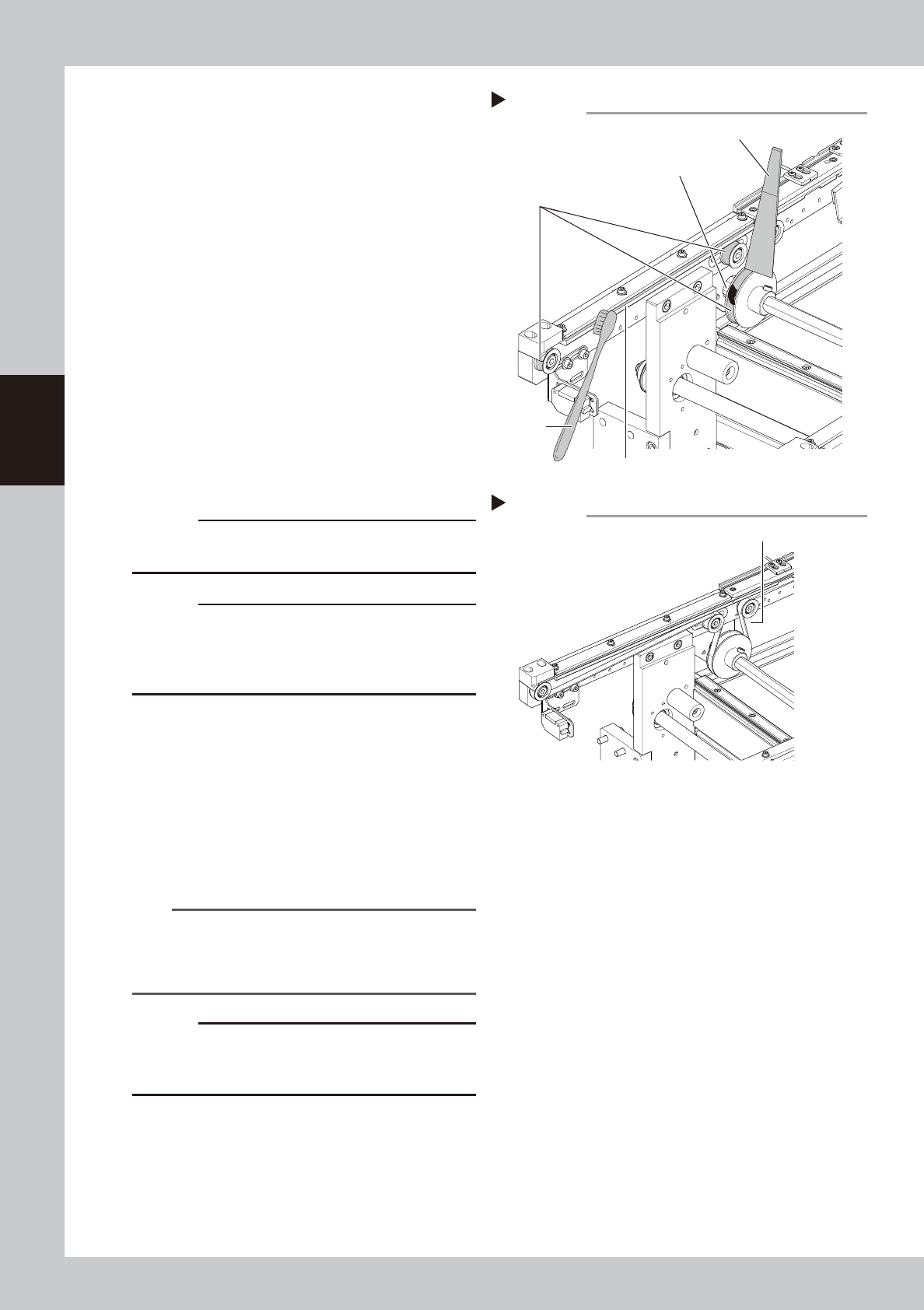
7
Clean the belt guides and pulleys.
1. Use a vacuum assembly (option) to
suction the belt wear debris on the belt
guides and sensors, etc.
2.
Use a plastic spatula or similar tool to
remove the belt wear debris adhering to
the outer peripheral surface of the pulleys.
3.
Use a brush or similar tool to remove the
belt wear debris caught in the belt guides
.
53357-L6-00
c
CAUTION
Use a plastic spatula and brush to avoid scratching the
pulleys and guides.
c
CAUTION
Do not use a solvent (IPA, etc.) unless the guides and
pulleys are excessively dirty. If using a solvent, be
careful not to spill the solvent on the bearing in the
pulleys during cleaning.
8
Replace the conveyor belt.
1. Replace the belt temporarily while
putting it on the pulley.
2. Move the pulley to the position marked
in Step 4 and tighten the mounting bolts.
3.
If looseness of the belt is found, adjust the
pulley position to apply tension.
53358-L6-00
n
NOTE
The conveyor belt tension standard value of this
machine is 550 to 610 Hz. Adjust the conveyor belt
tension with a tension meter as necessary. The same
standard value applies to the extension conveyor type.
c
CAUTION
The tightening torques of the pulley mounting bolt that
applies tension is 5.5N·m. Do not tighten the bolt
excessively.
Step 7
Cleaning the belt guide and pulley
Spatula (made of plastic)
Belt wear debris
sticking to pulley
Outer peripheral
surface of pulley
Belt guide
Brush
Step 8
Tension measurement point
Tension measurement point