PSV5000_OwnersManual.pdf - 第115页
Pick and Place Prob e Inspecting Gantr y Parts PSV5000 O wner ’s M anual - 111 - R EQUIREMENTS • AFB ‐ LF from THK Grea se • hex key set (Allen wrench es ) WAR NIN G: Po ssibl e col li sion ha zar d! The h igh sp eed…
Maintenance ■ Pick and Place Probe
- 110 - Data I/O ■ 096-0465-001C
3. Properly shut OFF the PSV5000 System. See Shutting Down the
PSV5000 System on page 38.
WARNING: Shock hazard! Opening the safety doors stops
motion of the gantry only. It does not remove electrical power
from the machine or any optional equipment. Turn the main
power OFF for safety unless otherwise directed.
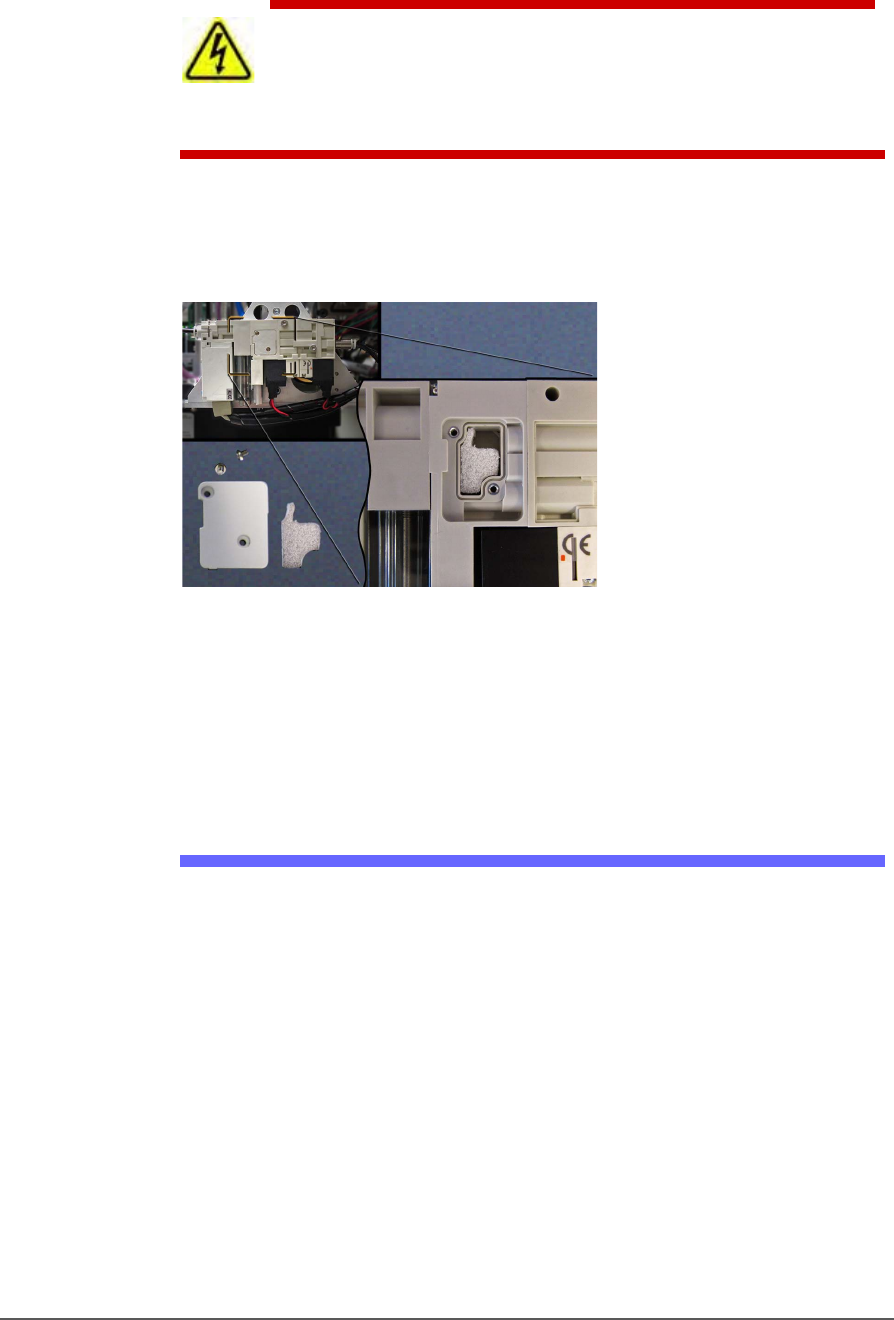
4. Open the safety door and remove the small silencer cover plate on
the accessible vacuum generator (two 1.5 mm hex key).
Figure 66: The vacuum generator silencer. It is included in the
Self-Service Spares Kit.
5. Inspect the silencer. If it looks dirty—not white—replace it.
6. Replace the cover plate.
Inspecting Gantry Parts
CHECKING THE PNP HEAD
1. Properly shut OFF the PSV5000 sub-systems and machine power.
Refer to Shutting Down the PSV5000 System on page 38.
2. Check that all connectors are secure.
3. Turn on the system air and check that there are no vacuum leaks.
LUBRICATING THE GANTRY
There are a total of seven grease ducts on the gantry for lubricating the
linear guides. Additionally, the ball screw requires lubrication
periodically, also.
Pick and Place Probe Inspecting Gantry Parts
PSV5000 Owner’s Manual - 111 -
REQUIREMENTS
• AFB‐LF from THK Grease
• hex key set (Allen wrenches)
WARNING: Possible collision hazard! The high speed and force of
the gantry can seriously harm anyone working inside the
workspace.
When working within the machine workspace, moving the PNP head must
be the responsibility of only one qualified individual. All others must stay
clear of the machine controls to prevent injury to that person. Ensure that
the system power is OFF prior to proceeding.
WARNING: Possibility of serious eye damage! AFB LF grease
causes serious eye irritation. Wear eye protection goggles.
GANTRY X-AXIS LUBRICATION
1. Move the PNP head to the Park position.
2. Properly shut OFF the PSV5000 sub-systems and machine power.
See Shutting Down the PSV5000 System on page 38.
3. The guard on the back linear guide must slide out to the left or right.
Therefore, remove either the left or right clear workspace side panel.
Remove the four screws (4 mm hex key) and lift the panel off.
4. Open the rear safety doors and remove the four screws in the gantry
guard with a 2.5 mm hex key.
5. At the open side of the machine, lift the end of the guard slightly and
pull it out of the workspace.
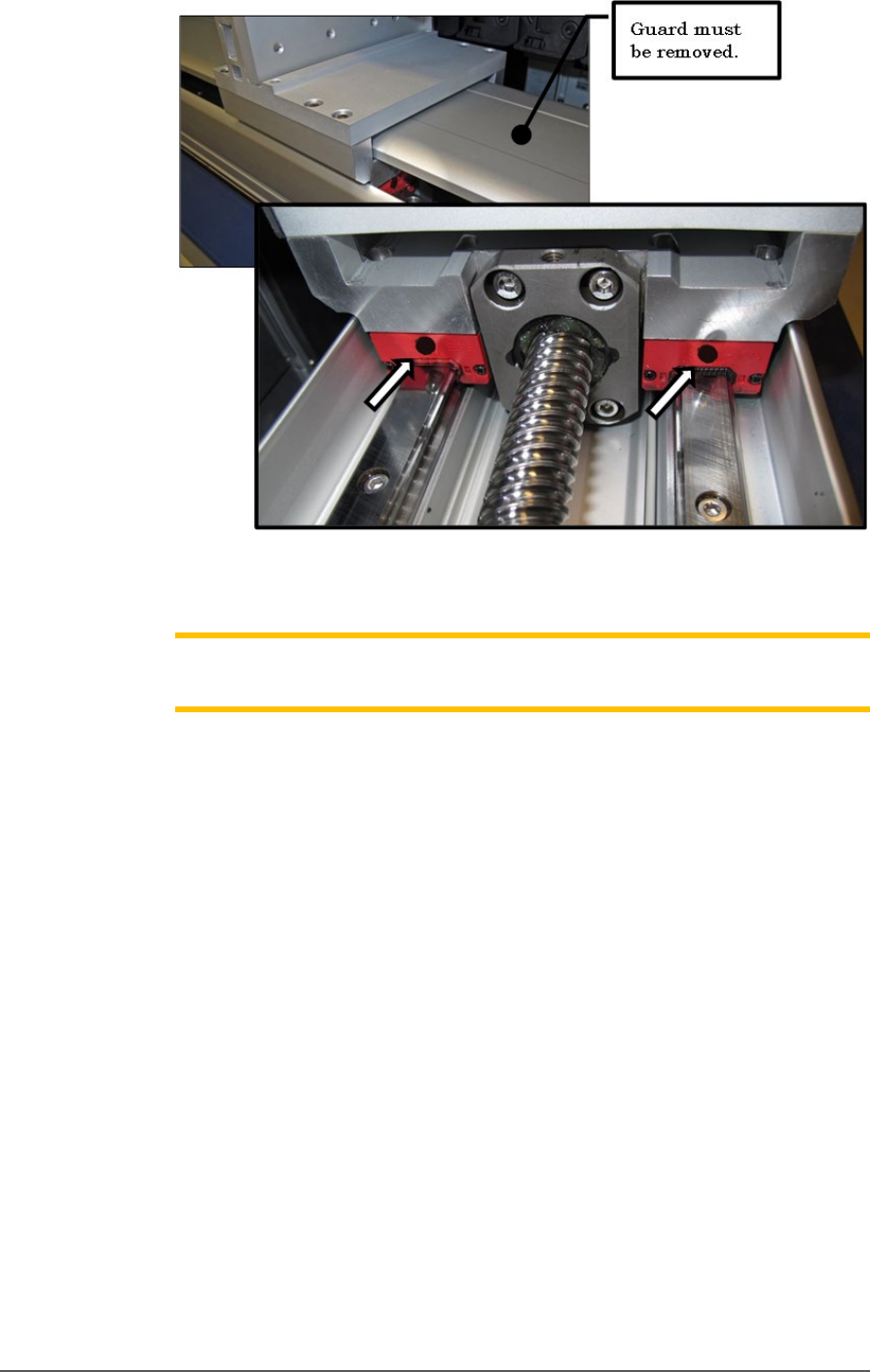
6. Remove the two screws covering the grease ducts.
7. Apply grease to the two grease ducts on each end of the slide block
(as shown on the next page). Wipe off any excess.
8. Replace/insert the screws removed from Step 6.
Maintenance ■ Pick and Place Probe
- 112 - Data I/O ■ 096-0465-001C
Figure 67: Two of the four grease ducts on the rear linear guide of
the gantry.
Note: Too much grease may cause grease to splatter inside the work
envelope. Do not over-apply the grease.
9. Lubricate the rear ball screw after wiping off the old grease. Directly
apply new grease to the ball screw sparingly. Wipe off any excess.
10. Open the front safety doors and remove the four screws securing the
front guard of the front linear guide of the gantry (2 mm hex key).
11. Remove the screw covering the grease duct.
12. Apply grease to the grease duct on each end of the slide block. Wipe
off any excess. See figure below.