PSV5000_OwnersManual.pdf - 第142页
Maint enance ■ T roubles hooting - 138 - Data I/O ■ 096 - 046 5 - 00 1C Air P ressure Problem s Lamp Color Error M essages Pos sible Res olution Red • There is no m ain air pressure. • Ma ke sure that the main air sw itc…
Troubleshooting Pick and Place Problems
PSV5000 Owner’s Manual - 137 -
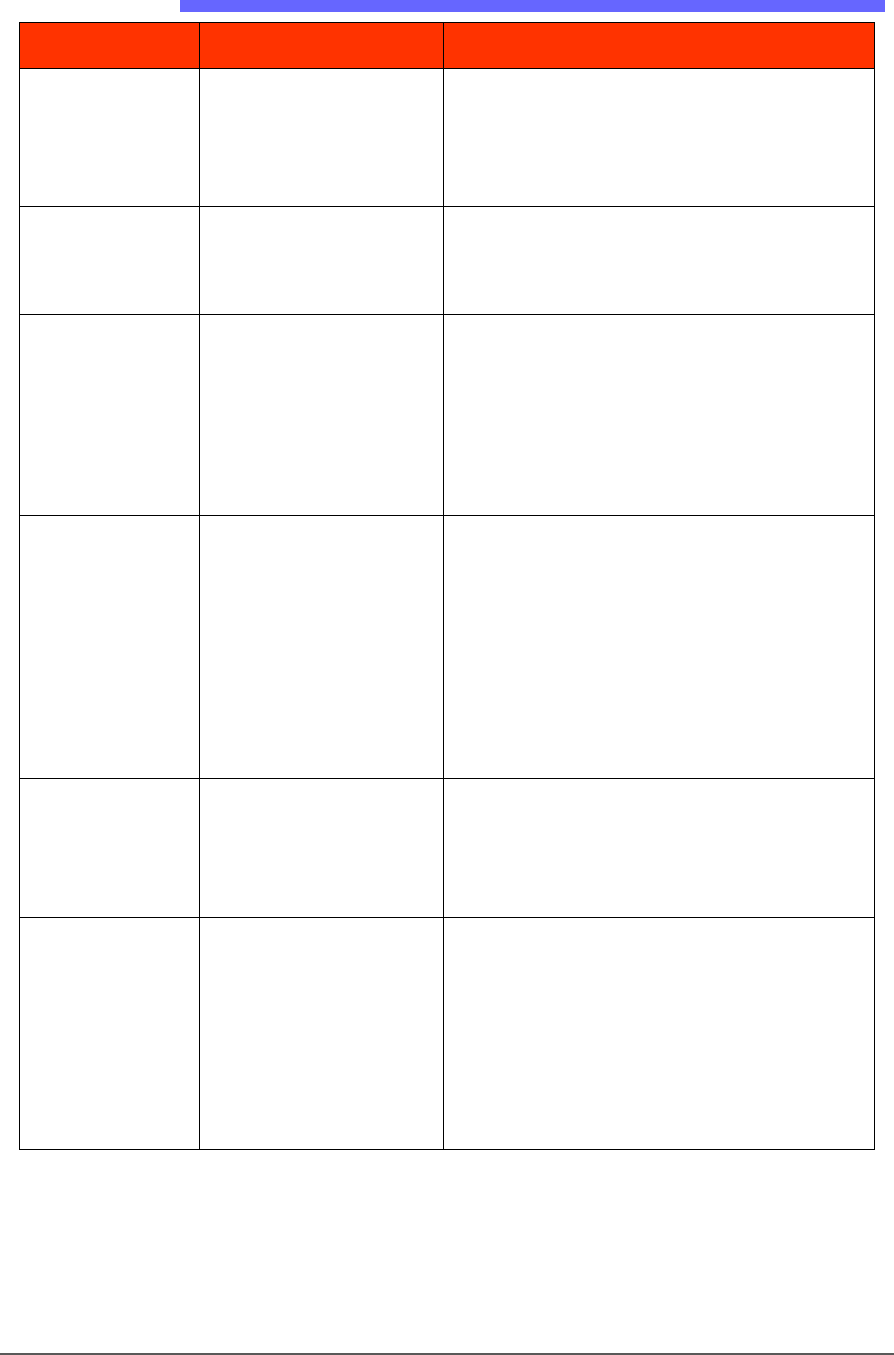
Pick and Place Problems
Lamp Color Error Messages Possible Resolution
• Red/
Yellow
• Devices are not being
placed into sockets or
output media
accurately.
• Check that the probe is not bent.
• Check all fasteners and connections on the
head and gantry. Also see Inspecting Gantry
Parts on page 110.
• Yellow/
Red
• The probe experiences
pick and/or place
errors regularly.
• Contact Data I/O Customer Support or a
local Data I/O approved service
representative.
• None • The probe is dropping
devices.
• Clean or replace the Probe Tip. See Pick and
Place Probe on page 103
• Clean the vacuum filters. See Vacuum
Generator Filters on page 108.
• Check the main input air pressure; refer to
Connecting Air on page 34.
• None • A probe attempts to
pick a device twice
even though it picked
up the device the first
time.
• The Vacuum sensor may need calibrating.
See To Adjust Probe Vacuum Generator
Sensors on page 106.
• If programming TQFP 144, you can increase
the value for ‘suckup time’ in the Package
File to maximum value of 500 ms. See the
Setup window > System > Package File. Refer
to the on-screen Help.
• None • Devices are bouncing.
The socket air pressure may be too high.
• Reduce the socket actuation air pressure.
See Adjusting the Socket Actuator Air
Pressure on the Programmers on page 99.
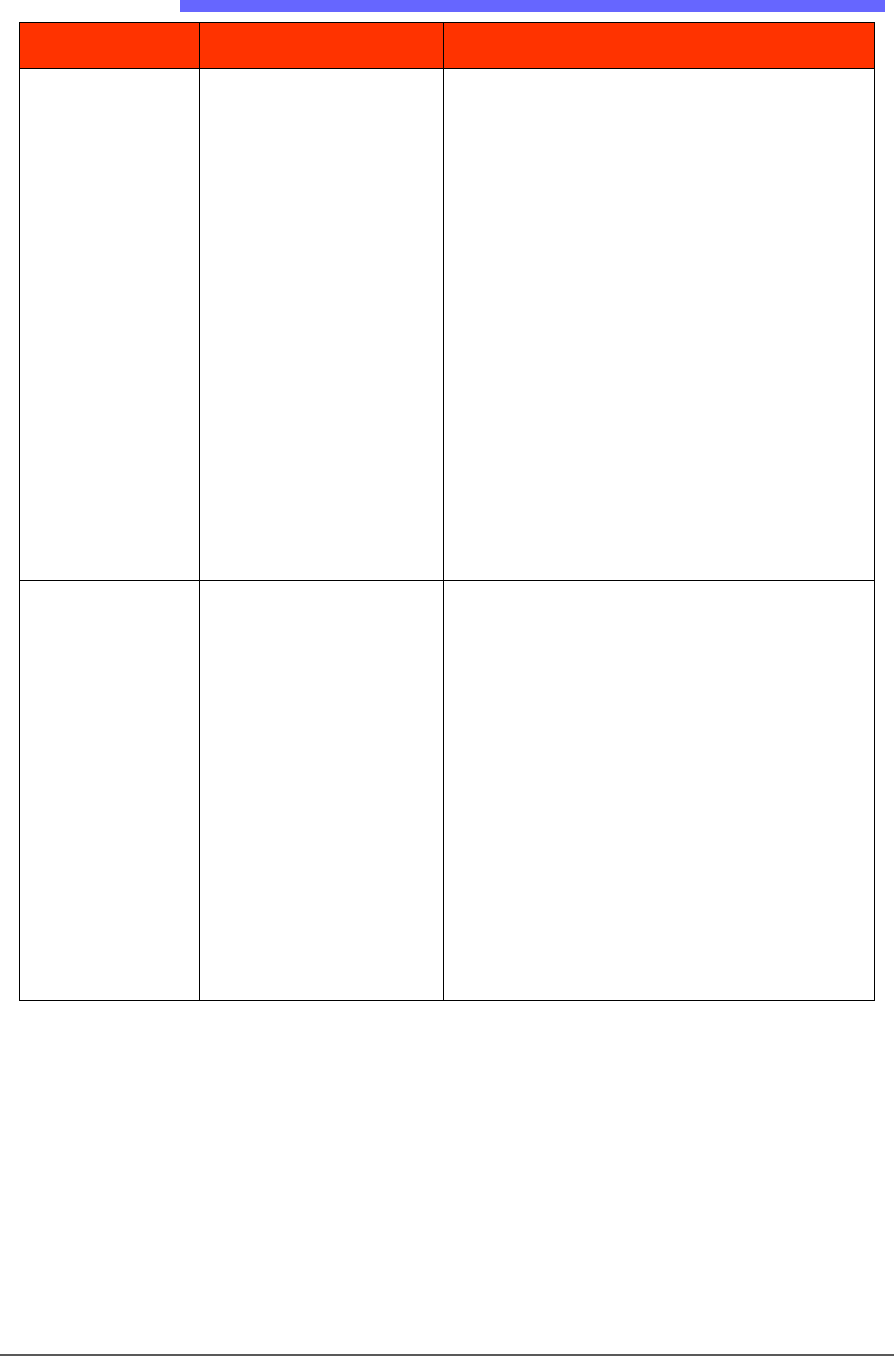
Red/
Yellow
• Pick or place errors at
all programmers.
The socket is not opening completely—the air
pressure might be set too low.
• Adjusting the Vacuum Generator Sensors on
page 105.
• Increase the socket actuation air pressure.
See Adjusting the Socket Actuator Air
Pressure on the Programmers on page 99.
Maintenance ■ Troubleshooting
- 138 - Data I/O ■ 096-0465-001C
Air Pressure Problems
Lamp Color Error Messages Possible Resolution
Red
• There is no main air
pressure.
• Make sure that the main air switch on the
Power Panel is in the ON position.
• Check that the air regulator on the Power
Panel displays within the acceptable range:
PSV5000 Specifications on page 1-9.
If not:
• Check your shop air pressure.
• Shut down and replace the filter. See
Replacing the Input Air Pressure on page 107.
The digital display on the regulator will be
green when air pressure is within the correct
range and red when it is out of range. The
regulator has been set at the factory and is
not adjustable.
Red
• There is no (or low)
vacuum on the PNP
probe.
• Check that the probe is not loose and that
the O-Ring is not destroyed or leaking.
See Pick and Place Probe on page 103.
• Determine if the PNP head probe is clogged.
Clean if necessary. Refer to Removing and
Installing a Probe in the PSV5000 Operator’s
Manual.
• Check the probe vacuum and Blow-off
solenoids; see Adjusting the Vacuum
Generator Sensors on page 105.
• Clean the vacuum generator filters and
silencers; see Vacuum Generator Filters and
Silencers on page 108.
Troubleshooting Tray Feeder Problems
PSV5000 Owner’s Manual - 139 -
Tray Feeder Problems
Lamp Color Error Messages Possible Resolution
Yellow
• The Run window
indicates a tray is
present on the Tray
Feeder when there is
no tray there, or vice
versa.
• Navigate to the System > MISC I/O window
and verify that the Tray Present Sensor = ON.
None
• Probe miss-picks or
misplaces devices at
the trays.
• Probe hits devices in a
tray hard at one end
and not the other.
• Check that the tray feeder is level. Adjust the
outside mounting bar if necessary.
Handler Computer Failure
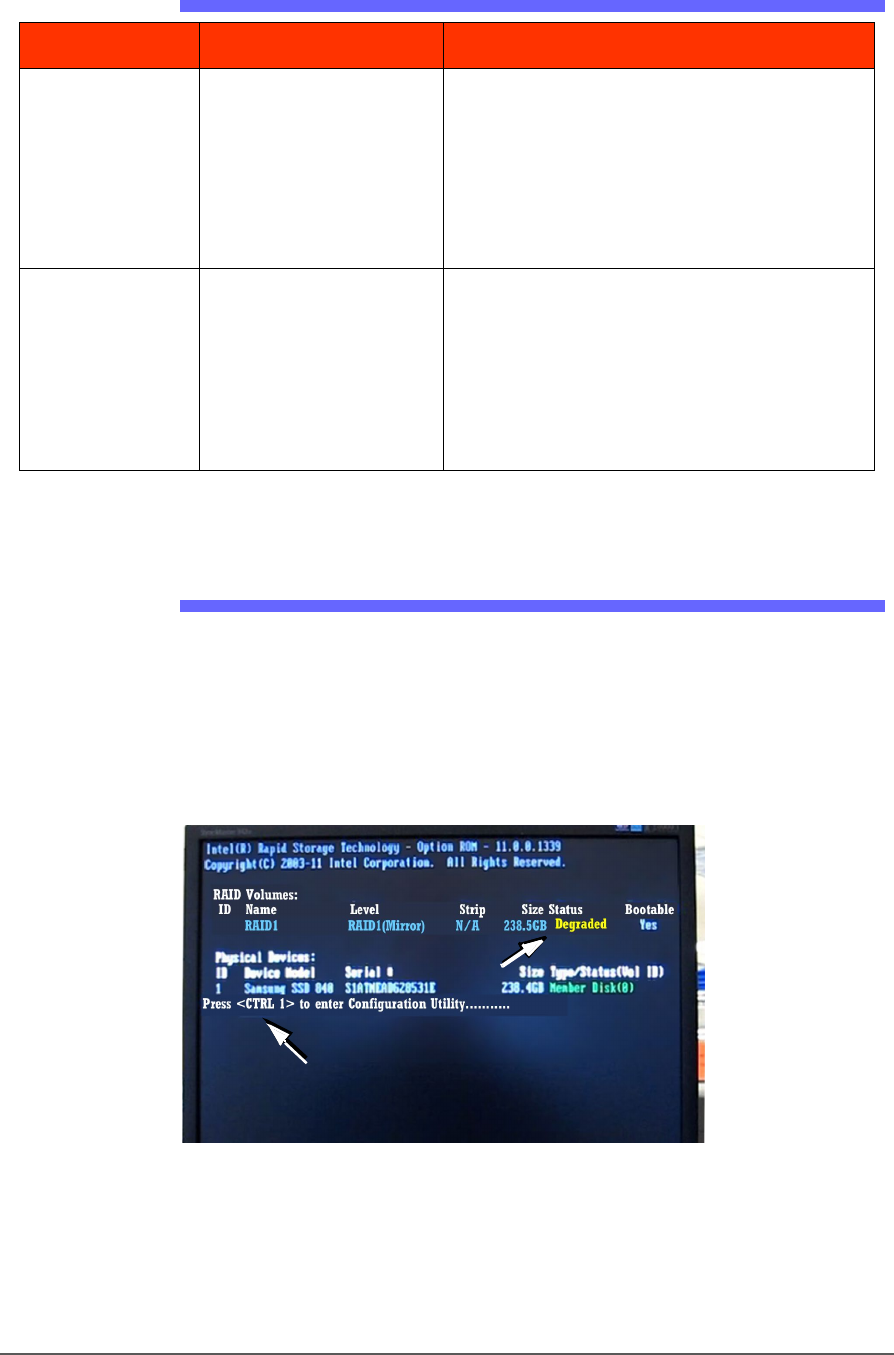
If the Handler computer drive fails, its behavior or a message indicates
that a computer has crashed.
Your PSV5000 System is equipped with a mirror-backup system called
RAID that creates a real-time ghost image. You will see an error message
display for a few seconds at system start-up.
Figure 80: This message, DEGRADED, will display for about seven
seconds at startup if a Handler drive has failed.