PSV5000_OwnersManual.pdf - 第39页
■ Machine I nstallation □ Connecting Electrical Power PSV5000 O wner ’s M anual - 35 - Figure 16: Pow er Panel on the ba ck o f th e mach ine. Connect air to PSV50 00 at th e main regulator an d filter. S ee the fi gure …

Setup ■ Machine Installation
- 34 - Data I/O ■ 096-0465-001C
the floor, or if the leg locknuts are not tightened against the frame. Only the
adjustable feet provided on the PSV5000 Machine should be used for
leveling. Do not use shims to assist in leveling.
Connecting Facilities
The PSV5000 requires two external services: pressurized air and
electrical power. It also allows one optional connection to an Internet via
a Network connection. These services connect to the PSV5000 Machine
at the Power Panel located on the back of the machine.
With the two required services, the machine creates all the unique
electrical voltages needed as well regulating pneumatic pressure for all
systems within the machine.
Connecting Air
The machine requires clean, dry, oil-free air from an industrial grade
compressor.
PSV5000 Air Requirements Table
Note: If the compressor cannot maintain the correct air pressure and
stable air volume, PSV5000 System performance will be affected and may
damage devices.
System
Air Volume
@ Air
Pressure
at
inlet
regulator
on
PSV5000
Supply Air
Min.
Air
Tube
Length
1
Customer supplies a
primary
filter/regulator
required between
factory compressor
and
PSV5000
2
—Metric
85 L/minute
[.084 m3/min],
tt
5.5 ±0.3 Bar
5.5 ‐ 8.2 Bar
3 Meters 10 micron
3 SCFM constant
80 ±5 PSI 80 to 120 PSI 10 Feet 10 micron
1
This external air line must allow the supplied air to cool sufficiently so that water vapor in
the air
condenses and can be extracted.
2
The air filter on the Facilities Panel is a secondary filter only.
■ Machine Installation □ Connecting Electrical Power
PSV5000 Owner’s Manual - 35 -
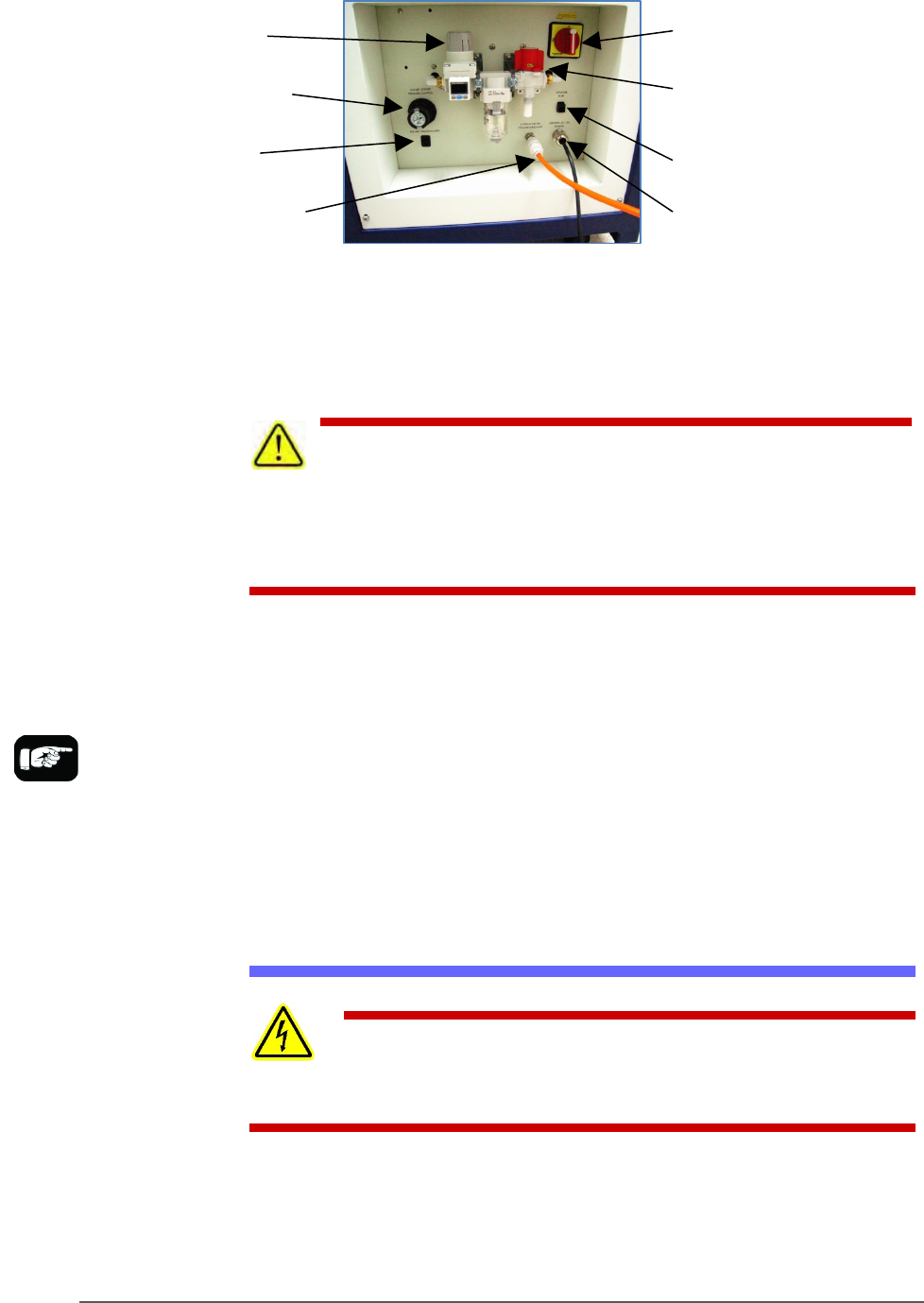
Figure 16: Power Panel on the back of the machine.
Connect air to PSV5000 at the main regulator and filter. See the figure
above for the location of the external air line connection.
CAUTION: Possible air system damage! Oil, excessive moisture, or
poorly filtered air will obstruct the system’s internal air pathways,
affect performance, and void the warranty related to air system failure. If oil or
excessive moisture is detected, contact Data I/O Customer Support or a local
Data I/O approved service representative.
MAIN AIR PRESSURE GAUGE
The main pressure regulator is set at the factory, but can be changed
manually. See Connecting Air on page 34 for the factory setting.
When air pressure is within range, the regulator readout is green. If air
pressure is above or below the acceptable range, the readout displays red.
If it is red (out of range), contact Data I/O Support or a qualified service
technician. The upper and lower limits cannot be changed without the
password.
Connecting Electrical Power
WARNING: Electric shock hazard! Personal injury could be
caused from high leakage electrical current from the main power cable. An
Earth (ground) connection is essential before connecting power.
Required power is provided through a supplied 3-wire power cable with
one end terminated in an electrical plug as required by the customer’s
facility. For power specifications, see PSV5000 Specifications on page 18.
For cable location see Figure 35.
Main regulator
and filter
Socket Opener
Pressure Control
Programmer Power
Toggle (up is ON)
Main Power Switch
(Lockout capable)
Air Shut-off
valve
Ethernet
connection
Power Cable (does not
disconnect here)
Air Connection
If there is low air
pressure the monitor
may display a message
reading No air.
Setup ■ Machine Installation
- 36 - Data I/O ■ 096-0465-001C
(Optional) Connecting an Ethernet Cable
A Network connection is on the Power Panel. Plug in an Ethernet cable.
Refer to Figure 2-1.
Network settings are described in (Optional) Network Settings on page 38
CAUTION: Possible PC virus hazard! The PSV5000 System has no
antivirus software installed from the factory. Prior to connecting to a
network, Data I/O recommends installing antivirus software.
To install antivirus software refer to (Optional) Installing Antivirus
Software on page 38.