PSV5000_OwnersManual.pdf - 第40页
Setup ■ Machine Inst allati on - 36 - Data I/O ■ 096 - 0465 - 00 1C ( Optional) Connecting an Ethernet Cable A Network c onnection is on t he Power Panel. Pl ug in an Eth ernet cable. Refer to Figure 2 -1 . Networ k sett…
■ Machine Installation □ Connecting Electrical Power
PSV5000 Owner’s Manual - 35 -
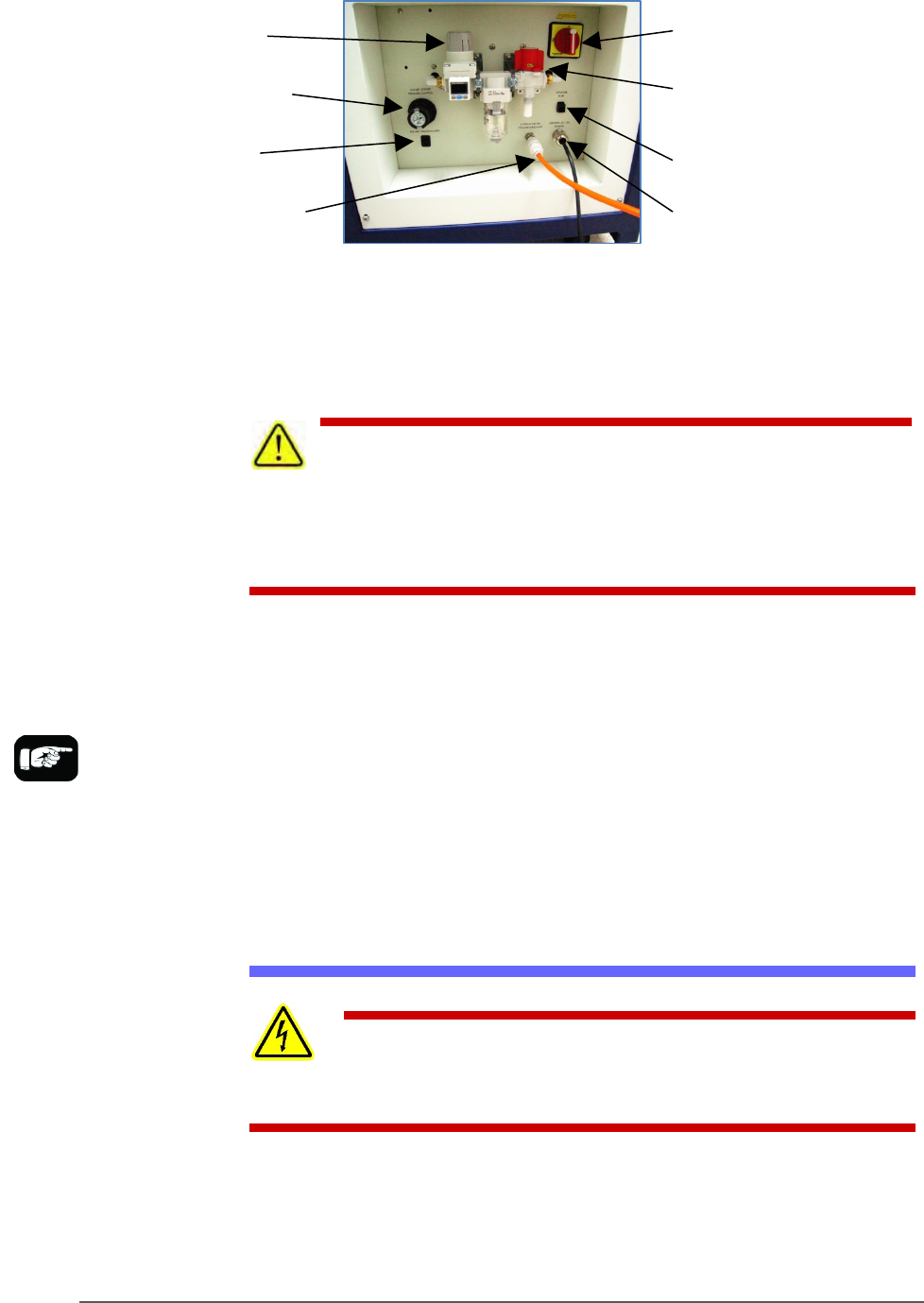
Figure 16: Power Panel on the back of the machine.
Connect air to PSV5000 at the main regulator and filter. See the figure
above for the location of the external air line connection.
CAUTION: Possible air system damage! Oil, excessive moisture, or
poorly filtered air will obstruct the system’s internal air pathways,
affect performance, and void the warranty related to air system failure. If oil or
excessive moisture is detected, contact Data I/O Customer Support or a local
Data I/O approved service representative.
MAIN AIR PRESSURE GAUGE
The main pressure regulator is set at the factory, but can be changed
manually. See Connecting Air on page 34 for the factory setting.
When air pressure is within range, the regulator readout is green. If air
pressure is above or below the acceptable range, the readout displays red.
If it is red (out of range), contact Data I/O Support or a qualified service
technician. The upper and lower limits cannot be changed without the
password.
Connecting Electrical Power
WARNING: Electric shock hazard! Personal injury could be
caused from high leakage electrical current from the main power cable. An
Earth (ground) connection is essential before connecting power.
Required power is provided through a supplied 3-wire power cable with
one end terminated in an electrical plug as required by the customer’s
facility. For power specifications, see PSV5000 Specifications on page 18.
For cable location see Figure 35.
Main regulator
and filter
Socket Opener
Pressure Control
Programmer Power
Toggle (up is ON)
Main Power Switch
(Lockout capable)
Air Shut-off
valve
Ethernet
connection
Power Cable (does not
disconnect here)
Air Connection
If there is low air
pressure the monitor
may display a message
reading No air.

Setup ■ Machine Installation
- 36 - Data I/O ■ 096-0465-001C
(Optional) Connecting an Ethernet Cable
A Network connection is on the Power Panel. Plug in an Ethernet cable.
Refer to Figure 2-1.
Network settings are described in (Optional) Network Settings on page 38
CAUTION: Possible PC virus hazard! The PSV5000 System has no
antivirus software installed from the factory. Prior to connecting to a
network, Data I/O recommends installing antivirus software.
To install antivirus software refer to (Optional) Installing Antivirus
Software on page 38.

■ Applying Power for the First Time □ (Optional) Connecting an Ethernet Cable
PSV5000 Owner’s Manual - 37 -
Applying Power for the First Time
Before the PSV5000 System is turned on for the first time, ensure the
following:
The external air line is connected, and the main air valve is open.
All E-Stop buttons are in the released (operating) positions (refer to
Emergency Stop (E-Stop) Buttons on page 1-4 for location).
All safety doors and access doors are closed.
The programmer power toggle switch on the Power Panel is ON (UP)
position.
The power switch on the Handler Computer is set to the ON position
(although it will not have power
yet). The rocker switch is ON when
tipped to the down position.
(Optional) The Socket Adapters
required for the job have been
installed on all necessary programmer sites. See Installing Socket
Adapters in the Operator’s Manual for more information. Note that
Socket Adapters can also be installed after power is on.
Note: To tighten socket adapters/boards, the recommended torque
range for FlashCORE programmer screws is 1.4 – 1.5 Newton Metre
(Nm)/12.4 – 13.3 pound force inch (lbf-in).
When satisfied, rotate the main power switch on the Power Panel to the
ON position (clockwise).
After power is applied, verify that no obvious failures or electrical
anomalies occur. Verify that the Handler Computer starts properly and
displays a network log-on dialog.
Note: If electrical or mechanical problems are noted, turn OFF the
PSV5000 System and notify Data I/O Customer Support.
At the Microsoft Log-on window, click the user profile (usually labeled
MFG) to complete the startup procedure.