PSV5000_OwnersManual.pdf - 第44页
Setup ■ S etting Up In put and Output Media - 40 - Data I/O ■ 096 - 0465 - 00 1C Setting Up Input an d Output Media There are m any op tions fo r devic e inpu t and output. O ne opti on fo r inpu t and o ne fo r output m…
■ Applying Power for the First Time □ (Optional) Network Settings
PSV5000 Owner’s Manual - 39 -
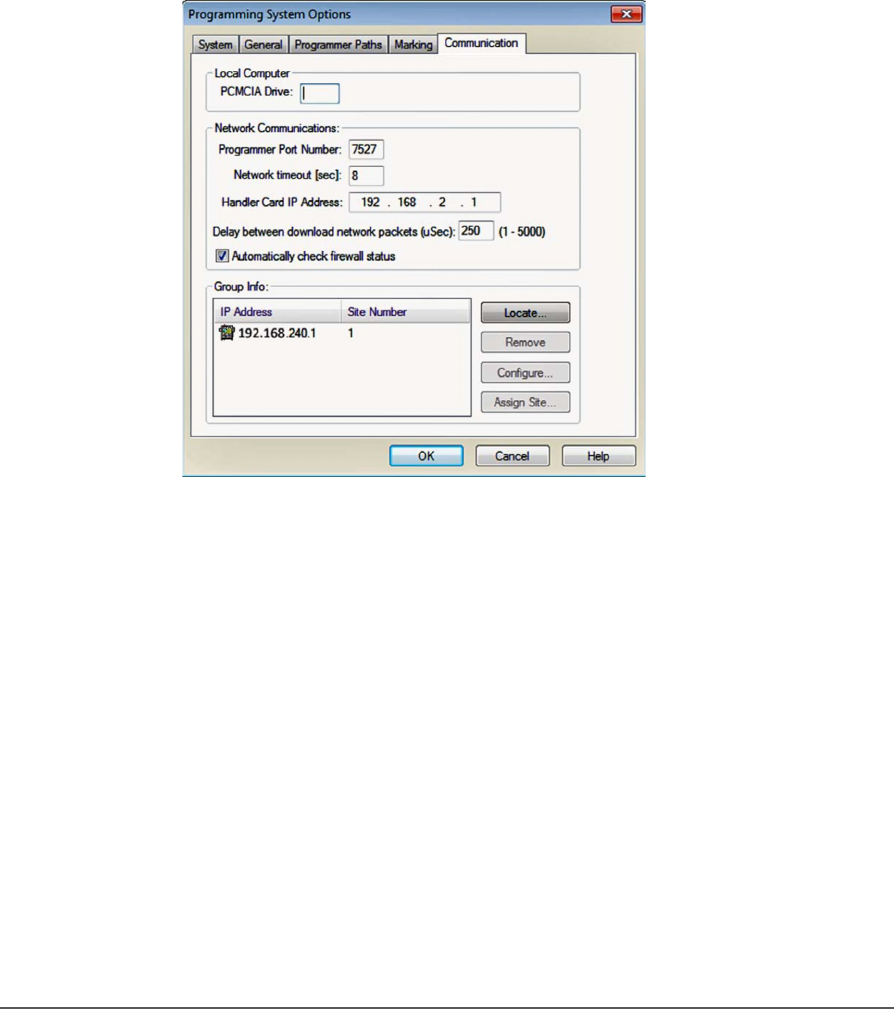
IP ADDRESS AND PORT NUMBER
If you need the IP Address for communicating with other Data I/O
software, they are available via TaskLink. The Port numbers are also
displayed. (Port numbers are the same for all programmers on a PSV5000
Machine.)
Addresses and Port numbers can be found as follows.
1. Start TaskLink on the target PSV5000 System. (Closing CH700
will return to TaskLink.)
2. Click System > Options > Communication tab. The IP Address
and site numbers are listed in the lower left corner.
Figure 17: TaskLink Communication Tab displays IP Addresses and
site numbers.
Setup ■ Setting Up Input and Output Media
- 40 - Data I/O ■ 096-0465-001C
Setting Up Input and Output
Media
There are many options for device input and output. One option for
input and one for output must be set up on the PSV5000 Machine for
your target job. Further, the setup must correspond with the current
software, such as the Job file, winAH400.ini file.
These input/output media are described in this section:
• Static Tray (below)
• Reject bin
• Auxiliary tray
• Automatic Tray Feeder, page 43
• Tape Output Module, page 47
Note: The Tape Input feeder installation is covered in the PSV5000
Operator’s Manual.
About Static Tray Input and Output
The standard configuration for the PSV5000 System is static tray input
and static tray output media. The latest tray mounting configuration
uses two rows of locating pins and a magnet. Specific steps for installing
trays are described in the PSV5000 Operator’s Manual.
Note: Make sure that the correct devices for the target job are loaded into
the input tray and that they have the correct pin 1 orientation. (If pin 1
orientation doesn’t match pin 1 that is set in the Package File it must be
corrected). Pin 1 on Data I/O sockets is almost always toward the far side
of the Socket Adapter (the back of the machine).
Remember that tray arrangement affects:
• The Setup window > Options tab which must be set to match the
workspace setup (covered in the Operator’s Manual).
• The Package File which must be taught the Tray locations (covered
later in Chapter 3 of this manual).
REMOVING TRAY PLATFORMS
Static Tray Platforms can be removed to support different mediums such
as to install an automatic tray feeder.
Note that the work
surface layout is
affected by what
programmer models
are installed.
■ Setting Up Input and Output Media □ Install the Reject Bin
PSV5000 Owner’s Manual - 41 -
REQUIREMENTS
Metric hex key set.
To remove a Static Tray Platform:
1. Shut OFF the PSV5000 System. See Shutting Down the PSV5000
System on page 38.
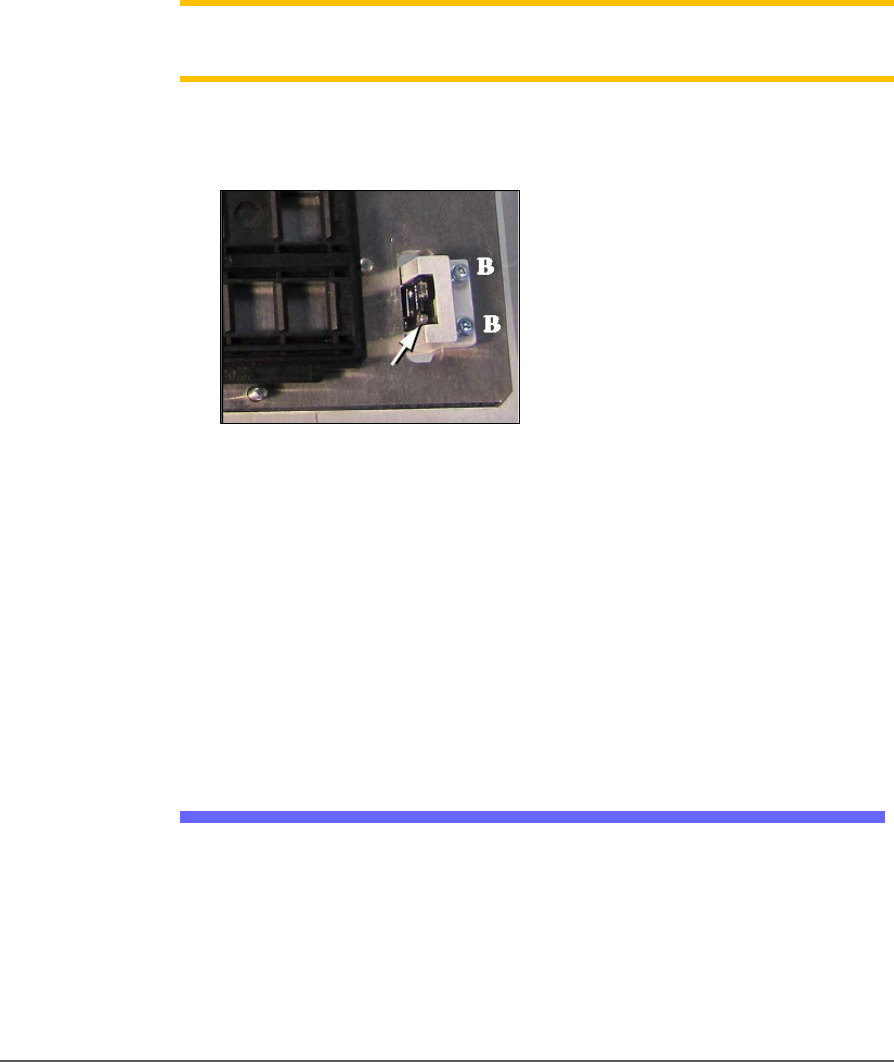
2. Disconnect the tray sensor-
2a. Remove two sensor bracket screws (2.5 mm).
2b. Lift the bracket up and remove the two screws securing the
sensor to the bracket (1.5 mm).
Note: Best practice is to re-attach the sensor screws to the bracket, and
the bracket to the platform so parts don’t get lost.
3. Open the front or back lower access door and remove four screws
from the target Static Tray Platform (3 mm hex key).
Figure 18: Static Tray Sensor and bracket. Two bracket screws
shown (at B). Only one of the sensor screws is visible (arrow).
(This image is for reference only. Yours may not be positioned
like this.)
4. Move the sensor into the bottom side of the machine through the
sensor cable hole in the working plate. Tie it carefully to the cable
way.
To re-install the platform, reverse the steps for removal.
Install the Reject Bin
Install a reject container for devices failing any process. Many workspace
layouts are possible. Generally, a reject bin (or box) is placed on the front
left of the workspace as shown in Figure 2-5, on top the Tape Input
media exit chute. However, a box or pad can be placed wherever there is
room for it as long as its location is taught in the Package File.