PSV5000_OwnersManual.pdf - 第66页
Ad minist rativ e F unctions ■ Saf ety Message and Pre cauti ons - 62 - Data I/O ■ 096 - 0465 - 00 1C Safety Me ssage and Precautio ns For your saf ety and prev enting loss of time an d damage to equi pment, this manual …
Setting Up the Laser Marking Module ≡ CH700 Configuration
PSV5000 Owner’s Manual - 61 -
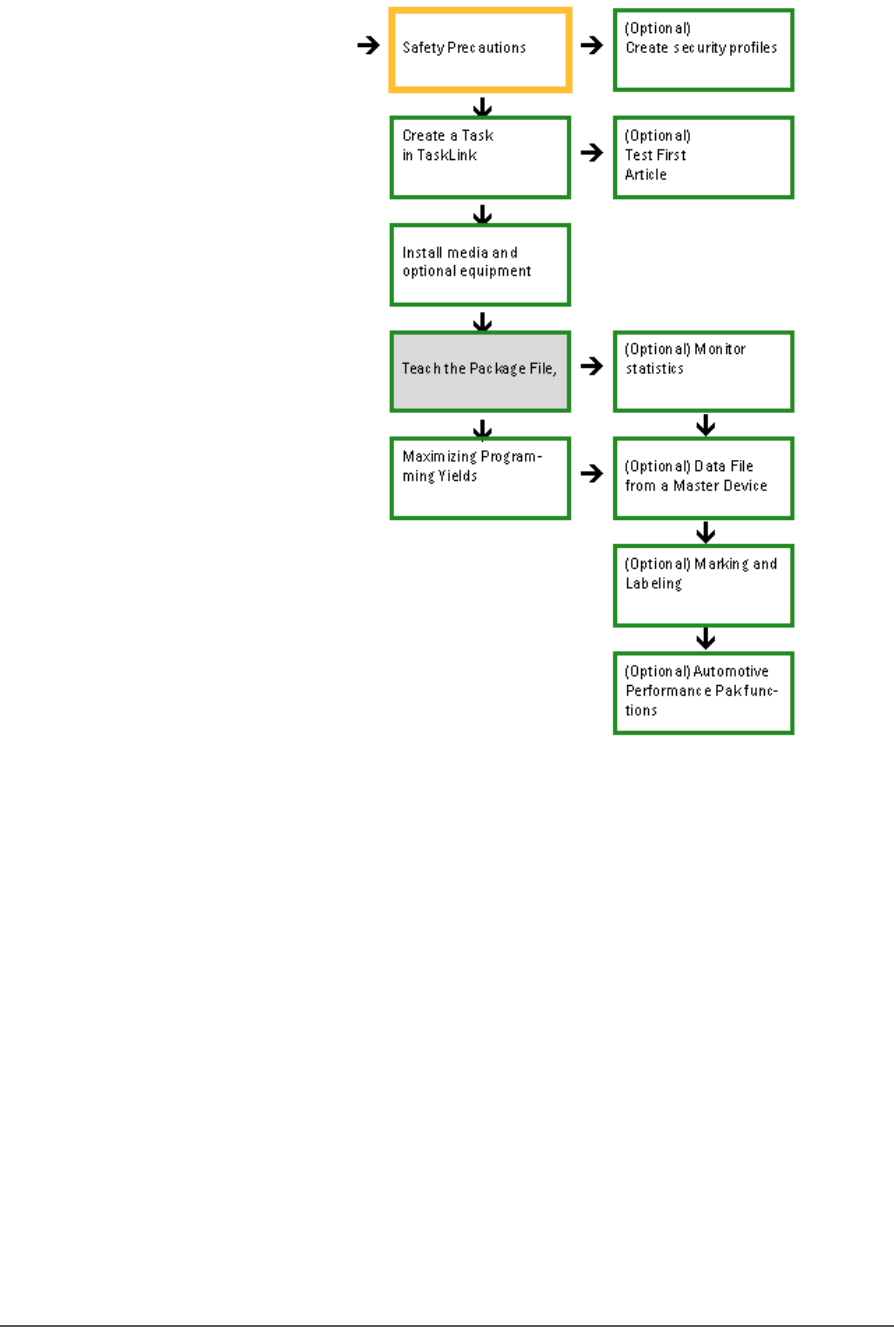
Creating a Job—Administrator Functions at a Glance
Figure 36: Detailed Administrator Functions begin on the next
page. Shaded boxes are activities that are performed once per
package type.

Administrative Functions ■ Safety Message and Precautions
- 62 - Data I/O ■ 096-0465-001C
Safety Message and Precautions
For your safety and preventing loss of time and damage to equipment,
this manual uses special symbols, paragraphs, and color to call your
attention to hazardous situations and recommend safe practices to help
avoid them.
Refer to Using This Manual on page - 1 - (in the Preface) for symbols and
fonts used for safety messages.
Refer to Safety Systems on page 12 for safety regarding Emergency Stops,
the safety doors, and ESD.

Administrator Functions ≡ Reference List of Operator Functions
PSV5000 Owner’s Manual - 63 -
Administrator Functions
Administrators are responsible for creating Tasks in TaskLink™ and Job
Creator, and for other functions not generally performed by operators.
Administrators would likely perform these functions:
• Editing the winAH400.ini File on page 64
• Creating a Task in TaskLink on page 64
• Creating Security Profiles on page 65
• (Optional) Do a First Article Test on page 66
• (Optional) Setting TaskLink to Operator Mode on page 68
• Enhanced Yield Programming on page 68
• Teaching the Workspace Locations on page 69
• Optimize Movetimes on page 70
• Monitoring Statistics on page 71
• Maximizing Programming Yields on page 77
• (Optional) Creating a Data File from a Master Device on page 80
• Creating a Laser Marking File (if marking) on page 81
• Automotive Performance Pak on page 89
These functions are discussed in this section.
Reference List of Operator Functions
These functions for operators are discussed in the separate Operators
Manual.
NOTE: All users, administrators, and operators should know these
procedures.
Checking the System
Installing Input/Output Media
Installing Socket Adapters and Actuator Plates
Installing the Correct Probe
(Optional) Installing the Correct Shuttle Cups
Turning PSV5000 System Power ON
Selecting a Job (Starting CH700 via TaskLink or Job Runner)
(Optional) Preselecting Programmers
Setting Media and Options—the Setup window
Starting Programming