PSV5000_OwnersManual.pdf - 第75页
Ad minist rator F uncti ons ≡ Monitoring Statistic s PSV5000 O wner ’s M anual - 71 - For tu rning ON Sort - On - Error - Co de in the winAH400.ini file, see th e CH7 00 on - scr een He lp. For se tting up Sort - On - …
Administrative Functions ■ Administrator Functions
- 70 - Data I/O ■ 096-0465-001C
1b. When the CH700 Application opens, click Start.
1c. At the Setup window, make setup selections.
1d. Click System > Gantry. A password may be required—refer to
Creating Security Profiles on page 65.
2. To continue, see the CH700 on-screen Help (Teaching Locations >
Printable list of the steps). It covers teaching workspace locations for
all media options.
Note: The PSV5000 System can have static trays or a Tray Feeder.
Teaching tray locations is the same for both.
ERRORS
Please Refer to CH700 on-screen Help. In the Help table of contents click
Browse Sequences->Create a Package File->Errors Creating the Package File.
Optimize Movetimes
After the equipment locations are taught, you can optimize the
movement of the PNP head in the work envelope. This command (Get
Movetimes) calculates programming times versus head travel time to
decide the best PNP head path, especially effective when some
programmers are not used.
To get Movetimes:
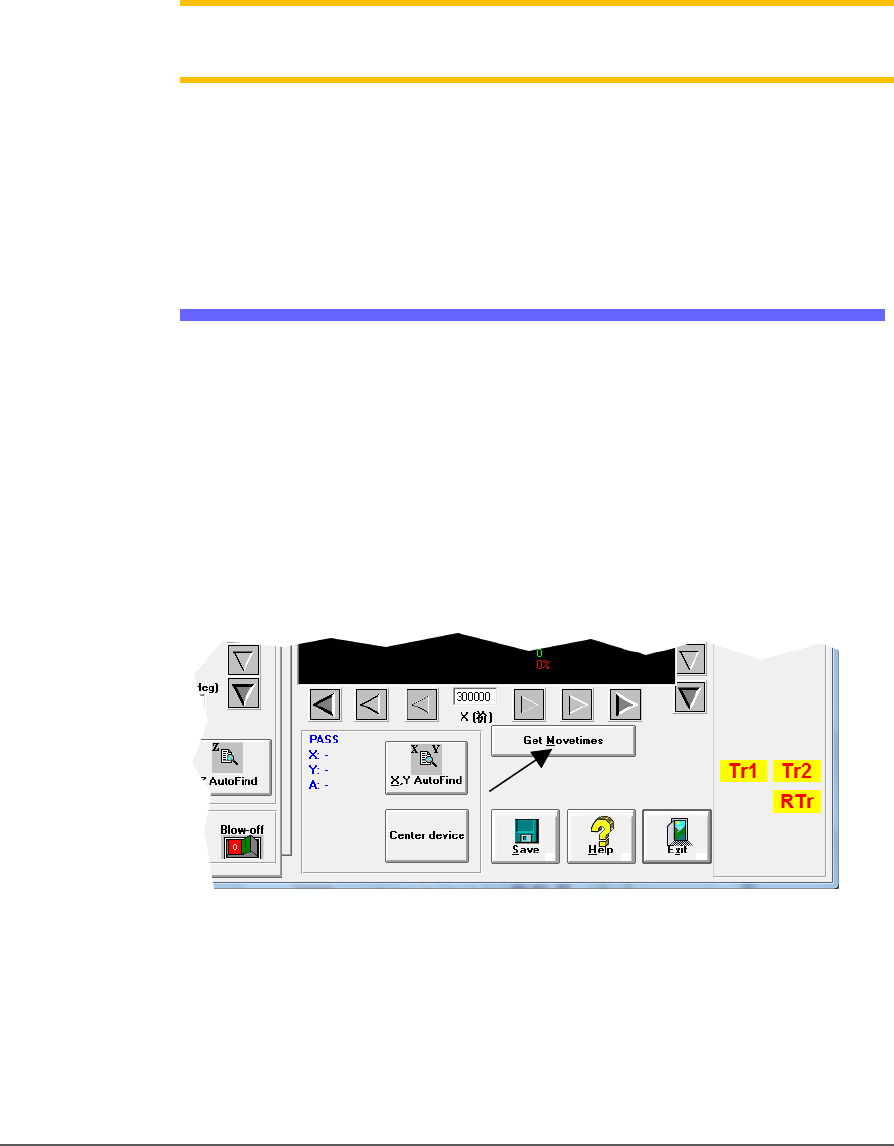
1. On the Gantry window, click Get Movetimes.
Figure 38: Click Get Movetimes to optimize head travel.
2. Click Yes when prompted to save positions.

Administrator Functions ≡ Monitoring Statistics
PSV5000 Owner’s Manual - 71 -
For turning ON
Sort-On-Error-Code in
the winAH400.ini file,
see the CH700 on-screen
Help.
For setting up
Sort-On-Error-Code see
TaskLink Help for
PSV5000.
Monitoring Statistics
Occasionally, the system administrator may require statistics for a group
of devices for a given job. This is easily accomplished using any of three
statistics tools described on the next pages:
• TaskLink’s Session Data Logging feature
• the CH700 Statistics window
• (optional) Statistical Process Control Software (customer-supplied)
• Sort-on-Error-Code separates devices that fail specific, customer
specified processes.
In addition, Data I/O offers additional utilities for enhancing yield and
reducing errors. These include the Automotive Performance Pak (see page
89) and several other software packages and hardware such as Factory
Integration Software (FIS) and Serial Number Server (SNS).
TASKLINK SESSION DATA LOGGING
For complete instructions on enabling and using TaskLink’s Session
Data Logging option, see TaskLink online Help.
CH700 STATISTICS WINDOW
The PSV5000 software called CH700 provides statistics that include:
devices programmed successfully, continuity failures, and verify failures.
To view programming statistics using the CH700 software:
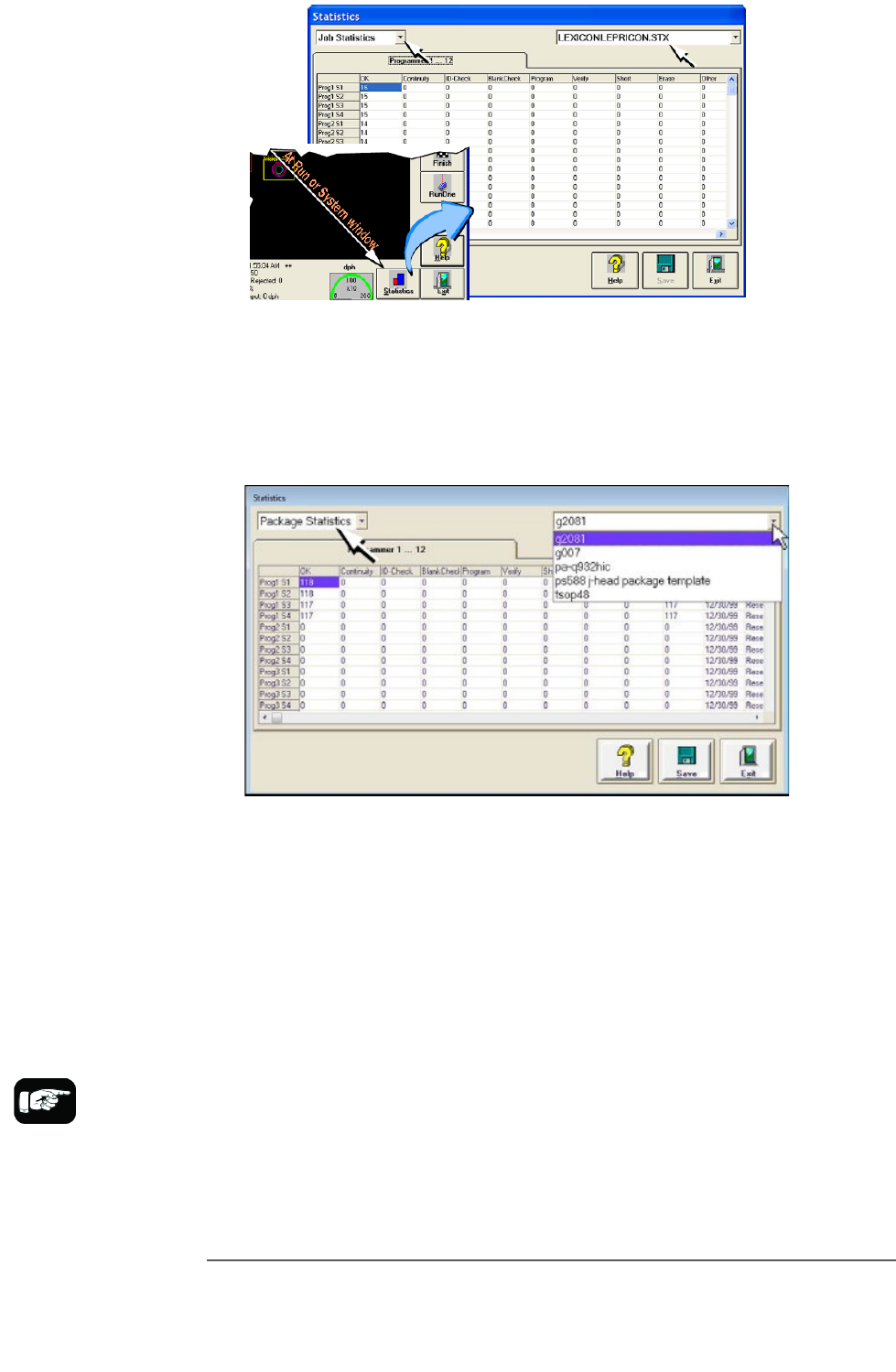
1. At either the Setup window or at the Run window, click Statistics.
2. Select either Package Type or Job Statistics from the drop-down
field in the upper left corner.
Administrative Functions ■ Administrator Functions
- 72 - Data I/O ■ 096-0465-001C
*For FlashCORE, only
HIC Socket Adapters and
HPS Socket Adapters are
designed to
accommodate
replacement of
individual sockets on the
adapter board.
For LumenX, Socket
Adapters only have one
socket.
Figure 39: At the Statistics window, the Job Statistic file can be
viewed (Jobname.stx) as shown. When Job Statistics is selected,
Pass/Fail criteria are logged for each individual socket and
programmer listed in the left column.
Figure 40: At the Package Statistics window, statistic can be
viewed by Package Type (PackageType.sts).
RESETTING PACKAGE STATISTICS
The Package statistics displayed correspond to the Package File and
therefore to the Socket Adapter used. When a Socket Adapter is replaced
on a programmer, statistics for that Socket Adapter must be reset.
To reset Package statistics:
1. In the Statistics window, select Package Statistics in the drop-down
field in the upper left corner. Refer to the image below.
1. Click Reset in the right-most column corresponding to the
programmer on which the Socket Adapter was replaced.
• For example, if a Socket Adapter was replaced, reset all rows for
that programmer.