SP08.pdf - 第17页
Filter Replacements General An indication that a filter is in need of replacement is when: • An odour is apparent - requiring an ozone filter change. • Loss of suction - indicating one of the three filters is blocked. NO…
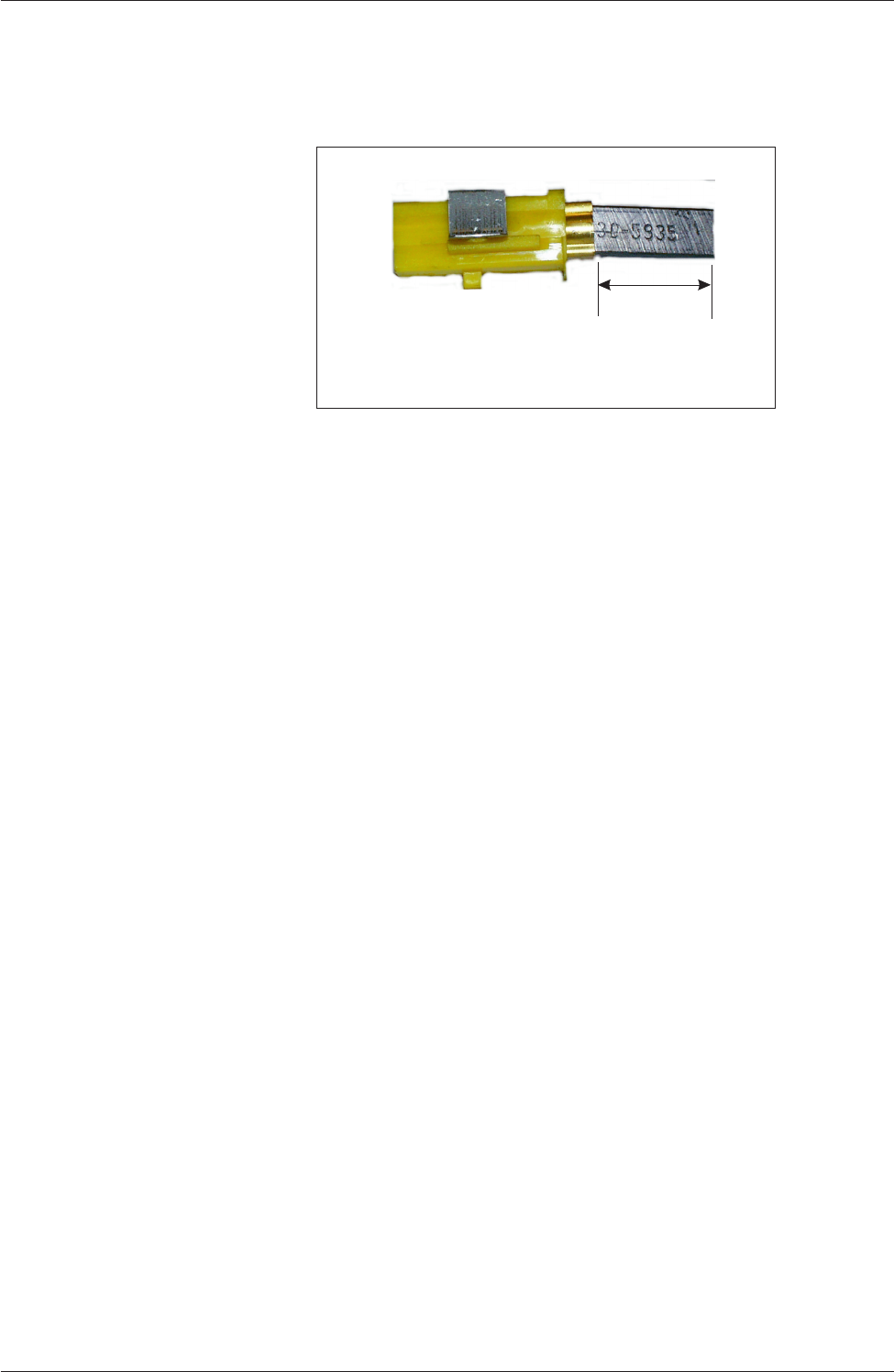
11. Check the length of the carbon head remaining, if less than 6mm the brushes
require replacement.
12. With the brushes out, inspect the motor commutator for signs of wear,
carbon deposit build up or short circuits. Clean as appropriate.
13. Refit the motor enclosure to the vacuum unit in the reverse order, ensure the
“Air Out” flexible hose is secure on the exhaust (positioned on the rear right
hand corner).
14. Reconnect the vacuum unit on the machine and copnnect mains power.
15.
Enter Diagnostics and select Screen Cleaner, to test operation of the unit.
NOTES:
1. When changing carbon brushes, BOTH brushes must be changed at the
same time, ie a pair of replacement brushes contain one Auto Stop and one
Standard brush.
2. It is also advisable to bed the new carbon brushes in by running the
motors at 50% speed for 10 minutes.
14 DEK Printing Machines Ltd Issue 3. Nov 00
DEK VACUUM AND FILTRATION UNIT SP08
INSPECTION AND REPLACEMENTS
Minimum Brush Length
6mm
Figure 7 Brush Length

Filter Replacements
General An indication that a filter is in need of replacement is when:
•
An odour is apparent - requiring an ozone filter change.
•
Loss of suction - indicating one of the three filters is blocked.
NOTES:
1. Dependant on the duty cycles and the type of solvents that are use in the under
screen cleaning process, it is advisable that the ozone filter is replaced after a
period of 6 months.
2. If only water-based solvents are used, then it is recommended that the ozone
filter be replaced annually, as a minimum.
WARNING
PROTECTIVE GLOVES AND FACEMASK SHOULD BE WORN AS
THE FILTERS MAY CONTAIN TOXIC DUST.
Fabric Pre-filter Located at the base of cabinet, Figure 1 refers.
Tools Required: 1x Pozidrive screwdriver
1. To gain access to the Fabric Pre-filter, see General Servicing and
Maintenance Information, Access.
2. Unplug the motor unit from control box and raise control box to the vertical.
3. Pull off the internal link hose on top of motor unit.
4. Lift off by-pass cooling assembly.
5. Lift off motor unit (via central pick-up point).
6. Lift off the fabric filter 3rd stage filter.
7. Lift off ozone filter (via the integral handles).
8. Pull out fabric pre-filter.
9. Reverse procedure to replace.
Ozone Filter Located central in cabinet, Figure 1 refers.
Tools Required: 1x Pozidrive screwdriver
1. To gain access to the Ozone filter, see General Servicing and Maintenance
Information, Access.
2. Unplug the motor unit from control box and raise control box to the vertical.
3. Pull off the internal link hose on top of motor unit.
4. Lift off by-pass cooling assembly.
5. Lift off motor unit (via central pick-up point).
6. Lift off the fabric filter 3rd stage filter.
7. Lift off ozone filter (via the integral handles).
8. Reverse procedure to replace.
Issue 3. Nov 00 DEK Printing Machines Ltd 15
DEK VACUUM AND FILTRATION UNIT SP08
INSPECTION AND REPLACEMENTS

3rd Stage Filter Located at top under motor unit, Figure 1 refers.
Tools Required: 1x Pozidrive screwdriver
1. To gain access to the 3rd Stage Filter, see General Servicing and
Maintenance Information, Access.
2. Unplug the motor unit from control box and raise control box to the vertical.
3. Pull off the internal link hose on top of motor unit.
4. Lift off by-pass cooling assembly.
5. Lift off motor unit (via central pick-up point).
6. Lift off the fabric filter 3rd stage filter.
7. Reverse procedure to replace.
High Efficiency
Particulate Filter
This filter should not normally need changing over the lifetime of the machine.
Located on the under side of the motor unit, Figure 1 refers.
Tools Required: 1x Pozidrive screwdriver
1x 10mm socket or wrench or 10mm nut spinner
1. To gain access to the HEPA Filter, see General Servicing and Maintenance
Information, Access.
2. Unplug the motor unit from control box and raise control box to the vertical.
3. Pull off the internal link hose on top of motor unit.
4. Lift off by-pass cooling assembly.
5. Lift off motor unit (via central pick-up point).
6. On clean work surface invert power unit to expose H.E.P.A. Filter.
7. Whilst holding onto H.E.P.A filter cartridge (with gloved hand) undo the
central securing nut (M6) and place to one side.
8. Lift off H.E.P.A. filter cartridge.
9. Dispose of cartridge in non-pervious sack and dispose off as per local Health
& Safety requirements/Environmental laws and regulations.
10. Replace with new H.E.P.A. filter cartridge and ensure that the rubber seal is
intact and seal with the aluminium adapter spinning.
11. Reverse procedure to replace.
Disposal of Filters
As a precaution used / spent filters should be placed in non-pervious red
sacks, clearly marked and disposed of in the manner recommended in your
locality for such substances.
16 DEK Printing Machines Ltd Issue 3. Nov 00
DEK VACUUM AND FILTRATION UNIT SP08
INSPECTION AND REPLACEMENTS