Application Backflush 1-0 to SAP Data Converter.pdf - 第39页
Application 2 Installation instructions for the Backflush 1.0 to SAP Data Converter application 04/2006 Edition 39 2.7.4 Graphical representation of the in teraction between the sof tware compo- nent s 2 2 2
2 Installation instructions for the Backflush 1.0 to SAP Data Converter application Application
04/2006 Edition
38
2.7.3.6 backflushPath
This XML tag can occur from 1 to 12 times. It is used to describe the storage locations of the XML
files (source files ), plus the storage locations of the files identified as "good“ (processed) and
those identified as "bad“ (faulty). The source files are stored in the relevant folders. 2
Line 2
Just one name for the line, e.g. "Line 1“. 2
The value is not used and only serves to make the XML file more readable. 2
backflush 2
The path to the board backflush XML files for the line concerned. This folder contains the XML
files that have not yet been processed. 2
Please note: Absolute path must be entered 2
Example: C:\StationBoardBackflush\Line1 2
processed 2
The path to be used to store a backflush file that is processed successfully. In this folder, subfold-
ers are created with a timestamp (format: YYYYMMDD) and the backflush files are then moved
to these subfolders. 2
Please note: Absolute path must be entered 2
Example: C:\StationBoardBackflush\Line1\processed 2
faulty 2
The path to be used to store a backflush file in the event of a fault. In this folder, subfolders are
created with a timestamp (format: YYYYMMDD) and the backflush files are then moved to these
subfolders. 2
Please note: Absolute path must be entered 2
Application 2 Installation instructions for the Backflush 1.0 to SAP Data Converter application
04/2006 Edition
39
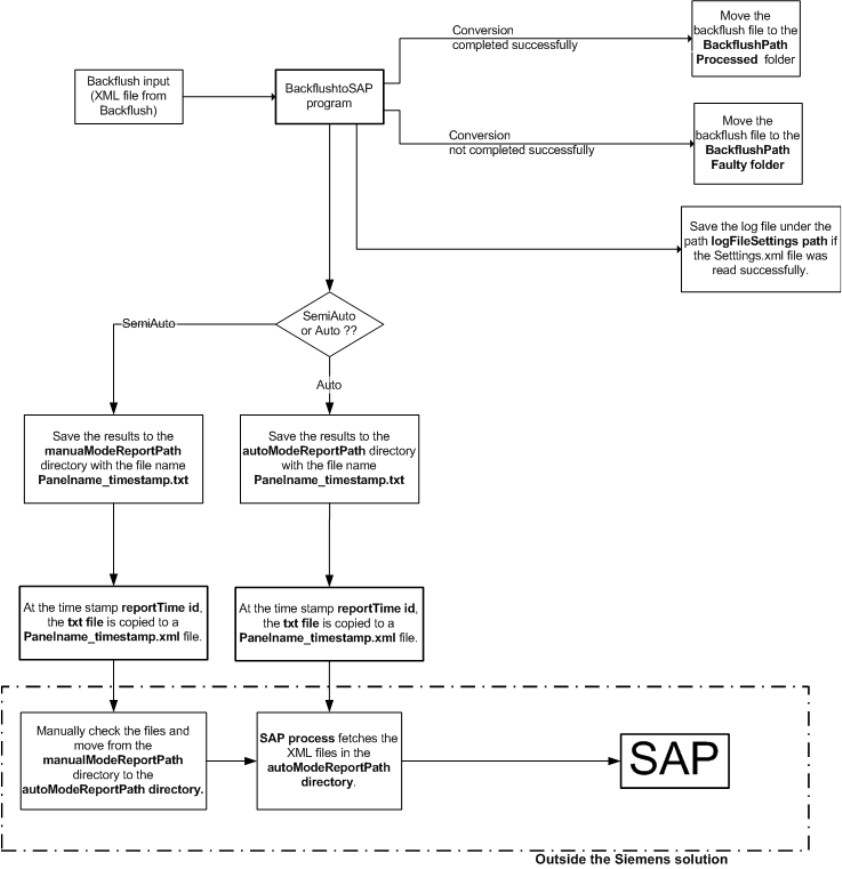
2.7.4 Graphical representation of the interaction between the software compo-
nents
2
2
2
2 Installation instructions for the Backflush 1.0 to SAP Data Converter application Application
04/2006 Edition
40
2.8 Installation
2.8.1 Preparation for initial installation:
To install the Backflush to SAP program, Java 2 Runtime Environment SE v1.4.2 must be installed
on the computer. This may already have been done when SIPLACE Explorer was installed. 2
If this is not the case, the setup program can be found in the \3rdParty Installer\Java directory.2
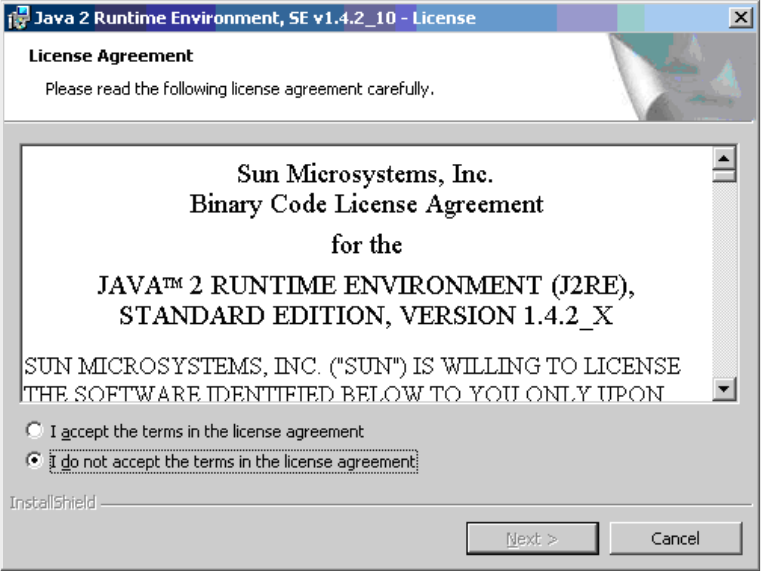
Step 1: 2
Run j2re-1_4_2_10-windows-i586-p.exe. 2
The license agreement appears after a short time. 2
2
2
Agree to the license agreement. 2
2
2
2
2