Application Backflush 1-0 to SAP Data Converter.pdf - 第7页
Application 1 Installationsanleitung Application Backflush 1.0 to SAP Data Converter Ausgabe 04/2006 7 1.7 Beschreibung Settings xml-file 1.7.1 Allgemein Nachfolgend wird die mögliche Konfiguration des Konverters mit Hil…
1 Installationsanleitung Application Backflush 1.0 to SAP Data Converter Application
Ausgabe 04/2006
6
1.5 Sprachen
Die Application erzeugt ausschließlich englischsprachige Status- und Fehlermeldungen in Form
von Logfiles. 1
1.6 Software-Komponenten
1.6.1 Übersicht
1
1
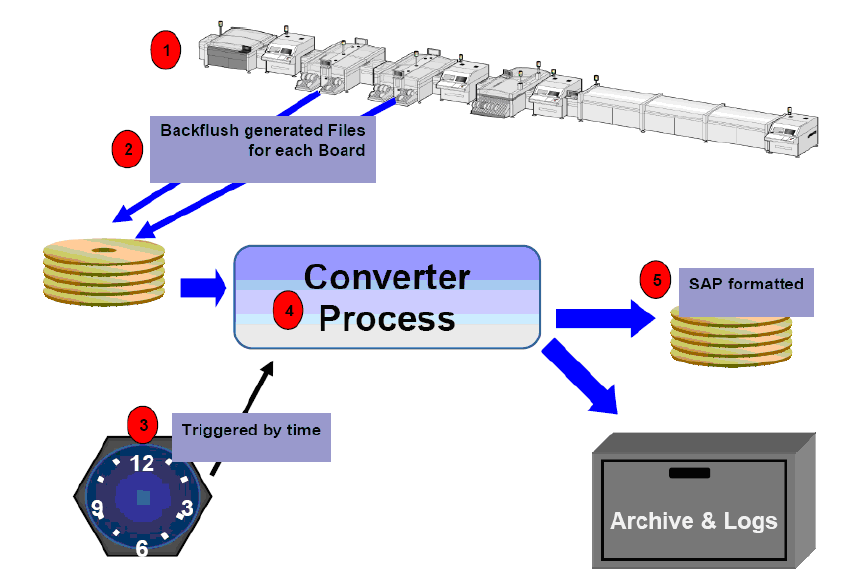
Die Application beschränkt sich auf die zeitgesteuerte (Nr. 3) Konvertierung der Backflush – XML
Files (Nr. 2) in ein SAP-Format XML – File ( Nr. 5). Nach der Abarbeitung der Files werden diese
Backflush-Files in einem Archiv abgelegt und Fehler in einem Logfile protokolliert. Dabei be-
schränkt sich die Verarbeitung ausschließlich auf einen gesamten Nutzen und die Zählung von
verbrauchten Bauteilen. 1
1

Application 1 Installationsanleitung Application Backflush 1.0 to SAP Data Converter
Ausgabe 04/2006
7
1.7 Beschreibung Settings xml-file
1.7.1 Allgemein
Nachfolgend wird die mögliche Konfiguration des Konverters mit Hilfe des Konfigurationsfiles
SETTINGS.XML beschrieben. Dieses File muß sich im gleichen Verzeichnis, wie das Backflush
Programm befinden. Dieser Pfad kann während der Installation einmalig definiert werden. 1
1.7.2 Beispiel-file
1
<?xml version="1.0" encoding="utf-8"?>
<!-- Note: All paths have to be written in absolute way.
That is: FALSE ..\MyFolder\
RIGHT C:\MyFolder\ -->
<backflushSumRecordSettings xmlns="backflushReportSettings" version="1.0">
<!-- backflushSettings: occurrences: exactly 1 time
pollSpan: scan backflush dirs all x seconds (maximum: every 60 seconds)
processDataCount: processes at most x files and then changes to next backflush dir (0:
process all files in dir)
processDelSpan: del processed backflush files that are older than x days (0: don't delete
processed data) -->
<backflushSettings pollSpan="10" processDataCount="200" processedDelSpan="14" />
<!-- reportSettings: occurrences: exactly 1 times
mode: "auto" or "Semiauto"
autoModeReportPath: path for the report files in automatic mode
SemiautoModeReportPath: path for the report files in Semiauto mode -->
<reportSettings mode="auto" autoModeReportPath="C:\Program Files\Siemens
SIPLACE\BackflushToSAP\out\auto" SemiautoModeReportPath=" C:\Program Files\Sie-
mens SIPLACE\BackflushToSAP\out\Semiauto">

1 Installationsanleitung Application Backflush 1.0 to SAP Data Converter Application
Ausgabe 04/2006
8
1
1
1
1
1
1
<reportTime id="Time 1" time="0:00" />
<reportTime id="Time 2" time="8:00" />
<reportTime id="Time 3" time="16:00" />
</reportSettings>
<!-- logFileSettings: occurrences: exactly 1 times
detail: "verbose" (show all messages), "medium" (show important messages) or "error"
(show only severe messages)
path: path for the log files
fileName: name of the log files (Note: a %g in a file name will be replaced by a
consecutive number) -->
<logFileSettings detail="medium" path=" C:\Program Files\Siemens SIPLACE\Back-
flushToSAP\out\log" fileName="BF_log_%g.log" />
<!-- backflushPath: occurrences: 1 to 12 times
line: just a name of that line
backflush: the path to the backflush files of this line
processed: the path where the successfully processed backflush files shall be moved
faulty: the path where the faulty processed backflush files shall be moved -->
<backflushPath line="Line 1" backflush="D:\BoardBackflushFiles\Line1" proces-
sed="D:\BoardBackflushFiles\Line1\processed" faulty="D:\BoardBackflushFi-
les\Line1\faulty" />
<backflushPath line="Line 2" backflush="\\LinePCName\BoardBackflushFiles\Line2"
processed="\\LinePCName\BoardBackflushFiles\Line2\processed" faulty="\\LinePC-
Name\BoardBackflushFiles\Line2\faulty" />
<backflushPath line="Line 3" backflush="X:\BoardBackflushFiles\Line3" proces-
sed="X:\BoardBackflushFiles\Line3\processed" faulty="X:\BoardBackflushFi-
les\Line3\faulty" />
</backflushSumRecordSettings>