00194103-01.pdf - 第183页
User Manual SIPLAC E F5 HM 7 Options Software Version SR.408.xx 03/ 2006 US Edition 7.2 Nozzle changer for the 6-segment Collect&Place head 183 7.2.4 Notes on operation Æ When you fi ll a magazi ne with a certain noz…

7 Options User Manual SIPLACE F5 HM
7.2 Nozzle changer for the 6-segment Collect&Place head Software Version SR.408.xx 03/2006 US Edition
182
There is a positioning fiducial for position detection on each magazine of the nozzle changer. The
magazine locations are identified by numbers 1 to 5 on the nozzle changer. The nozzle garages
in the magazines are numbered consecutively from 1 to 6 (see Fig. 7.2 - 2
).
PLEASE NOTE 7
Special magazines are available upon request (contact Siemens A&D for details) and will be
numbered differently. 7
Picking up a nozzle
– The Collect&Place head Z axis moves down.
– The locking plate (item 2 in Fig. 7.2 - 2
) opens and releases the nozzles.
– The nozzle is picked up by the sleeve of the Collect&Place head.
– The Z axis moves up.
Setting down a nozzle
– The locking plate (item 2 in Fig. 7.2 - 2) opens and releases the nozzles.
– The Collect&Place head Z axis moves down and sets the nozzle down.
– The locking plate closed.
– The Collect&Place head Z axis moves up.
Discarding defective nozzles
– The Collect&Place head Z axis moves down 14 mm towards the discarding device (items 4
and 5 in Fig. 7.2 - 1
) and thus moves the defective nozzle into the hole in the discarding device.
– The Z axis moves up again and the nozzle is stripped from the sleeve by spring wires.
– The nozzle drops into the used tape channel container (item 6 in Fig. 7.2 - 1
).
User Manual SIPLACE F5 HM 7 Options
Software Version SR.408.xx 03/2006 US Edition 7.2 Nozzle changer for the 6-segment Collect&Place head
183
7.2.4 Notes on operation
Æ When you fill a magazine with a certain nozzle type for the first time, attach an adhesive label
to identify the type.
PLEASE NOTE 7
Fill the magazines off the machine and always replace complete magazines. 7
Æ Open the locking plate and place the nozzles in the nozzle garages.
Æ Close the locking plate so that the nozzles cannot drop out of the magazines.
CAUTION 7
Before you fill magazine, make sure that all the nozzles on the Collect&Place head have
been returned to their magazines. 7
Æ Programming the nozzle changer is described in the SIPLACE Pro user manual.
PLEASE NOTE 7
Æ Do not allow components to drop onto the magazines. If they do, they could jam the locking
plate.
Æ Do not allow components to drop onto free feeder module locations. They will stick to the
magnetic bar. Production may have to be interrupted if the feeder modules are not placed on
the component table correctly. You should therefore regularly clean the magazines and free
locations.
7 Options User Manual SIPLACE F5 HM
7.2 Nozzle changer for the 6-segment Collect&Place head Software Version SR.408.xx 03/2006 US Edition
184
7.2.5 Emptying the reject bin
The capacity of the reject bin is approx. 50 nozzles for nozzle family 9xx and approx. 5 nozzles
for nozzle family 8.xx. To avoid interruption of the placement sequence, you should regularly
empty the reject bin.
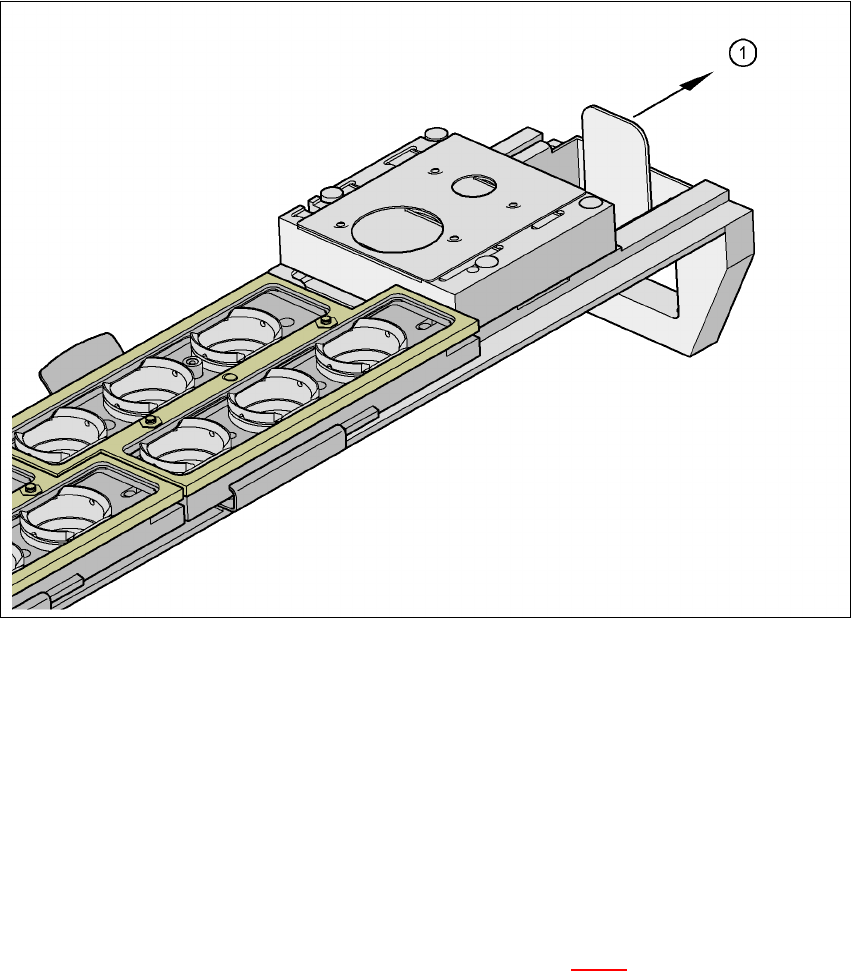
Fig. 7.2 - 3 Emptying the reject bin
(1) Remove the reject bin
Æ Pull the reject bin out of its retainer in the direction indicated by the arrow, and lift the bin out
of its holder.
Æ To return the reject bin, push it back into the retainer.
7.2.6 Changing the magazine
Æ To remove the magazine, push the spring hook (item 1 in Fig 7.2 - 4) to the side and lift the
magazine out of the carrier.