00194103-01.pdf - 第188页
7 Options User Manual SIP LACE F5 HM 7.4 PCB barcode Software Version SR.408.xx 03/2006 US Edition 188 7.4 PCB barcode 7.4.1 Overvie w The PCB barcode scanner is used to automa tically r ecord an d decode barcodes o n PC…

User Manual SIPLACE F5 HM 7 Options
Software Version SR.408.xx 03/2006 US Edition 7.3 Component barcode
187
Components
Data can be read from the component reels to compare the stock of components against the
quantity specified in the set-up file (refill check), for example.
An audible signal is given when each dataset has been read successfully.
PLEASE NOTE 7
The component barcode scanner option must be configured on the SIPLACE Pro computer.
Barcodes that start with the number 1 or 2 and are less than 5 digits long are interpreted as track
barcodes. All other barcodes (that do not start with number 1 or 2 and are more than 5 characters
long) are interpreted as component barcodes. 7
7.3.2 Technical data
7
Connection Station computer
Data entry via barcode scanner or keyboard
Number of characters up to 40
Not permissible Barcodes starting with a 1 or 2 and less than 5
characters long
Number of barcodes up to 6 per component
Filter for suppressing data up to 1 per barcode
Preset code types Code 39 (standard or ASCII)
Code 2 of 5, interleaved and normal,
Code 128, UPC/EAN/JAN codes
(others available upon request)
7 Options User Manual SIPLACE F5 HM
7.4 PCB barcode Software Version SR.408.xx 03/2006 US Edition
188
7.4 PCB barcode
7.4.1 Overview
The PCB barcode scanner is used to automatically record and decode barcodes on PCBs. The
PCB barcode scanner sends the read data via its serial interface to the machine controller for fur-
ther processing.
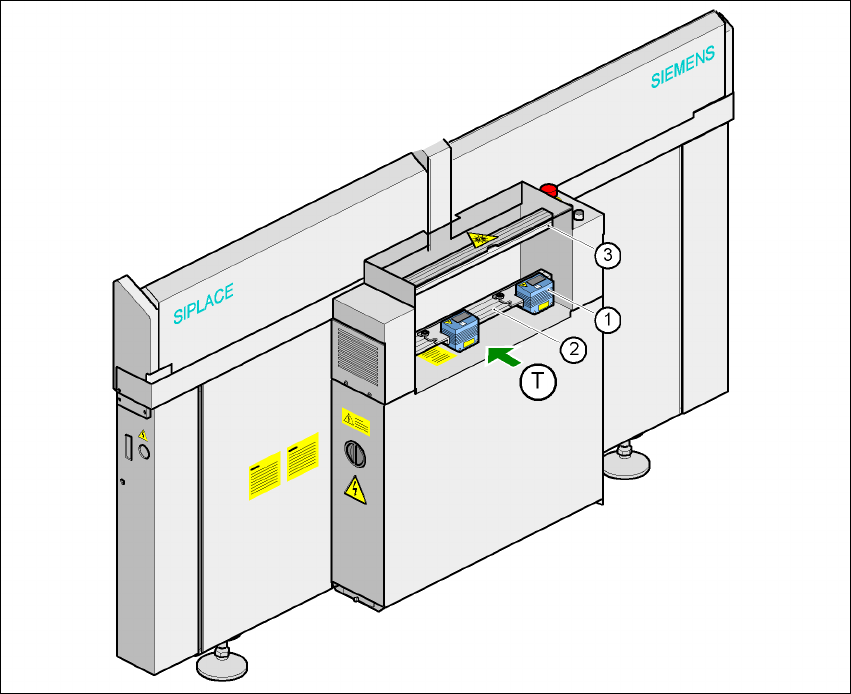
The PCB barcode scanners are installed on the input side of the placement machine, above and
below the PCB conveyor, so that barcode labels on the topside and underside of the PCBs can
be read.
One or two PCB barcode scanners may be retrofitted in order to read the topside and underside
of the PCB on the transport track.
7
Fig. 7.4 - 1 Position of the modules on the input side of the placement machine
(1) Barcode scanning head
(2) Profiled rail for ‘underside’ PCB barcode scanner
(3) Profiled rail for ‘topside’ PCB barcode scanner

User Manual SIPLACE F5 HM 7 Options
Software Version SR.408.xx 03/2006 US Edition 7.4 PCB barcode
189
The PCB barcode scanners are fixed to the top and bottom profiled rail using retainers. These
can be positioned as required on the profiled rails, and aligned with respect to the barcode
labels. Depending on the position of the barcode strips, the barcode scanner can be attached in
a few simple steps so that the strips can be read parallel to or across the PCB transport direction.
7.4.2 Warning label W216 on the cover of the PCB input side
7
Warning label W216 "Laser class 2" on the cover of the PCB input side,
item no. 03010316-01 (number per placement machine: 1)
PLEASE NOTE 7
When you install a PCB barcode scanner on the placement machine, you must attach laser
warning label W206 contained in the retrofit kit to the cover on the PCB input side.
7.4.3 Description of the functions
7.4.3.1 PCB barcode scanner for the single conveyor
The SIPLACE PCB barcode scanner supports the flexible manufacture of SMD products, and
increases placement reliability. It recognizes all the code types conventionally used in industrial
applications.
The laser scanner reads the barcode label on the topside or underside of each incoming PCB as
they are transported onto the input conveyor. The SIPLACE Pro computer uses the barcode
information to automatically select the right placement program from the previously created bar-
code assignment list (BA list), and sends it to the station. If a barcode filter is defined, only infor-
mation that is identified as relevant within the barcode is compared. This procedure is carried out
time neutrally during placement of the PCB already in the machine. If several PCBs with the
same barcode enter in succession, the program is only transferred the first time. The following
requirements apply to all products to be produced using the PCB barcode:
– The component set-up must be identical on all the machines on the line
– All PCBs must be of the same width
7
7
7
7
7
7
LASER RADIATION!
Do not look into beam
Laser class 2