00194103-01.pdf - 第191页
User Manual SIPLAC E F5 HM 7 Options Software Version SR.408.xx 03/2006 US Edition 7.4 PCB barcode 191 7.4.5 Assembly options for the PCB barc ode scanner 7 Fig. 7.4 - 2 Assembly options for the PCB barcode scanner Front…

7 Options User Manual SIPLACE F5 HM
7.4 PCB barcode Software Version SR.408.xx 03/2006 US Edition
190
7.4.3.2 PCB barcode scanner for the dual conveyor
On the dual conveyor, the PCB barcode is only used to transfer the barcode via the GEM inter-
face. This is absolutely essential. The placement program cannot be supplied automatically.
7.4.4 Technical data
7
7
* This value can only be achieved if the barcode label on the PCB passes through the scanner
perpendicular to the machine’s transport direction.
**The position of the barcode scanner on the input conveyor can be easily adjusted, depending
on where the barcode labels are located on the PCBs.
Max. component sizes for the single
conveyor
Standard: (L x W) up to 460 x 460 mm²
Option: (L x W) up to 508 x 460 mm²
(same width for all the jobs in a sequence)
Label dimensions Stroke width B: 0.19 < W ≤ 0.3 mm
(corresponds to high and medium density)
Stroke length: ≥ 4 mm*
Length of the barcode template window: ≤ 90 mm
Label alignment on the PCB ** Parallel or perpendicular with respect to the PCB
transport direction,
as close as possible to the stationary PCB transport
side.
Label colors (contrast ratio > 70% to DIN
66236)
Coding: black, dark green, dark blue
Background: white, beige, yellow, orange
Code types Code 39, Code 128 / EAN 128,
Codabar, 2/5 IATA 2/5 industrial,
2/5 interleaved, UPC, EAN,
Pharma Code, EAN Addendum
(others available upon request)
Complete barcode Up to 25 digits (a barcode filter can also be defined)
Laser scanner safety Laser diode 670 nm (red) / 1 mW
Laser protection class 2, type of protection IP65
Scanning / analysis duration Time neutral (T ≤ 1 s), since it is carried out in parallel
to placement of the previous PCB
User Manual SIPLACE F5 HM 7 Options
Software Version SR.408.xx 03/2006 US Edition 7.4 PCB barcode
191
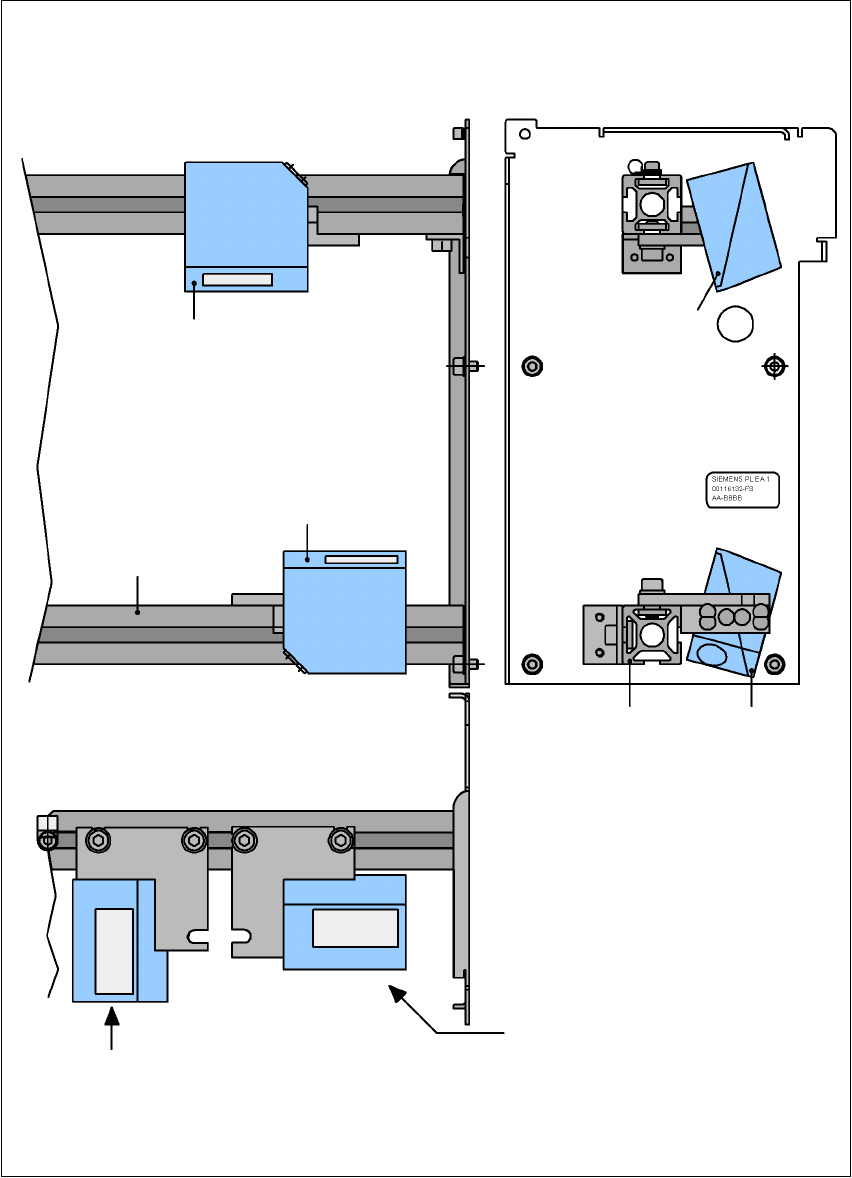
7.4.5 Assembly options for the PCB barcode scanner
7
Fig. 7.4 - 2 Assembly options for the PCB barcode scanner
Front view Side view
Assembly for
PCB barcode on
the PCB topside
Assembly for
PCB barcode on
the PCB underside
Plan view
Position of the PCB barcode scan-
ner if the barcode strip
is aligned parallel to
the PCB transport direction.
Position of the PCB barcode scan-
ner if the barcode strip
is aligned perpendicular to
the PCB transport direction.
Profiled rail
PCB barcode
scanner ‘topside’
PCB barcode
scanner ‘under-
Profiled rail

7 Options User Manual SIPLACE F5 HM
7.5 Ceramic substrate centering Software Version SR.408.xx 03/2006 US Edition
192
7.5 Ceramic substrate centering
7.5.1 General
The ceramic substrate can be centered either mechanically or optically.
The position of the fiducials on the ceramic substrates can be detected either with
– the sub-gantry PCB camera with normal lighting that is fitted as standard, or
– using the multi-color PCB camera (option).
7.5.2 Mechanical centering
7.5.2.1 General
Mechanical substrate centering is used to lock ceramic substrates firmly in position in the X and
Y directions in such a way that the material is not damaged. Ceramic substrates can also be
placed right up to the edge.
7.5.2.2 Assembling and dismantling the ceramic substrate centering unit
PLEASE NOTE 7
The ceramic substrate centering unit must only be assembled and dismantled by service engi-
neers. 7