00194103-01.pdf - 第215页
User Manual SIPLAC E F5 HM 7 Options Software Vers ion SR.408.xx 03/2006 U S Edition 7.12 SIPLACE productivity lift 215 7.12 SIPLACE prod uctivity lif t 7.12.1 Concept of p arall el placement Placeme nt lines are general…
7 Options User Manual SIPLACE F5 HM
7.11 Fine calibration Software Version SR.408.xx 03/2006 US Edition
214
– Magazine for 48 glass components
– Magazine for 196 ceramic components
7.11.4 Description of the functions
First select the placement program for fine calibration. To do this, select the item ‘Cluster for fine
calibration’ via the ‘Options’ pull-down menu. Then process the mapping plate with the glass
components from a magazine on the waffle-pack tray holder.
After placement, start the SITEST program and start the ‘Fine calibration’ measuring program.
The placement head (Collect&Place head or Pick&Place head) will measure the current place-
ment positions of the glass and/or ceramic components and compare these positions with the cir-
cular fiducials on the mapping plate.
The offset values in the X and Y direction and the angular deviation are determined with the help
of the 48 glass components.
The reliability of the measurement results for the offset values is increased by using the 196 ce-
ramic components. Angular correction is not possible with ceramic components.
The offset values are used to calculate the corrected values, which are then entered in the
machine file.
User Manual SIPLACE F5 HM 7 Options
Software Version SR.408.xx 03/2006 US Edition 7.12 SIPLACE productivity lift
215
7.12 SIPLACE productivity lift
7.12.1 Concept of parallel placement
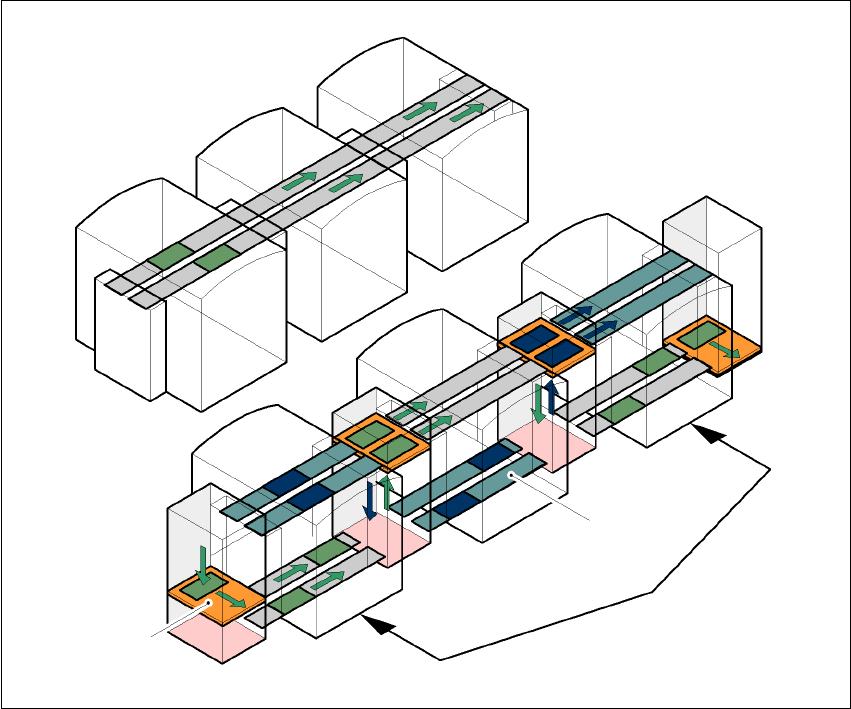
Placement lines are generally arranged in series and are linked to one another serially. The place-
ment program is processed sequentially while the PCBs are transported from one machine to the
next. This means that the placement of a PCB is distributed between various machines.
7
Fig. 7.12 - 1 A comparison of serial and parallel lines
When machines are connected in parallel, the components to be placed by individual machines
are combined. Several machines work through the same placement program. They place all the
components on one machine that would be distributed between several machines with serial pro-
cessing. When one machine runs out of capacity, the PCBs are moved to and placed at the next
machine with the same placement program. This combination of machines with the same compo-
nents to be placed is known as a group or “cluster”.
Serial line
Parallel line
Underfloor conveyor
Group (cluster)
Horizontal/
vertical lift
7 Options User Manual SIPLACE F5 HM
7.12 SIPLACE productivity lift Software Version SR.408.xx 03/2006 US Edition
216
7.12.2 Implementing parallel placement
Lines with machines arranged in parallel take up a lot more space, so the parallel placement con-
cept was implemented with an underfloor conveyor and horizontal / vertical lift (HV shuttle). The
machines are still arranged in series, but the lift units and underfloor conveyors allow the line to
be operated in parallel. In this way, SIPLACE lines remain almost as compact as before.
Underfloor conveyor
Two conveyor belts carry empty or placed PCBs underneath the machines (see Fig. 7.12 - 1).
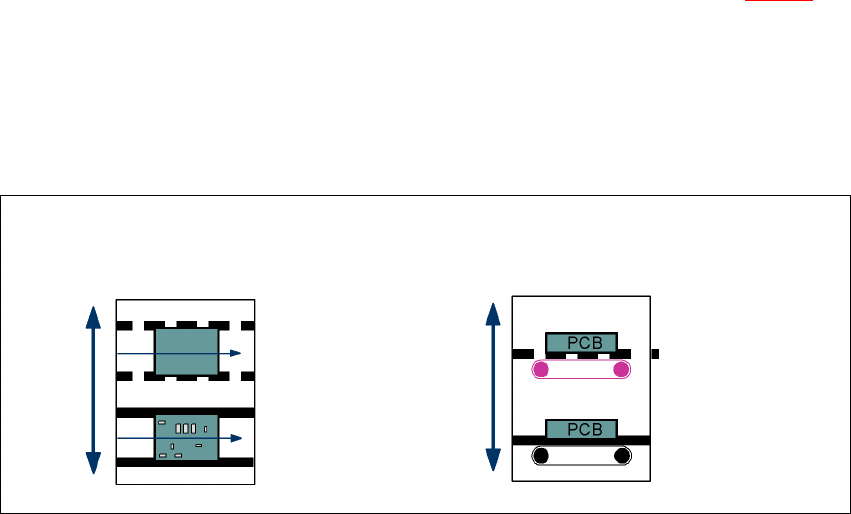
Horizontal/vertical lift (horizontal/vertical shuttle)
There is an HV shuttle at the start of a line, between the machines and at the end of the line. It
carries the PCBs between the underfloor and processing levels, and between the two tracks on
the underfloor conveyors.
7
Fig. 7.12 - 2 Horizontal / vertical shuttle (HV shuttle), conveyor track change and lift function
Horizontal conveyor
HV shuttle
Lift function
Vertical conveyor
Unplaced
Placed
Standard
conveyor level
Underfloor
conveyor level
HV shuttle
Conveyor track change