00194103-01.pdf - 第82页
3 Technical data User Manual S IPLACE F5 H M 3.7 Controls S oftware Version SR.408.xx 03/2006 US Edition 82 3.7.2 Descript ion All the c ontrols can be reac hed b y a 1.60 m tall person. 3 Main power switch 3 The main po…
User Manual SIPLACE F5 HM 3 Technical data
Software Version SR.408.xx 03/2006 US Edition 3.7 Controls
81
3.7 Controls
3.7.1 Position of the controls
3
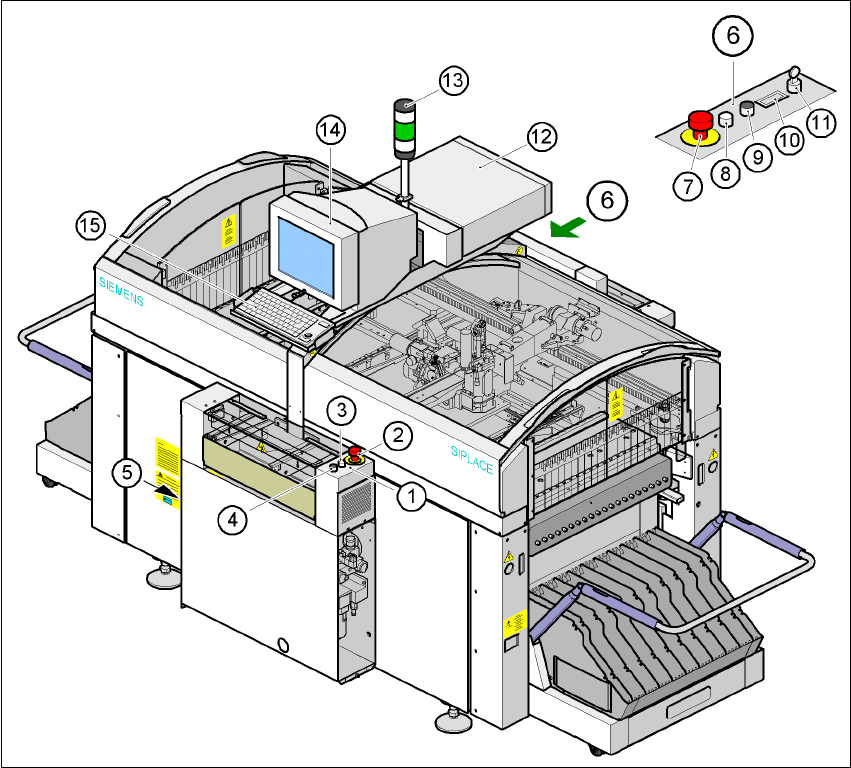
Fig. 3.7 - 1 Overview of the modules - controls
(1) Operator panel, input side (2) EMERGENCY STOP button
(3) Start button (white) (4) Stop button (black)
(5) Main power switch (6) Operator panel, output conveyor
(7) EMERGENCY-STOP button (8) Start button (white)
(9) Stop button (black) (10) Component counter
(11) Key switch (12) Computer
(13) Indicator lamp (14) Touchscreen monitor
(15) Keyboard with trackball

3 Technical data User Manual SIPLACE F5 HM
3.7 Controls Software Version SR.408.xx 03/2006 US Edition
82
3.7.2 Description
All the controls can be reached by a 1.60 m tall person. 3
Main power switch 3
The main power switch is used to switch the power supply to the placement system on and off. 3
RISK OF DEATH
Some parts inside the placement system carry potentially lethal voltages - even when switched
off at the main switch. 3
Key switch 3
In normal mode, the key switch is set to "0". The key should be removed and kept in a safe place.
It must only be turned to position "I" (set-up mode) by authorized personnel, and then only for
certain maintenance and servicing work. 3
Stop button 3
This button is used to stop the placement system. 3
Start button 3
This button starts the placement system after it has been switched on or after faults have been
eliminated. 3
EMERGENCY-STOP button 3
The EMERGENCY STOP button latches in the ON position when pressed. The power supply to
the gantry axes, the star axes, CO tables, conveyor belts and the used tape cutters is interrupted.
Turn the button to release it. 3
Component counter 3
The component counter displays the number of components processed. 3
Station computer, monitor and keyboard 3
The station computer, monitor and keyboard are mounted on a pivoting console on the place-
ment system’s central crossbeam. The station computer is a desktop model with a Pentium pro-
cessor. The operating system is WINDOWS XP. The SIPLACE graphical user interface, which is
based on the Windows standard, is used to operate and monitor the placement system. A color

User Manual SIPLACE F5 HM 3 Technical data
Software Version SR.408.xx 03/2006 US Edition 3.7 Controls
83
touch screen monitor with a resolution of 1024 x 768 pixels provides the screen display. The ul-
tra-flat IBM-compatible PC keyboard incorporates a trackball for controlling the mouse. 3
Indicator lamp 3
The sequence of colors is white - green - white. These lamps are used to signal operating sta-
tuses and malfunctions of the placement system. 3
Component barcode scanner (option) 3
There is a compartment for the Datalogic DL 910 component barcode scanner between the mon-
itor and keyboard. The barcode scanner enables the components to be set up and topped up
quickly and reliably. 3
3.7.3 Ergonomic arrangement of the controls
Figure 3.7 - 1 on page 81 provides an overview of the position of the controls. They are subdivided
into the following groups: 3
Operating panel on the PCB input side with 3
– Start button
– Stop button
– EMERGENCY STOP button
– Main switch (on the left-hand side)
Operating panel on the PCB output side with 3
– EMERGENCY STOP button
– Start button
– Stop button
– Component counter
–Key switch
Console on the central crossbeam with 3
– Station computer
– Touchscreen
– Keyboard and
– Component barcode scanner (option)