mechanical reference xp141-1.2e - 第4页
About This Manual This manual contains important machine maintenance information for the operator. The manual content is intended for specialized technicians who are familiar with Surface Mount Technology (SMT). Please r…

Notice
1. All rights regarding this manual are reserved by Fuji Machine Manufacturing Co., Ltd. This
manual may not, in whole or in part, be reproduced by any means (electronic, mechanical or
otherwise), or reused in any way, without the prior written permission of Fuji Machine
Manufacturing Co., Ltd.
2. Fuji Machine Manufacturing Co., Ltd. accepts no responsibility for any situations that may
arise as a result of the use of this manual.
3. Fuji Machine Manufacturing Co., Ltd. reserves the right to change the content of this manual
without notice.
4. Every effort has been made to ensure that this manual is correct in every detail. However,
please contact Fuji in the unlikely event that errors or omissions are detected.
5. Windows NT is a trademark of Microsoft Corporation, USA.
6. UNLHA(32).DLL is a freeware product created by Micco.
Copyright 2001 by Fuji Machine Manufacturing Co., Ltd. All Rights Reserved.
is a trademark of Fuji Machine Manufacturing Co., Ltd., and registered in the
following countries: Austria, Belgium, Denmark, Finland, France, Germany, Greece, Indonesia,
Ireland, Italy, Japan, Korea, Luxembourg, the Netherlands, Portugal, Spain, Sweden, the U.K., and the
U.S.A.
Fuji Machine Manufacturing Co., Ltd. serves its customers from the following locations:
Fuji Machine Manufacturing Co., Ltd.
19 Chausuyama Yamamachi, Chiryu, Aichi, 472-8686 Japan
Tel: (0566) 81 - 2111 Fax: (0566) 83 - 1140
Fuji America Corporation
171 Corporate Woods Parkway, Vernon Hills, IL. 60061 USA
Tel: (847) 913-0162 Fax: (847) 913-0186
Fuji Machine Mfg (Europe) GmbH
Peter-Sander-Str. 43, D-55252 Mainz-Kastel Germany
Tel: 06134-202120 Fax: 06134-202200
Fuji do Brasil Maquinas Industriais Ltda.
Rua Joao Cachoeira,
128 Itaim Bibi, Sao Paulo, SP 04535-000 Brazil
Tel: 11-3064-7650 Fax: 11-852-6833
Fuji Machine Philippines, Inc.
Warehouse 888 Don Mariano Lim
Industrial Complex (La Fuerza Compound) Alabang, Zapote Rd.,
Almanza Uno Las Pinas City, Philippines
Tel: (02) 809-4565 Fax: (02) 807-2767
Fuji Machine Mfg (Singapore) Pte Ltd.
Blk 2/51, Ubi Avenue 1, #01-24, Paya Ubi Industrial Park,
Singapore 408933
Tel: 65-7464966 Fax: 65-8412326
Fuji Malaysia Office
C/O Mecomb Malaysia Sdn Bhd
2487, Jalan Sultan Azlan Shah, 11700 Penang, Malaysia
Tel: (04) 656-4002 Fax: (04) 656-2941
Fuji Taiwan Office
C/O Ascentex Industry Corp.
3 Fl, No. 396, Sec. 1, Nei Hu Rd., Taipei, Taiwan R.O.C.
Tel: (02) 8797-8716 Fax: (02) 8797-8717
R

About This Manual
This manual contains important machine maintenance information for the operator.
The manual content is intended for specialized technicians who are familiar with Surface
Mount Technology (SMT).
Please read this manual carefully in order to ensure safe and efficient machine
maintenance.
Manual Structure
This manual consists of the following five parts.
Safety Guidelines
Part 1 The Machine
Part 2 Basic Operation
Part 3 Maintenance
Part 4 Setup
About This Manual
Edition 1.2 i XP-141E Mechanical
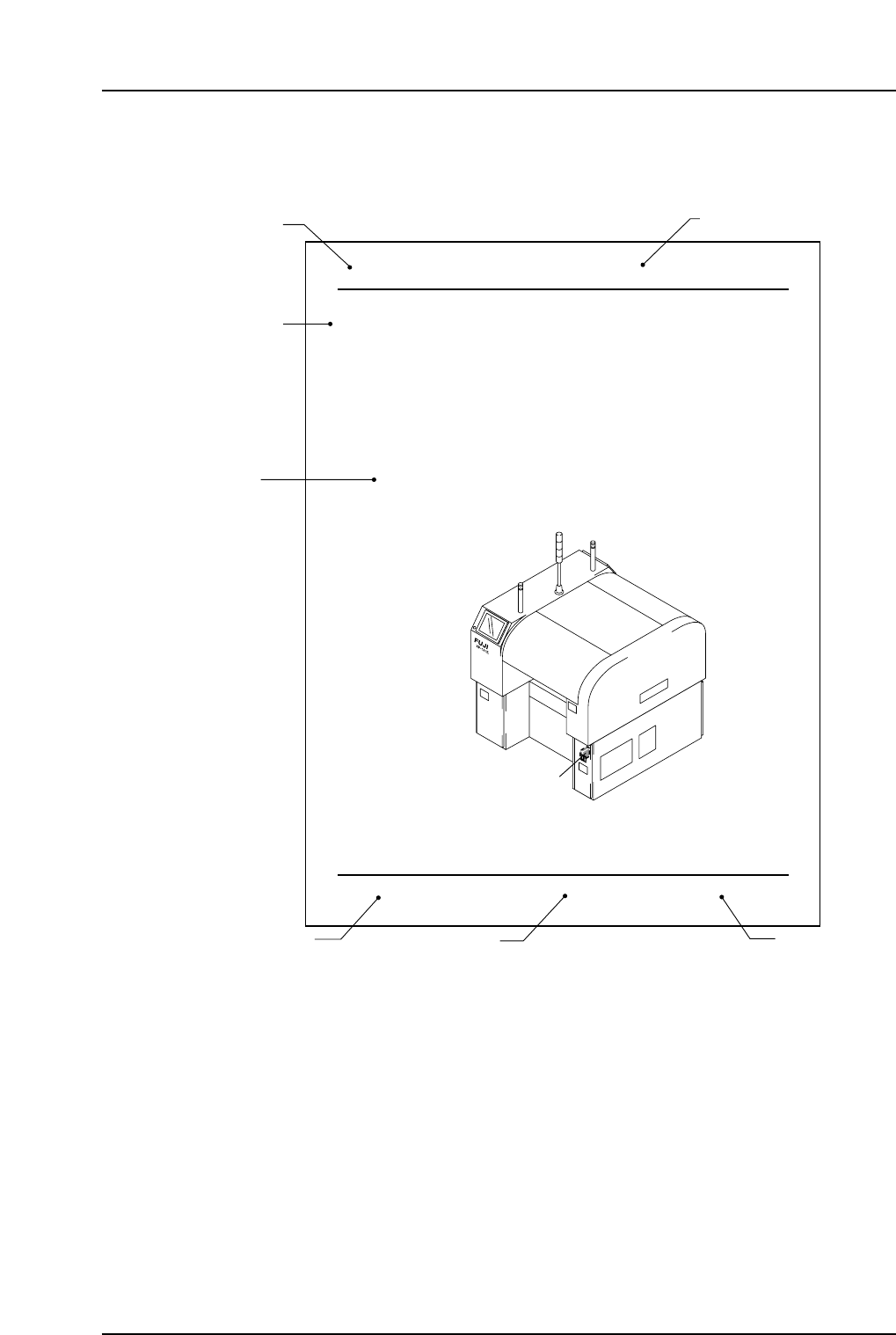
Page Layout
Each page indicates the part number, chapter title, section title , manual name, page
number, and the edition number of the manual.
Part number
The part number to which each chapter belongs is shown on the header on each page.
Chapter number and title
The title of each chapter is shown in the header on each page. Each part may contain one
or more chapters.
Section title
Each chapter may be divided into several sections. The section number is composed of
the number of the chapter to which the section belongs, followed by a sequential number
for each section.
4. Connecting the Data Transmission Cable
(RS-232C)
Point
The machine is connected to the host computer by means of an RS-232C communication
cable which permits program transmissions and production log collection.
Procedure
1. Register the XP-141E in the line descriptor file at the host.
Note: Refer to the host computer manual for details regarding the registration procedure.
2. Connect one end of the transmission cable to the designated port at the host, and
connect the other end to the connector on the machine.
Note: Shielded cables are recommended if cable types other than Ethernet are used.
XP1MS006
Data cable port
Part 4 Chapter 4 Connecting the Data Transmission Cable (RS-232C)
Edition 1.0 4-4-1 XP-141E Mechanical
Manual name
XP1MF001
Body
Edition number
Page number
Section title
Chapter number and title
Part number
About This Manual
Edition 1.2 ii XP-141E Mechanical