00191369-02.pdf - 第127页
User Manual HS-50 3 Introduction and Basic Concepts Software Vers ion SR.501.xx 12/99 Issue US 3.3 User Interface - V iews and Menus 127 t I I t Load table program 3 This menu item a llows y ou to rel oad the table progr…

3 Introduction and Basic Concepts User Manual HS-50
3.3 User Interface - Views and Menus Software Version SR.501.xx 12/99 Issue US
126
t IIt
3
Å Select the tab corresponding to the required machine component and activate/deactivate the
test commands by clicking the corresponding checkboxes.
Å Click Accept to set the software options.
NOTE
When the station is rebooted, the software options are reset to their original settings. 3
Cycle mode ... Alt+t 3
You use this menu item to switch the station to cycle mode (e.g. to localize errors). 3
Å Click the menu item Cycle mode... or press the key combination ALT+t. The "Cycle mode"
settings box is opened.
Å Click the On radio button to activate cycle mode or the Off radio button to deactivate it.
Å Click the OK button. Cycle mode is now either activated or deactivated.
NOTE
In cycle mode, you must press the Start button on the machine for every operating step. 3
User Manual HS-50 3 Introduction and Basic Concepts
Software Version SR.501.xx 12/99 Issue US 3.3 User Interface - Views and Menus
127
t IIt
Load table program 3
This menu item allows you to reload the table program into the memory of the table program con-
troller. You may need to do this, for example, if a machine error has resulted in the loss of the table
program. 3
NOTE
This function cannot be executed in "Operator" access mode. 3
Å Click the menu item "Load table program".
The program is loaded. (The loading process can take some time).
Video image PA1 > Alt+8 3
In the case of certain actions, it may be necessary to display the camera image of the MVS system
on-screen (vision evaluation unit) during assembly. 3
Å Click the menu item Video image> or press the key combination ALT+8.
The display area is switched to the MVS system camera image in processing area 1.
Å Press then ESC key to restore the display area to the normal view.
Video image PA2 > Alt+9 3
Switch to the MVS system camera image in processing area 2. 3
3
3 Introduction and Basic Concepts User Manual HS-50
3.3 User Interface - Views and Menus Software Version SR.501.xx 12/99 Issue US
128
t IIt
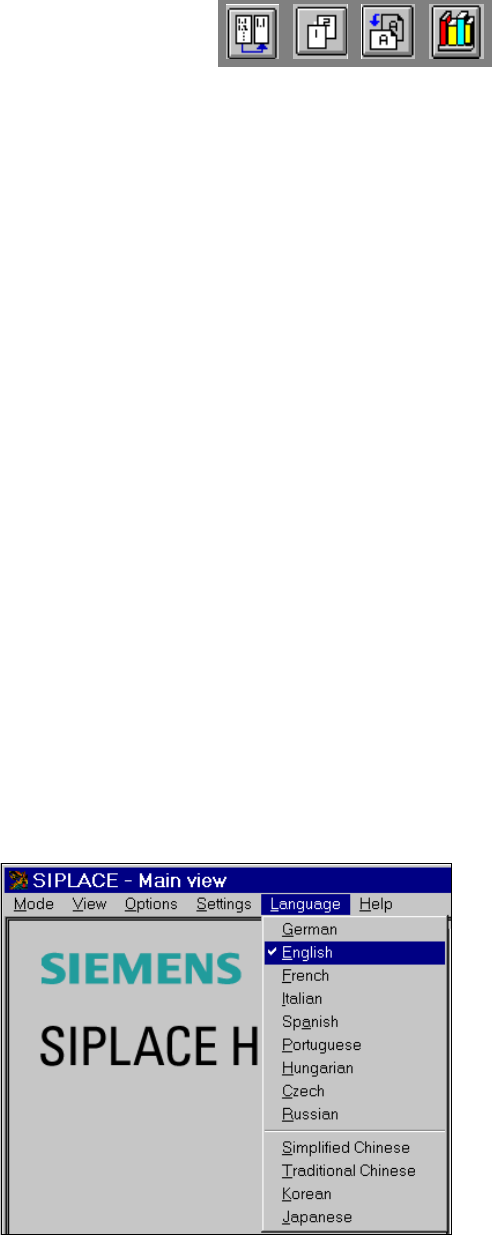
3.3.2.4 "Language" Menu
You can use the "Language" menu to select between the language versions which are integrated
in the SC software.
You can chose between the languages 3
– German
–English
–French
–Italian
–Spanish
– Portuguese
– Hungarian
– Czech
– Russian
– Simplified Chinese
– Traditional Chinese
– Korean and
– Japanese.
3
Å Click the menu item corresponding to the required language.
The user interface texts are displayed in the selected language.