00191369-02.pdf - 第291页
User Manual HS-50 6 Vision functions Software Version S R.501.xx 12/99 Issue US 6.6 Test Comp onent 291 t I I t 6.6.4.16 ‘Size ’ measuring mode Click o n the ‘ Settin g’ fiel d for the ‘Siz e’ mea suring mode to over lay…
6 Vision functions User Manual HS-50
6.6 Test Component Software Version SR.501.xx 12/99 Issue US
290
t IIt
The following combinations of measurement methods are used: 6
– Size — corner — lead (see table in Section 6.6.4.15
) or
– Row — corner — lead (see table in Section 6.6.4.15
)
– Grid (component inspection with the 80F
4
or 80F
5
machines)
The measurement results will provide information on the approximate coordinates and approx-
imate rotation of the component. In addition, you will be informed of the quality of measure-
ment.
– The measurement results will provide precise information on the approximate coordinates and
approximate rotation of the component. In addition, you will be informed of the maximum ball
offset and the quality of measurement.
6.6.4.15 Recommendations regarding the Optimum Sequence of Measurement Methods
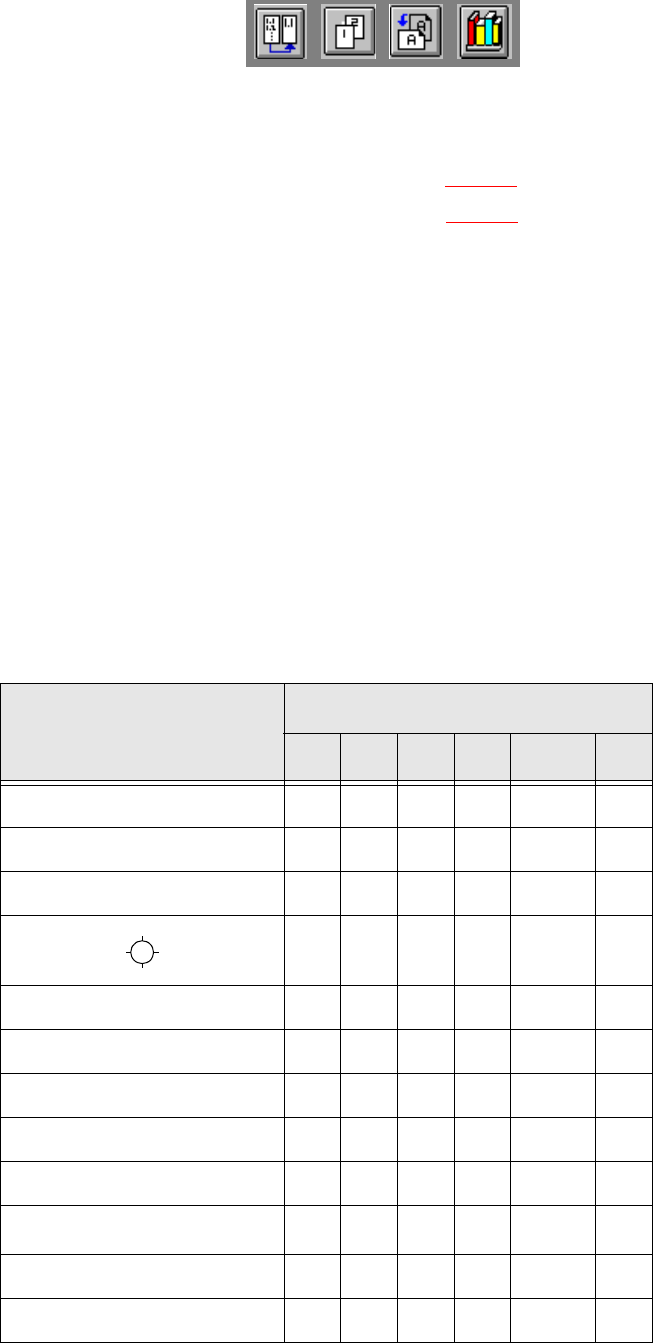
The following table contains our recommendations for the optimum sequence of measurement
methods for particular components. The following abbreviations are used: 6
B = ball C = corner G = grid
L = lead R = row S = size
*)
L applies to irregularly shaped components with separate windows 6
Component
Measurement sequence
S R G C L B
MELF S L
CHIP S L
SOT S C L
SL
SOJC6 S C
SOJC14 R C
LCC R C L
PLCC R C L
QFP R C L
TAB R C L
*)
BGA, flip-chip S G B
Bare dies S
User Manual HS-50 6 Vision functions
Software Version SR.501.xx 12/99 Issue US 6.6 Test Component
291
t IIt
6.6.4.16 ‘Size’ measuring mode
Click on the ‘Setting’ field for the ‘Size’ measuring mode to overlay the Size measuring mode
menu on the screen. 6
6
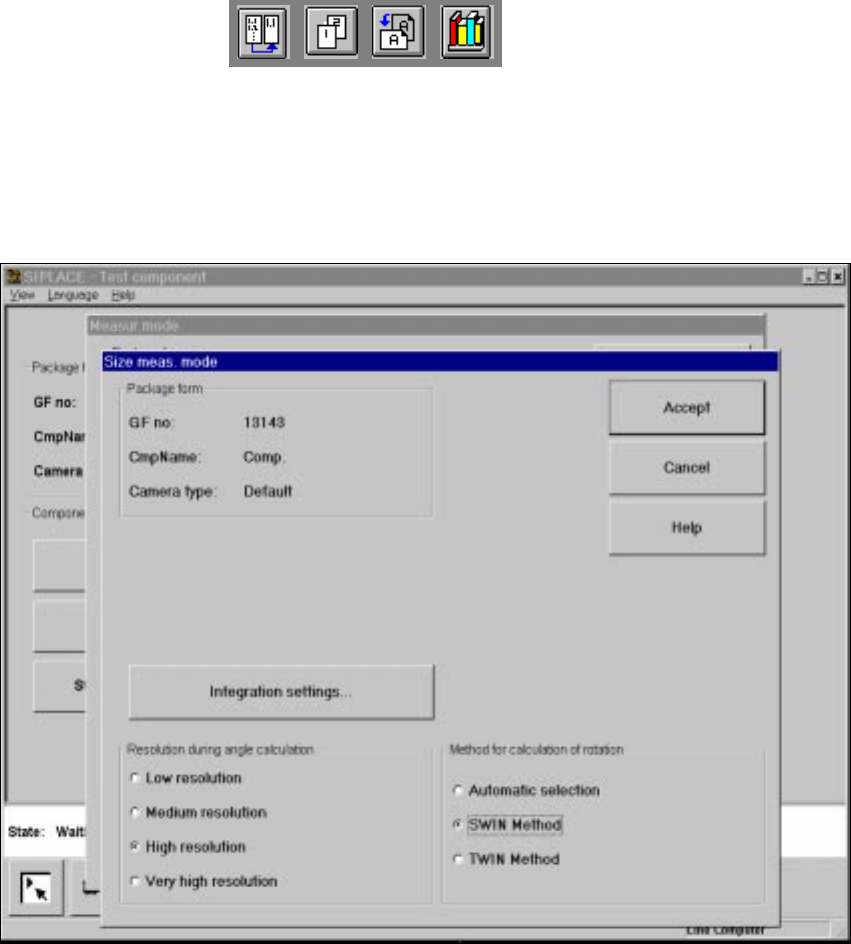
Fig. 6.6 - 35 Measuring mode option, Size measuring mode menu
This menu is used to 6
– vary the resolution the angle calculation.
– specify the method for the rotation calculation and
– vary the integration settings.
Resolution for the angle calculation 6
In this measuring mode, if the component rotation has been calculated incorrectly on account of
ambiguity, you can increase the angular resolution in order to determine the angle of rotation. The
following increments may be used in relation to the resolution in order to determine the angle of
the components: 6
– Simple components: Low resolution:
– Complex components: High resolution
6 Vision functions User Manual HS-50
6.6 Test Component Software Version SR.501.xx 12/99 Issue US
292
t IIt
Method for calculating the rotation 6
Here you must specify the number of rotation windows in order to determine the angle: 6
– Automatic selection
The system selects the number of windows.
– SWIN method (Single Window)
Selects a single window. This method is suitable for small and complex components or com-
ponents with fluctuating dimensions.
– TWIN method (Two Windows)
Two windows are selected. This method is particularly suitable for rapid analysis, for PLCCs,
for example. However, this requires the structures to be investigated to lie in the center of the
window. If this is not the case, select just one window (SWIN method).
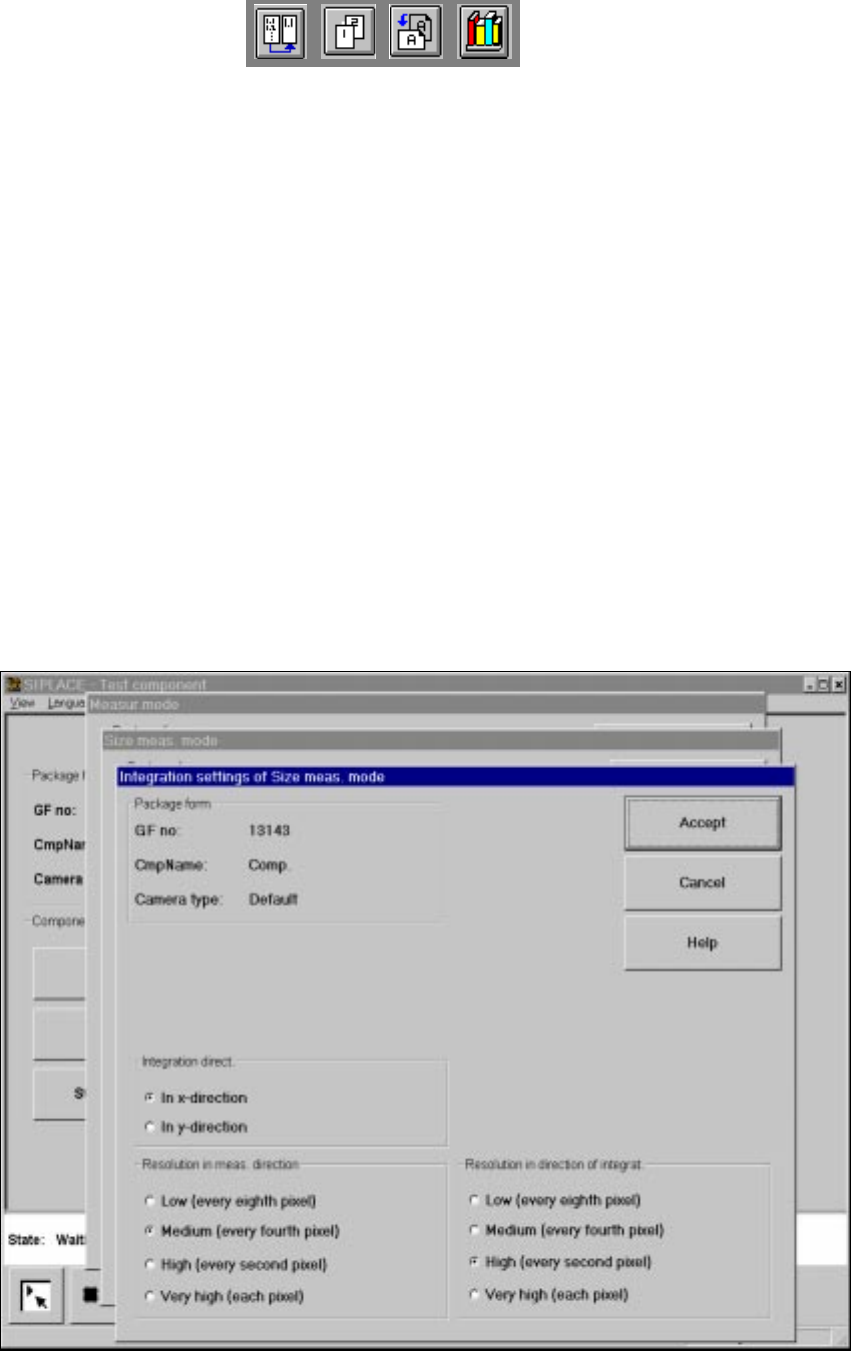
Integration settings 6
If you click on the 'Integration settings' field, the Integration settings of Size measuring mode
menu will appear on screen. 6
6
Fig. 6.6 - 36 Measuring mode option, Integration settings of Size measuring mode menu