00191369-02.pdf - 第34页
1 Introduction User Manual HS-50 1.11 Overview of the modules - controls Software Version SR.501.xx 12/99 Issue U S 34 t I I t 1.1 1 Overview of the modul es - controls 1.1 1.1 Controls 1 Fig. 1.1 1 - 1 Overview of the m…
User Manual HS-50 1 Introduction
Software Version SR.501.xx 12/99 Issue US 1.10 Setting up the placement system
33
t IIt
3 x 16 A for 3 x 380 VAC 1
3 x 16 A for 3 x 400 VAC 1
3 x 16 A for 3 x 415 VAC 1
1.10.6 Setting up the placement system
Å Raise the placement system using the fork-lift truck and adjust the feet until there is a gap of
830 mm (952.5 mm SMEMA height) between the top edge of the PCB conveyors and the bot-
tom edge of the feet.
Å Leave a gap of 1 to 3 mm between the PCB conveyors of the placement system.
Å Use a cord pulled tight to ensure that all the placement systems are exactly in line with one
another.
Å Adjust each placement system using a spirit level with an accuracy of 0.02 mm/m.
Å Lock the feet in position.
Å Check the placement system again using the spirit level and correct the settings, if necessary.
CAUTION
Make sure that you remove all the shipping braces from the placement system. 1
Å Fit any components that were dismantled for dispatch.
Å Connect all the electrical and pneumatic lines.
RISK OF DEATH
The electrical connection work MUST be carried out only by appropriately trained and certi-
fied personnel. 1
1 Introduction User Manual HS-50
1.11 Overview of the modules - controls Software Version SR.501.xx 12/99 Issue US
34
t IIt
1.11 Overview of the modules - controls
1.11.1 Controls
1
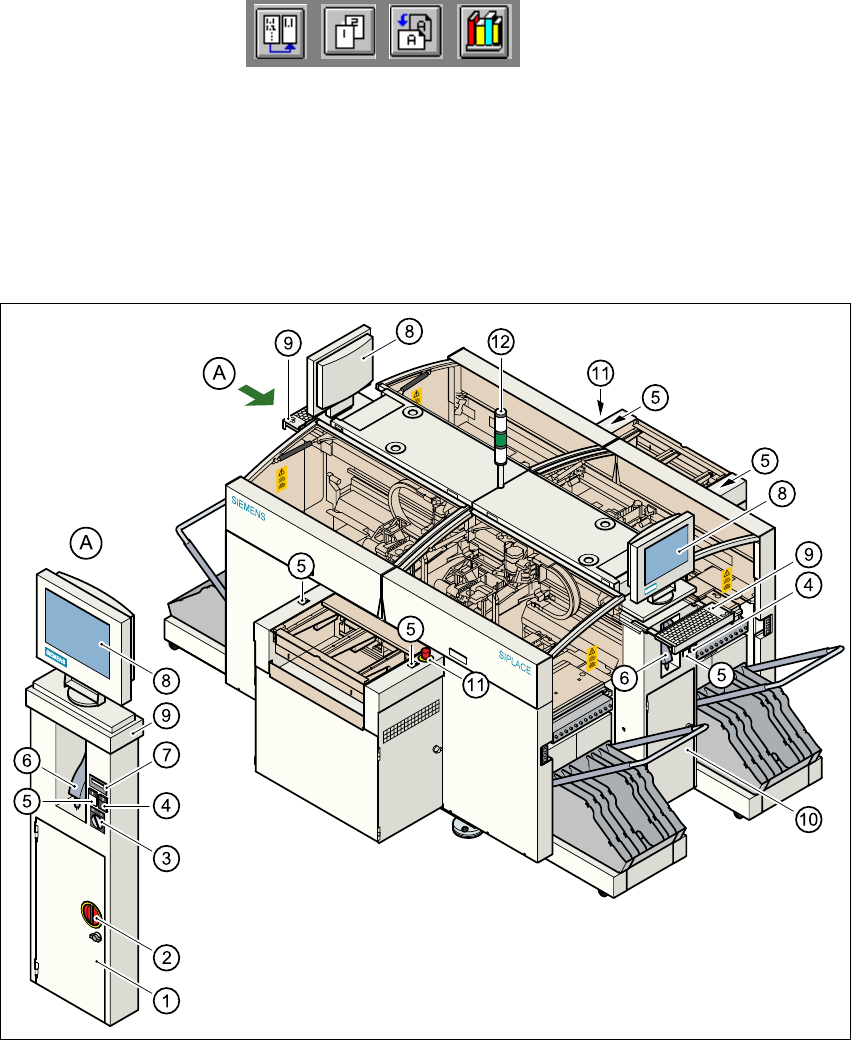
Fig. 1.11 - 1 Overview of the modules - controls
1
(1) Operating panel, left-hand side (2) Main switch
(3) Key switch (4) Stop button (black)
(5) Start button (white) (6) Component barcode scanner
(7) Component counter (8) LCD screen
(9) Keyboard with trackball (10) Operating panel, right-hand side
(11) Emergency stop mushroom-head push-button (12) Indicator lamps
User Manual HS-50 1 Introduction
Software Version SR.501.xx 12/99 Issue US 1.11 Overview of the modules - controls
35
t IIt
1.11.2 Description
All the controls can be reached by a 1.60 m tall person. 1
Main switch 1
The main switch is used to switch the power supply to the placement system on and off. 1
RISK OF DEATH
Some parts inside the placement system carry potentially lethal voltages - even when switched off
at the main switch. 1
Key switch 1
In normal mode, the key switch is set to "0". The key should be removed and kept in a safe place.
It must only be turned to position "I" (set-up mode) by authorized personnel, and then only for cer-
tain maintenance and servicing work. 1
Stop button 1
This button is used to stop the placement system. 1
Start button 1
This button starts the placement system after it has been switched on or after faults have been
eliminated. 1
Emergency stop mushroom-head push-button 1
The emergency stop mushroom-head push-button latches into place when it is pressed. The
power supply for the gantry axes, component tables, conveyor belts and cutting devices is inter-
rupted and the voltage to the star axes of the placement heads is reduced. The button must be
turned to release it. 1
Component counter 1
The component counter displays the number of components processed. 1
LCD screen 1
There is a flat LCD screen with a touch-sensitive surface (touch-screen) on either side of the
placement system. The screen resolution is 1024 x 768 pixels. 1