00191369-02.pdf - 第38页
1 Introduction User Manual HS-50 1.11 Overview of the modules - controls Software Version SR.501.xx 12/99 Issue U S 38 t I I t 1.1 1.4 T echnical dat a - component barcode reader Connected to Station c omputer Data entry…

User Manual HS-50 1 Introduction
Software Version SR.501.xx 12/99 Issue US 1.11 Overview of the modules - controls
37
t IIt
1.11.3.1 Controls on the left / right-hand operating panel of the placement system
The two operating panels have identical control functions. 1
Monitor, keyboard, Start and Stop buttons 1
There is a monitor and a keyboard on both sides of the placement system. They are arranged so
that any person who is at least 1.60 m tall can work comfortably and efficiently. 1
The Start and Stop buttons are located beneath the keyboard. The on-screen dialog will occasion-
ally prompt you to activate certain actions using buttons, and this arrangement will make it easier
for you both to activate and to interactively control these actions. 1
Key switch 1
The key switch is located on the left-hand operating panel beneath the Start and Stop buttons. It
is only needed for setting up and servicing work so, for reasons of efficiency, it is positioned near
the Start and Stop buttons. 1
Main switch 1
The main switch is part of the power supply unit, so it is positioned on the left-hand operating
panel. It is located here because it is only needed for servicing and maintenance work. With re-
spect to its infrequent use the switch is still ergonomically positioned. 1
Component barcode reader 1
The four component tables for supplying components are arranged on the right and left of the
placement system. For this reason, the component barcode readers are also located in the central
consoles, since it enables the operators to work comfortably and efficiently during the component
set-up and filling checks. 1
1.11.3.2 Controls on the input and output side of the placement system
The controls on the input and output side of the placement system are identical. 1
Emergency stop mushroom-head push-button and Start button 1
An emergency stop mushroom-head push-button and two Start buttons are located on both the
input and the output side of the PCB conveyor. This arrangement was adopted for the emergency
stop mushroom-head push-buttons because it enables them to be reached quickly and easily from
any position. 1
In addition, it is important to have an unrestricted view of the placement heads and placement area
during maintenance, servicing and setting up work in order to be able to check all the operations
carried out inside the machine. This is particularly important during testing phases or when start-
ing single functions, for example. 1
1 Introduction User Manual HS-50
1.11 Overview of the modules - controls Software Version SR.501.xx 12/99 Issue US
38
t IIt
1.11.4 Technical data - component barcode reader
Connected to Station computer
Data entry Via barcode scanner or keyboard
Number of characters Up to 40
Not admissible
Barcodes starting with a 1, 2, 3, or 4
of less than 5 characters long
Number of barcodes Up to 6 per component
Filter for masking out data Up to 1 per barcode
Preset code types
Code 39 (standard or ASCII)
Code 2 of 5 interleaved and normal,
Code 128, UPC/EAN/JAN codes
(others available upon request)
User Manual HS-50 1 Introduction
Software Version SR.501.xx 12/99 Issue US 1.12 Overview of the modules - gantries
39
t IIt
1.12 Overview of the modules - gantries
1.12.1 Position of the gantries
1
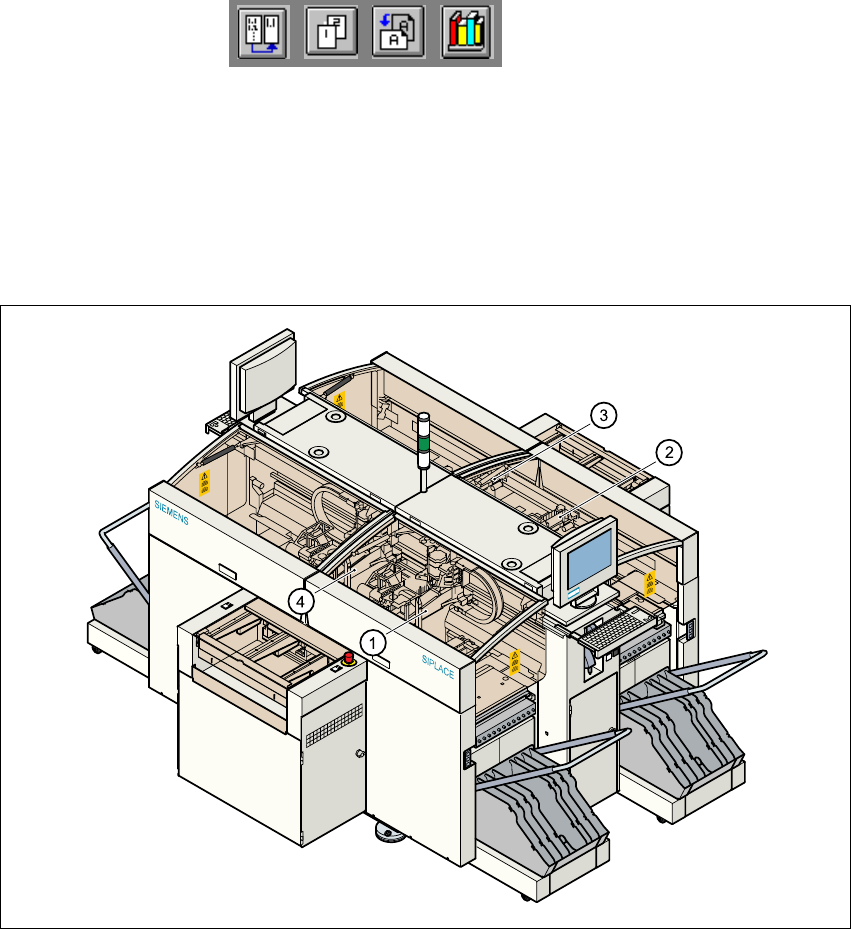
Fig. 1.12 - 1 Position of the gantries
(1)Gantry 1 (sector 1)
(2)Gantry 2 (sector 2)
(3)Gantry 3 (sector 3)
(4)Gantry 4 (sector 4)
1
The gantry system consists of two functional groups 1
–X-axis
–Y-axis
1