00195397-01_Installation Manual Setup Center 2.3.pdf - 第17页
Installation Operation System Installation Important Preparations Installation Manual SIPLACE Setup Center 2.3 17 5 Inst allation 5.1 Import ant Prep arations All computers must have been set up an d prepared app ropriat…
System components and configurations
System configuration Recommended Installation Scenarios
16 Installation Manual SIPLACE Setup Center 2.3
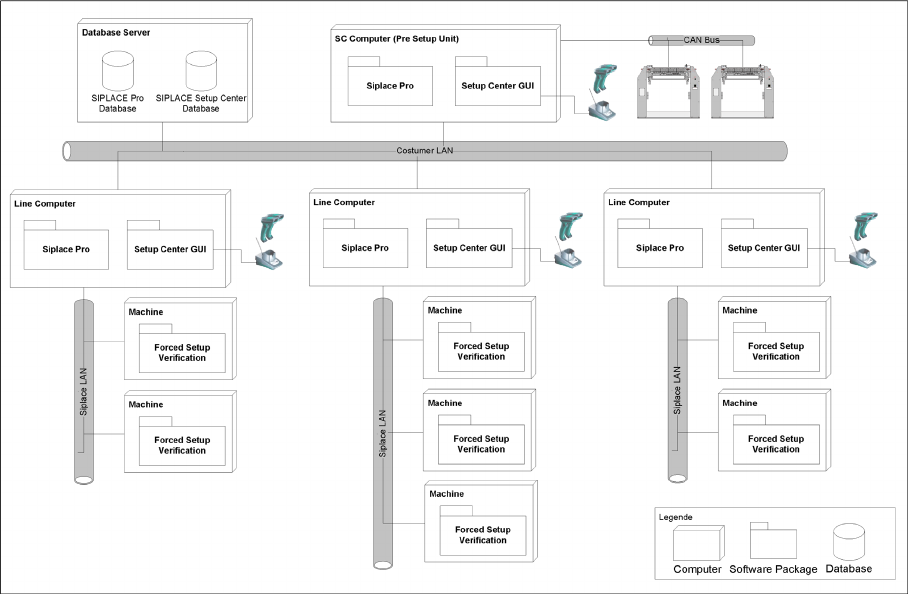
4.2.6.2 Central Database
4-3: System configuration Central Database
Usually the system configuration "Central Database" is for manufacturing facility with more than one
production line. Prerequisites for the configuration is
the SIPLACE Pro database is also installed centrally, or
the SIPALCE EDM product is deployed, or
a pre setup area with Setup Center is planned, or
packaging units often moves between different placement lines.
The Setup Center GUIs are connected to the local SIPLACE Pro and to the central Setup Center
Database. The docking stations are connected via CAN-Bus to the SC Computer. The pre setup unit is
the reason, why a central Setup Center Database is necessary.
Installation
Operation System Installation Important Preparations
Installation Manual SIPLACE Setup Center 2.3
17
5 Installation
5.1 Important Preparations
All computers must have been set up and prepared appropriately in advance of the complete installation
of SIPLACE Setup Center to function correctly.
These preparatory measures demand knowledge about the administrative functions of Windows and
SQL Server. Please contact your system administrator for assistance if required.
5.1.1 Operation System Installation
The following steps are essential before conducting the installation of SIPLACE Setup Center:
Installation of Windows 2003 or Windows XP with SP2.
Furthermore, you require Windows 2003/XP administrative rights and write rights for all computers
on which you are installing SIPLACE Setup Center.
5.1.2 MSDE Installation
If the database decision of SIPLACE Setup Center Database (see chapter) is made to use a MSDE
installation, this must be done prior installing SIPLACE Setup Center.
Installing MSDE is done by executing the file
\3rdpartyinstaller\MSDE\SETUP_Step.cmd
on the
Setup CD.
If the TCP port 1433 is not available then the alternate installer
\3rdpartyinstaller\MS-
DE\SETUP_Step_dynamic_port.CMD
must be used.
See the file
\3rdpartyinstaller\MSDE\readme.txt
for more details.
NOTE:
Always exit the running setup verification via task manager/process before the installation or
uninstallation of Setup Center.
NOTE:
It is not necessary to uninstall the current version of Setup Center before the installation of the
new version of Setup Center.
NOTE:
If during the installation a note appears, that Microsoft Data Access Components (MDAC) must
be installed. Accept this note.
NOTE:
You are required to have administrator rights for the installation procedure!
NOTE:
This installer creates a MSDE instance with the name SIPLACE_MSDE.
Installation
Hardware Installation Dragon Scanner’s Cradle
18 Installation Manual SIPLACE Setup Center 2.3
5.2 Hardware Installation
We recommend performing the installation in the specified order:
1. Installation of hardware
2. Installation of software
This chapter describes the hardware installation procedure.
5.2.1 Dragon Scanner’s Cradle
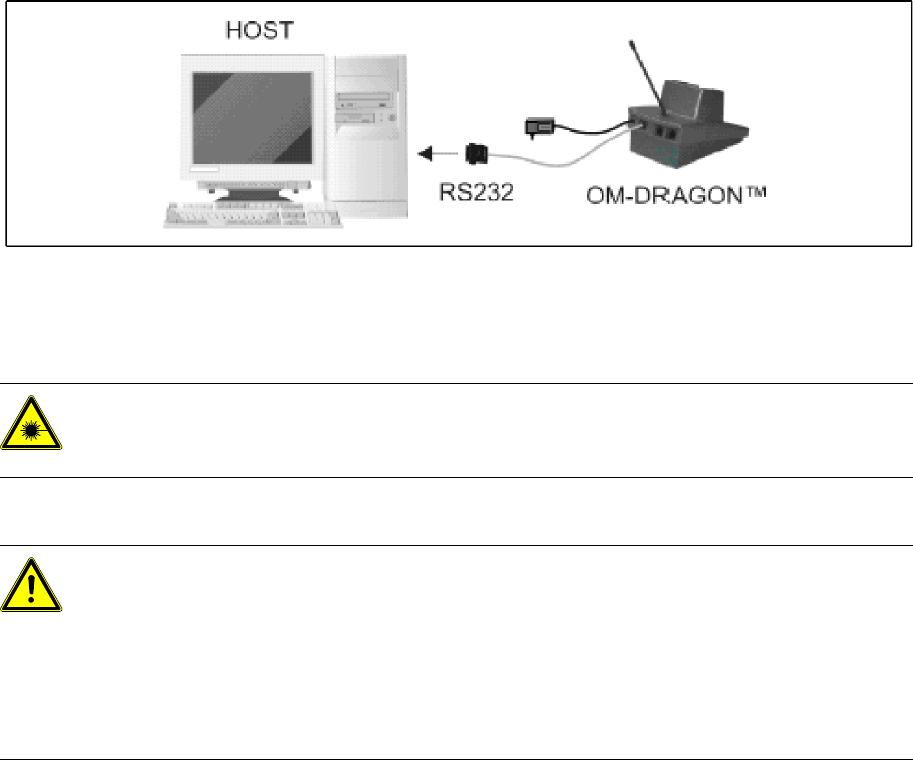
The Dragon scanner’s cradle needs to be connected to the Setup Center PC’s COM-port. The
default port is COM1.
If the COM1 port is already in use another COM port need to be configured
(Another port can be configured in the Setup Center after installation:
open Setup Center setting dialog – menu Options/Settings – dialog Scanner/Dragon Scanner/Serial
Port).
Connect the cradle to the Setup Center PC according to the following picture:
5-1: RS232 connection
5.2.2 Safety Instructions
The Dragon Scanner conforms to laser class 2.
Warning label W216 (shown above) is displayed on the Dragon scanner.
5.2.3 Symbol MC70 2D barcode scanner
5.2.3.1 System Requirements
The following components are required for the operation of the scanner:
WLAN-infrastructure (not included)
MC70 Scanner with firmware 01.21.0001
DANGER: LASER RADIATION!
Do not look into beam.
Laser class 2
WARNING: CAUTION:
Before using the Dragon scanner, inform all operating personnel about the laser regulations.
While operating the Dragon scanner, observe the respective regulations in line with VDE 0837
"Protection from radiation emitted by laser devices" and the "Laser radiation" accident
prevention regulations (VBG93), applicable in Germany.
Also observe the accident prevention regulations applicable in your country.
Despite the low laser power, avoid looking directly at the laser beam. The natural closure reflex
of your eyelids will protect your eyes from the visible beam.