00195397-01_Installation Manual Setup Center 2.3.pdf - 第5页
Introduction Explanation of symbols Installation Manual SIPLACE Setup Center 2.3 5 1I n t r o d u c t i o n Please read chap ters 2 through 6 befor e you inst all SIPLACE Setup Center. Chap ter 5 describes the installati…
Inhaltsverzeichnis
4 Installation Manual SIPLACE Setup Center 2.3
5.2.3.1 System Requirements......................................................................................................................... 18
5.2.3.2 Configurate WLAN on Scanner........................................................................................................... 19
5.2.3.3 Setup Center Client Installation........................................................................................................... 19
5.2.4 Optional: Docking Station...................................................................................................................... 29
5.2.4.1 Installing the CAN Card in the PC....................................................................................................... 29
5.2.4.2 Installing CAN Drivers ......................................................................................................................... 30
5.2.4.3 Installing the CAN Bus API ................................................................................................................. 35
5.2.4.4 Installing Docking Station.................................................................................................................... 38
5.2.4.5 Firmware download for docking station............................................................................................... 43
5.3 Software Installation ........................................................................................................................... 43
5.3.1 Setup Center ......................................................................................................................................... 43
5.3.1.1 General Settings ................................................................................................................................. 44
5.3.1.2 Individual setup types and next steps ................................................................................................. 47
5.3.1.3 Forced Setup Verification.................................................................................................................... 56
5.4 Steps to perform after Installation..................................................................................................... 62
5.4.1 SIPLACE Setup Center Database and Windows XP SP2 .................................................................... 62
5.4.2 Settings in the station software ............................................................................................................. 63
5.4.3 Scanner Configuration .......................................................................................................................... 63
5.4.3.1 Dragon Scanner.................................................................................................................................. 63
5.4.3.2 Symbol MC70 Scanner ....................................................................................................................... 66
5.4.4 SIPLACE Setup Center Configuration .................................................................................................. 69
5.4.5 Settings on the SIPLACE Pro ............................................................................................................... 69
5.4.6 Barcode Label Wizard........................................................................................................................... 70
5.5 Testing the Installation ....................................................................................................................... 70
5.6 Troubleshooting.................................................................................................................................. 70
5.6.1 Relevant files to analyze setup problems.............................................................................................. 70
5.6.2 How to run setup with verbose logging? ............................................................................................... 70
5.6.3 Error code 1316 and 1603 .................................................................................................................... 71
5.6.4 Conflicting old SIPLACE Setup Center installations ............................................................................. 71
5.6.5 Conflicts with old SIPLACE Setup Center configurations .....................................................................72
5.6.6 Remote installation with Windows XP clients........................................................................................ 72
5.6.7 Conflicting applications ......................................................................................................................... 72
6 Modify . . . . . . . . . . . . . . . . . . . . . . . . . . . . . . . . . . . . . . . . . . . . . . . . . . . . . . . . . . . . . .73
6.1 Modify Setup Center ........................................................................................................................... 73
6.2 Modify Forced Setup Center .............................................................................................................. 73
7 Uninstalling. . . . . . . . . . . . . . . . . . . . . . . . . . . . . . . . . . . . . . . . . . . . . . . . . . . . . . . . . .75
7.1 Backup configuration files ................................................................................................................. 75
7.2 Uninstalling Setup Center GUI........................................................................................................... 75
7.3 Uninstalling Setup Center Database ................................................................................................. 75
7.3.1 Uninstalling MSDE installations ............................................................................................................ 76
7.4 Uninstalling Forced Setup Verification ............................................................................................. 76
7.4.1 Uninstalling “Mobilink Patch”................................................................................................................. 77
7.5 Optional: Uninstalling the CAN Drivers ............................................................................................ 77
7.6 Optional: Uninstalling the C167API338W2K.exe of CAN Drivers ................................................... 78
Introduction
Explanation of symbols
Installation Manual SIPLACE Setup Center 2.3
5
1Introduction
Please read chapters 2 through 6 before you install SIPLACE Setup Center. Chapter 5 describes the
installation sequence for SIPLACE Setup Center as well as the related setup types and important
information regarding the installation.
See also:
J 5 Installation [J17]
1.1 Explanation of symbols
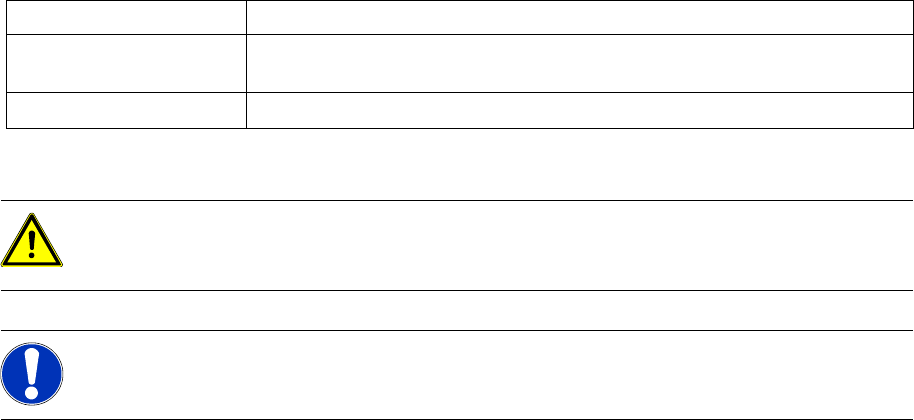
Various symbols and notes are used for making this document easier to read.
Words in bold These are dialog boxes and menu commands.
Step … An installation step includes all the actions relating to a specific dialog box. An
installation step may be composed of several actions.
X
Requires an action (e.g. mouse click, open file)
WARNING:
Corresponds to a warning. The information is critical to the success of the installation process.
The installation will be cancelled if you do not comply with the warning.
NOTE:
Explanatory information about the installation sequence.
Introduction
Explanation of symbols
6 Installation Manual SIPLACE Setup Center 2.3