00195397-01_Installation Manual Setup Center 2.3.pdf - 第9页
Navigation Guide for Installation SIPLACE System Installation Manual SIPLACE Setup Center 2.3 9 3 Navigation Guide for Inst allation 3.1 SIPLACE System Please use the fo llowing documents to le ad you throug h the instal…

Scope of Delivery
System requirements SIPLACE Setup Center GUI
8 Installation Manual SIPLACE Setup Center 2.3
– 1 CAN BUS cable for up to 4 docking stations
X docking station:
Docking station for SIPLACE X component trolley Item No.: 00116933-01
– 1 docking station for X-series
– 1 power supply cable 230 V AC (EU)
– 1 power supply cable 125 V AC (US)
– 1 pneumatic connection coupling
2.3 System requirements
The following hardware is required for a successful SIPLACE Setup Center installation.
2.3.1 SIPLACE Setup Center GUI
The same Hardware is recommended as used for SIPLACE Pro Client installations.
The following Software is required:
Windows 2003 Server or Windows XP Professional
Microsoft .NET Framework 2.0
SIPLACE Pro Interface 3.2, 4.1 und 5.0
2.3.2 SIPLACE Setup Center Database
The same Hardware is recommended for SIPLACE Setup Center Database as used for SIPLACE Pro
Server.
The following Software is required:
Windows XP Professional + service packs
Microsoft SQL Server 2005 Express SP1
Microsoft MSDE 2000 with SP3a and higher
Microsoft .NET Framework 2.0
NOTE:
A hard disk with 500 MB or more free space should be used for installation (without the
operating system installed there should be at least 1 GB free space).
NOTE:
A hard disk with 500 MB or more free space should be used for installation (without the
operating system installed there should be at least 1 GB free space).
The size of the database will grow constantly as additional data is stored, this should be taken
into consideration.
Navigation Guide for Installation
SIPLACE System
Installation Manual SIPLACE Setup Center 2.3
9
3 Navigation Guide for Installation
3.1 SIPLACE System
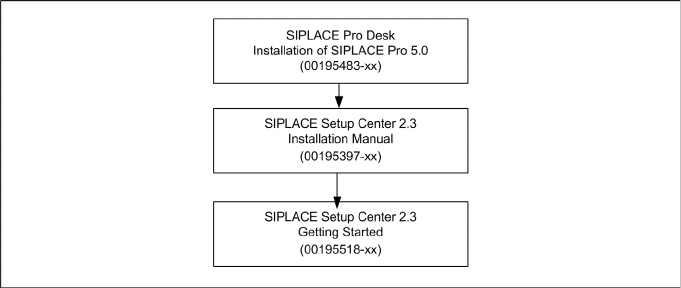
Please use the following documents to lead you through the installation procedure for SIPLACE System.
3.2 SIPLACE Setup Center 2.3
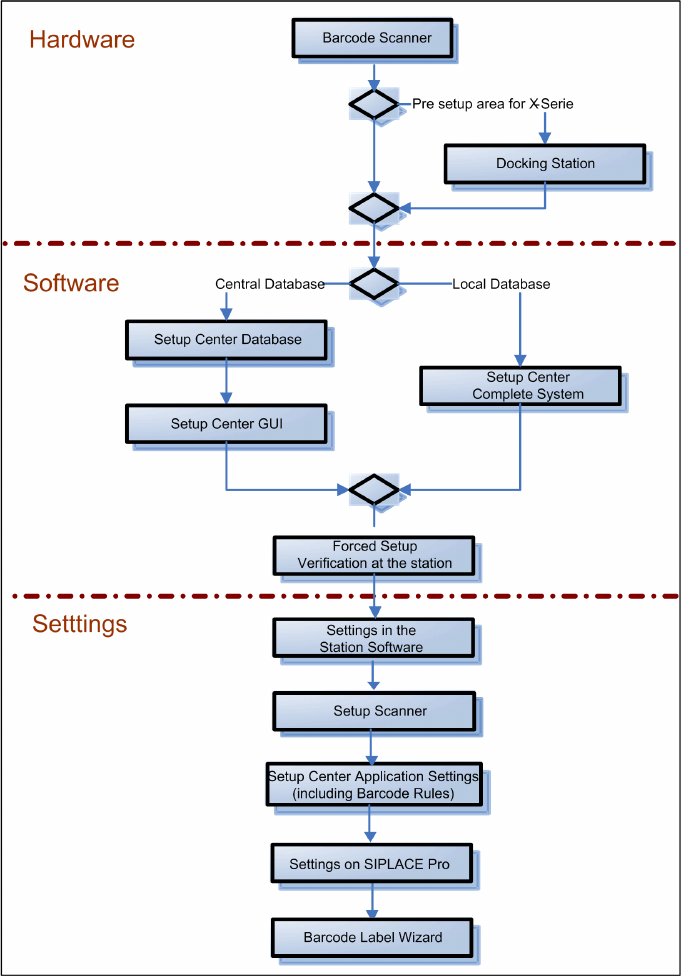
The installation procedure is divided into several parts (see the following Figure):
1. Installation of hardware
Barcode scanner
– Dragon Scanner's Cradle or Symbol MC70 2D barcode scanner
Optional: Docking Station
2. Installation of software
Setup Center, with setup type
–GUI
– Database
– Complete
Setup Center "Forced Setup Verification"
3. Settings
Station software, see SIPLACE Setup Center 2.3 User Guide (item no. 00195402-xx)
Dragon Scanner or Symbol MC70 2D Barcode scanner (see the chapter "Scanner Configuration")
Setup Center, see SIPLACE Setup Center 2.3 Getting Started (item no. 00195518-xx)
SIPLACE Pro, see SIPLACE Setup Center 2.3 User Guide (item no. 00195402-xx)
Barcode Label Wizard, see SIPLACE Setup Center 2.3 User Guide (item no. 00195402-xx)
Navigation Guide for Installation
SIPLACE Setup Center 2.3
10 Installation Manual SIPLACE Setup Center 2.3