00193826-01.pdf - 第112页
5 Operator, Line engineer, Service engineer Us er Manual SIPLACE C S 5.3 When you change shift Software version SR.101.xx06/2003 US Edition 112 5.3 When you change shif t Æ S plice the tapes ear ly . The feeders do not h…

User Manual SIPLACE CS 5 Operator, Line engineer, Service engineer
Software version SR.101.xx 06/2003 US Edition 5.2 Tools for the operator
111
5.1.4 Programmer
The programmer's jobs are as follows: 5
– Preparing CAD files
– Writing placement programs
– Data maintenance
– Data backup
5.2 Tools for the operator
All operators are to be equipped with the tools listed in the following. It is recommended to store
the tools in an appropriate container to avoid being injured when removing the tools from the con-
tainer (i.e. by a pair of tweezers).
Every operator of the machine requires:
– SMD tweezers
– A brush with short bristles to clean the component tables
– A set of small regular and Phillips-head screwdrivers
– A tape splicing clamp and splicing materials
– Scissors for splicing tape (do not use multi-purpose scissors or diagonal cutters)
– Erasers or fiberglass pens to remove fiducials
– Indelible pens for marking the tracks
– Cleaning agents (ethyl alcohol, Plexiglass cleaner, cotton wool tips, lint-free cloths,
pipe-cleaners)
– WD40 corrosion protection
– Vacuum cleaner
PLEASE NOTE 5
All tools of importance to the operator are contained in the SIPLACE operator kit. This can be or-
dered under part no. 00349303-xx.

5 Operator, Line engineer, Service engineer User Manual SIPLACE CS
5.3 When you change shift Software version SR.101.xx06/2003 US Edition
112
5.3 When you change shift
Æ Splice the tapes early. The feeders do not have to be refilled as soon as the new shift starts.
This avoids extended down times.
Æ At the shift change, pass important information on to the next operator. This includes, for in-
stance, changes to the placement program. Also read through the list of the descriptions of the
steps to take in Section 5.5
.
Æ Carry out a set-up check.
Make sure that the feeders are equipped with the correct components and that they are at the
correct locations in the component trolley.
NOTE
Hand over the line in the same state that you would want to find it in when starting your shift.
This means that: 5
– The rejection containers are empty.
– The waste containers are empty.
– The conveyor areas have been cleaned with a vacuum cleaner.
User Manual SIPLACE CS 5 Operator, Line engineer, Service engineer
Software version SR.101.xx 06/2003 US Edition 5.4 Carrying out a walk-through inspection
113
5.4 Carrying out a walk-through inspection
5.4.1 Check feeder
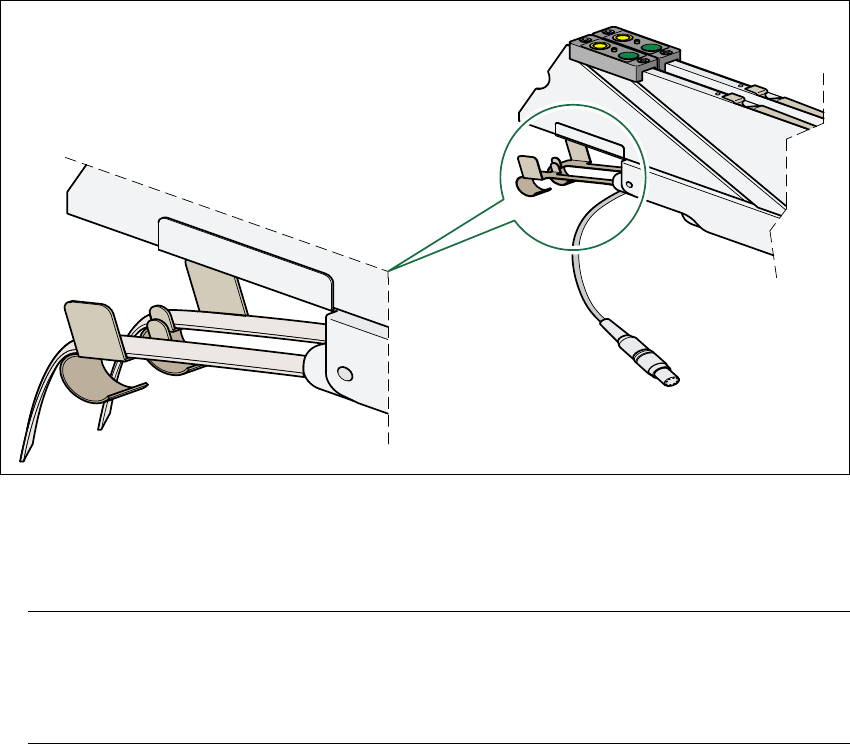
Æ Make sure that the tape is correctly placed in the springs of the S feeder.
5
Fig. 5.4 - 1 Placing the tape in the springs of the S feeder
Æ Check to see whether the tape foil removal container for the S feeder is full.
If it is full, then pull out the foil and cut it off with scissors.
NOTE
Tearing the foil instead of cutting it can lead problems with the tape removal mechanism.
For this reason the 3 x 8 mm feeders are fitted with an integral cutter. This is in the tape foil
removal container at the end of the feeder under the flaps. 5
Æ Check to ensure that the pick-up window on the feeder is the right size for the component.
Æ Check to see whether tape guides are inserted on Combi feeders (24 mm / 32 mm).
Æ Check to see whether the additional plastic guide is inserted on Combi feeders.