00193826-01.pdf - 第79页
User Manual SIPLAC E CS 3 Technical data Software vers ion SR.101.xx 06/2003 US Edition 3.7 Component bar code reader 79 3.7 Component barcode reader 3.7. 1 Gener al With the p lacemen t system , a barco de reader c an b…
3 Technical data User Manual SIPLACE CS
3.6 Controls Software version SR.101.xx06/2003 US Edition
78
3.6.3.1 Controls on the input and output sides of the placement system
EMERGENCY-STOP button, Start and Stop buttons
There is an EMERGENCY-STOP button, a Start button and a Stop button on both the input and
output sides of the PCB conveyor. This arrangement was adopted for the EMERGENCY-STOP
buttons because it enables them to be reached quickly and easily from any position.
In addition, it is important to have an unrestricted view of the placement heads and placement
area during maintenance, servicing and setting up work in order to be able to check all the oper-
ations carried out inside the machine. This particularly important during testing phases or when
starting single functions, for example.
Key switch
The key switch is located on the operating panel on the PCB output belt. It is only needed for set-
ting up and servicing work so, for reasons of efficiency, it is positioned near the Start and Stop
buttons.
Main switch
The main switch is part of the power supply unit, so it is positioned on the left-hand side of the
PCB input belt. It is located here because it is only needed for switching the placement system
on or off and is therefore not subject to frequent use.
3.6.3.2 Controls on the placement system console
Monitor and keyboard
The station computer, monitor and keyboard are all mounted on the console. They are arranged
so that any person who is at least 1.60 m tall can work comfortably and efficiently.
Component barcode reader
The two component trolleys for supplying components are arranged on the right and left of the
placement system. For this reason, the component barcode reader was arranged on the PCB
output side so that all the barcode labels are equally accessible. This enables the operators to
work comfortably and efficiently during the component set-up and filling checks.
User Manual SIPLACE CS 3 Technical data
Software version SR.101.xx 06/2003 US Edition 3.7 Component barcode reader
79
3.7 Component barcode reader
3.7.1 General
With the placement system, a barcode reader can be used to check that the track allocation is
correct and to read component data from component reels.
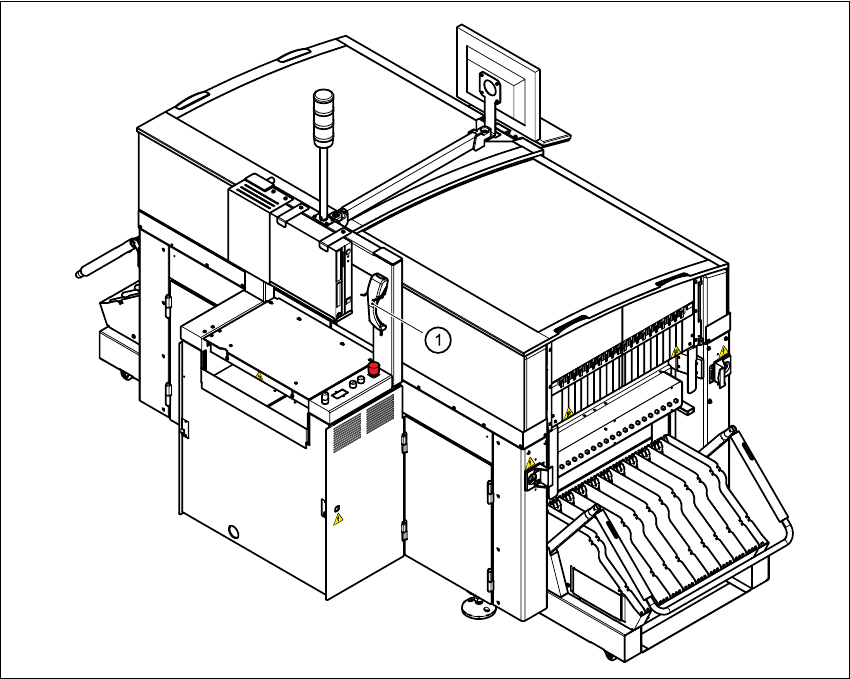
Fig. 3.7 - 1 Component barcode reader
(1) Component barcode reader
3 Technical data User Manual SIPLACE CS
3.7 Component barcode reader Software version SR.101.xx06/2003 US Edition
80
Track allocation
Four-digit barcode strips are attached to the lateral safety screens for the purposes of track allo-
cation. The first digit is used to identify the component table (1 or 2), while the remaining three
digits specify the track number. There are also return barcodes at both ends of the barcode strip.
The barcode strips are numbered consecutively in intervals of two (1, 3, 5, 7...) and each repre-
sents 2 tracks (barcode 1 = track 1 and 2).
Components
Data can be read from the component reels to compare the stock of components against the
quantity specified in the set-up file (refill check), for example.
An audible signal is given when each dataset has been read successfully.
NOTE 3
The component barcode reader option must be configured on the SIPLACE C Pro computer.
Barcodes that start with the number 1 or 2 and are 5 digits long are interpreted as track barcodes.
All other barcodes that do not start with number 1 or 2 are regarded as component barcodes. 3
3.7.2 Technical data
3
Connection Station computer
Data entry Via barcode reader or keyboard
Number of characters Up to 40
Not permissible Barcodes starting with a 1 or 2 and less than 5 characters long
Number of barcodes Up to 6 per component
Filter for suppressing data Up to 1 per barcode
Preset code types Code 39 (standard or ASCII)
Code 2 of 5, interleaved and normal,
Code 128, UPC/EAN/JAN codes
(others available upon request)