00195425-01.pdf - 第13页
Ins tall ati on and Confi gur ation G uid e SI PLA CE Exp lorer 2 Sys tem Comp onen ts an d Con fig urati ons Edi tion 05 /200 7 EN 2.1 Over vie w of Syste m Com ponen ts 13 2 System Compone nt s and Configurations 2.1 O…
1 Introduction Installation and Configuration Guide SIPLACE Explorer
1.3 Additional Remarks Edition 05/2007 EN
12
to be realized as a customer-specific project.
– There is a special OIS status module realized in SIPLACE OIS. This OIS status module is
shown in the SIPLACE Explorer status module which matches the SEMI E10 status module.
This may lead to deviations in the states and status times shown between OIS and SIPLACE
Explorer. A direct comparison is therefore not possible.
– The following restriction applies to platform I (S20, S23, F4, F5, F5HM) stations with dual con-
veyors:
The page Production Summary will display Unknown in the Current Recipe List table for
the 2nd conveyor lane. 1
Reason:
Platform I stations are unable to produce different recipes, even with dual conveyors. There-
fore, only one recipe will be loaded for the SIPLACE line. This recipe will then only be assigned
to conveyor lane I by SIPLACE Explorer. 1
– The following restrictions apply to the SMA pages listed below, if no boards are placed at the
last station in the production line:
– The page Production Summary will not update the values in the column Lot Progress of
the table Lot Progress, if the last station in the production line does not have any place-
ment contents for the recipe currently defined. In this case, the last station will conveyor the
boards through without placement. The column Lot Progress will continue to show the
name of the last recipe which had placement contents at the last station.
– Machine Navigator:
OLE value will not be shown (N/A).
– Overview of OLE / OEE:
Overall Line Efficiency diagram: Values for OLE, performance and availability will not be
shown correctly.
Overall Equipment Efficiency by Station diagram: station data is not shown correctly for
stations which do not place boards.
– OEE Analysis:
Table: values for performance and availability will not be shown correctly for lines and sta-
tions which do not place boards.
Overall Equipment Efficiency diagram – comparison diagram: Values for OLE, performance
and availability will not be shown correctly for the line.
– Factory Overview
The following values will not be shown correctly or will not be updated:
OLE, Current Recipe/ Job, Last Recipe Change, Completed, Lot Progress, Average Takt
Time.

Installation and Configuration Guide SIPLACE Explorer 2 System Components and Configurations
Edition 05/2007 EN 2.1 Overview of System Components
13
2 System Components and
Configurations
2.1 Overview of System Components
SIPLACE Explorer can either be installed in SIPLACE LAN or distributed via SIPLACE and client
LANs. Users not wishing to install the complete SIPLACE Explorer program on one computer can
distribute the individual components among several computers. 2
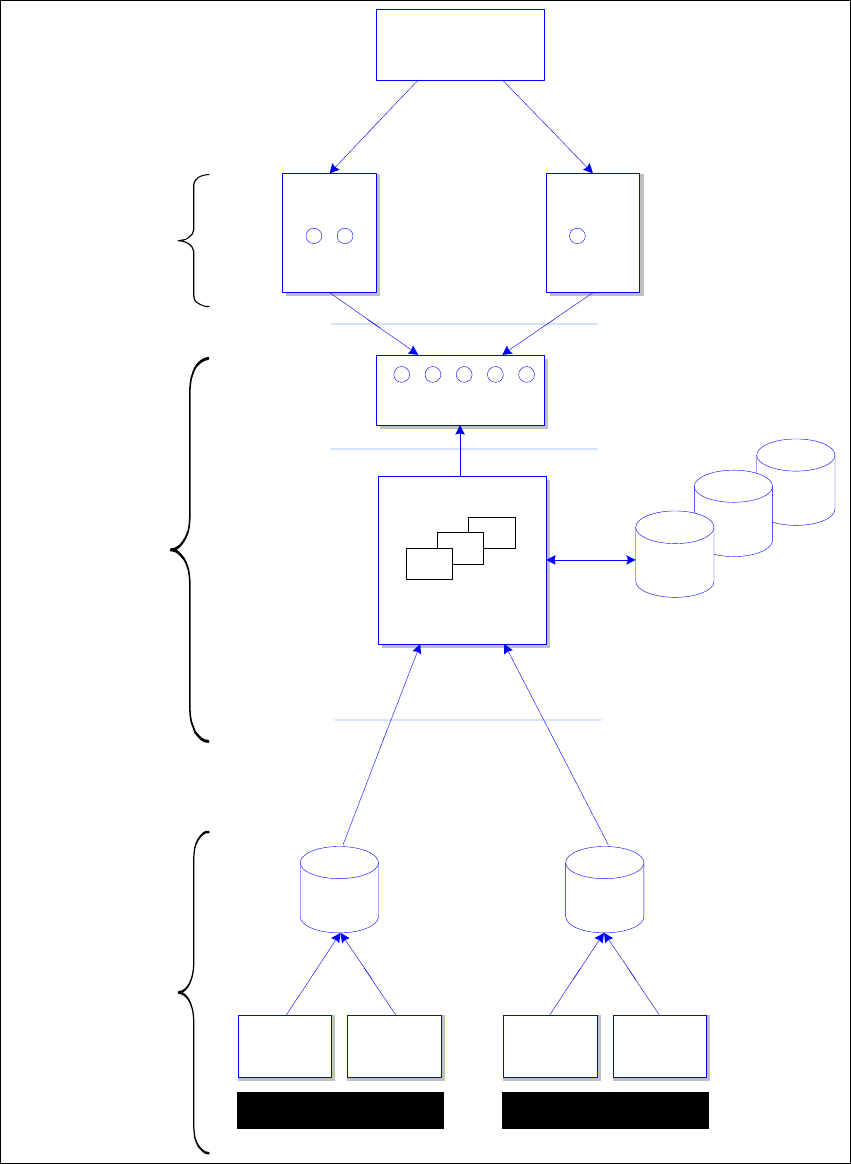
The SIPLACE Explorer architecture is displayed in the following diagram: 2
2 System Components and Configurations Installation and Configuration Guide SIPLACE Explorer
2.1 Overview of System Components Edition 05/2007 EN
14
2
Fig. 2.1 - 1 SIPLACE Explorer architecture
System
DB
System
DB
Web
Browser
applets
SMA / Line 1
...
Web
Browser
applets
SMA / Line 5
servlets, JSP
Tomcat Web Server
SIPLACE Explorer Host
SIPLACE Explorer
Applications 1.. 5
Web Clients
Software
Architecture
One or several Servers
SIPLACE
Station 1
SIPLACE
Station N
SIPLACE
Station 1
SIPLACE
Station N
Production Line 1 Production Line 5
...
OIS/SIS
DB
OIS/SIS
DB
...
SIPLACE OIS / SIS
compliant machines
Line 1 ... 5
System
DB
Factory Website
"Single Entry Point"