00195425-01.pdf - 第16页
2 S yst em Co mp on en ts a nd Co nfi gu rat io ns In st alla tio n a n d Co nf ig ura tio n G ui de S IP LAC E Ex plor er 2. 2 S I PL ACE E xp lo rer in th e SIPL AC E Sof twar e E nv iro nm en t Ed iti on 05 /2 00 7 EN…
Installation and Configuration Guide SIPLACE Explorer 2 System Components and Configurations
Edition 05/2007 EN 2.2 SIPLACE Explorer in the SIPLACE Software Environment
15
With SIPLACE Explorer "Runtime Environment", you can monitor multiple production lines at the
same time. The computer on which SIPLACE Explorer Runtime Environment is installed is known
as the SIPLACE Explorer host. This host can simultaneously monitor up to five production lines
with up to 20 stations. If you have also installed Factory Configuration Utility, you can configure
factory reports. 2
Another benefit is the creation of a special factory website for the monitoring of multiple production
lines at a particular factory. This special factory website is the "Single Entry Point" for all line ap-
plications currently in use. 2
SIPLACE Explorer V2.2 supports central organization of User Management via the Factory Con-
figuration Utility. This includes administration of all users with certain rights at line level. If central
organization of User Management is not used, only two standard users will be available at line
level: administrator and operator. Other users can not be created at line level. 2
2.2 SIPLACE Explorer in the SIPLACE Software
Environment
The SIPLACE software environment with SIPLACE Explorer consists of the following software
components: 2
– Stations software:
The station SW supplies SIPLACE Explorer with consumption data, error data and machine
status data, via the OIS interface.
The station SW is the source of all operating data. 2
– SIPLACE Pro:
SIPLACE Pro controls the entire operation of the production lines e.g. all placement pro-
grams; all management and configuration of production lines and stations, plus the creation
of setups.
SIPLACE Pro is the source of all placement data. 2
– Operator Information System (OIS):
The OIS stores consumption data, error data and machine status data. The OIS receives
this data from the station SW, stores it in the OIS database and makes it available to SI-
PLACE Explorer via the OIS database view.
– Setup Information System (SIS):
The SIS stores setup data. The SIS receives this data from SIPLACE Pro, stores it in the
SIS database and makes it available to SIPLACE Explorer via the SIS database view.
2 System Components and Configurations Installation and Configuration Guide SIPLACE Explorer
2.2 SIPLACE Explorer in the SIPLACE Software Environment Edition 05/2007 EN
16
– SIPLACE Explorer:
Siplace Explorer imports the data from the OIS and SIS, stores it in the Siplace Explorer
database and makes it available to the user.
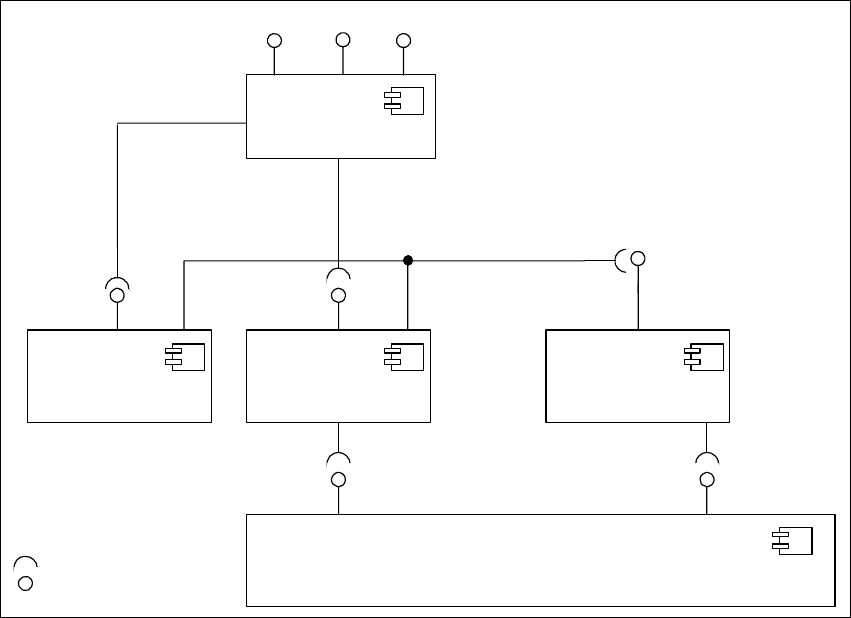
The following overview illustrates the necessary software components in the SIPLACE LAN: 2
2
Fig. 2.2 - 1 Software components in SIPLACE LAN
StationSW
<<Component >>
IDownload
SIPLACE Pro
<< Component>>
SPI
IOIS
OIS
<< Component >>
SIPLACE Explorer
<< Component >>
SIS
<< Component >>
SIS DB-View
OIS DB -View
IBackflushOption
Interfaces
IMaintenance
Manager
ITraceHost
Installation and Configuration Guide SIPLACE Explorer 2 System Components and Configurations
Edition 05/2007 EN 2.3 Standard Installation of SIPLACE Explorer
17
2.3 Standard Installation of SIPLACE Explorer
SIPLACE Explorer V2.2 provides various installation variants for the different components. This
section explains the following installation variants. 2
– Factory Layout Cl (see page 17)
– Factory Layout Dl (see page 19)
– Single Line Layout (see page 21)
We recommend that you use one of these installation variants for your system. 2
2.3.1 Factory Layout Central Installation (CI)
The Factory Layout Cl supports so-called "Multi Lines" supported i.e. different station software
platforms are supported within the same production line. The production line operation is con-
trolled via a central SIPLACE Pro with the relevant OIS/SIS installations. 2
SIPLACE Pro is installed on the SIPLACE line server and on the factory server, while OIS/SIS is
just installed on the SIPLACE line server. 2
In this installation variant, SIPLACE Explorer V2.2 is always installed on a separate SIPLACE
Explorer server. All SIPLACE Explorer components are installed on this server. This enables the
administration and any updates of SIPLACE Explorer to be realized at one central point. 2
The data to be monitored for all corresponding production lines are collected on the SIPLACE
Explorer server. 2
NOTE
This computer can monitor data from up to 5 applications, with up to 20 machines. 2
The following overview shows an example of the "Factory Layout Cl" installation: 2