00195425-01.pdf - 第20页
2 S yst em Co mp on en ts a nd Co nfi gu rat io ns In st alla tio n a n d Co nf ig ura tio n G ui de S IP LAC E Ex plor er 2.3 S tan dar d I nsta llati on of S IP LACE Expl ore r Edi tio n 0 5/20 07 E N 20 2 F ig. 2.3 - …

Installation and Configuration Guide SIPLACE Explorer 2 System Components and Configurations
Edition 05/2007 EN 2.3 Standard Installation of SIPLACE Explorer
19
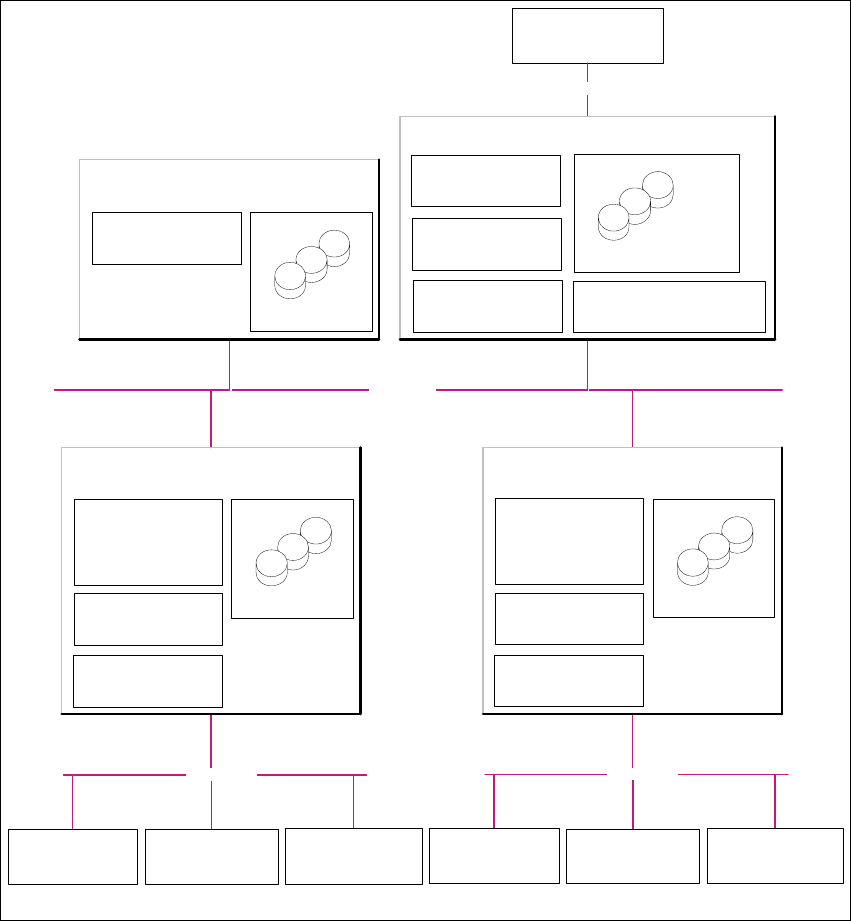
2.3.2 Factory Layout Distributed Installation (DI)
The Factory Layout Dl supports so-called "Multi Lines" supported i.e. different station software
platforms are supported within the same production line. The production line operation is con-
trolled via a central SIPLACE Pro with the relevant OIS/SIS installations. 2
SIPLACE Pro is installed on the SIPLACE line server and on the factory server, while OIS/SIS is
just installed on the SIPLACE line server. 2
In this installation variant, SIPLACE Explorer V2.2 is installed on multiple computers. SIPLACE
Explorer Runtime Environment is installed on the SIPLACE line server. All other SIPLACE
Explorer components are installed on the SIPLACE Explorer server. 2
The data to be monitored for all corresponding production lines are collected on the SIPLACE
Explorer server. 2
NOTE
With the SIPLACE line server (the computer on which SIPLACE Explorer "Runtime Environment"
is installed) you can monitor one production line with up to 7 stations. 2
The following overview shows an example of the "Factory Layout Dl" installation: 2
2 System Components and Configurations Installation and Configuration Guide SIPLACE Explorer
2.3 Standard Installation of SIPLACE Explorer Edition 05/2007 EN
20
2
Fig. 2.3 - 2 Installation Variants: Factory Layout Dl
Customer LAN
- Line Control Server /GUI
- SIPLACE Pro Desk
- OIS Server/ OIS Client
- SIS Server
SIPLACE Explorer
Webpages:
- MS internet Explorer
- OIS DB
- SIS DB
SIPLACE Line Server
(already existing)
SIPLACE Explorer
Webpages:
- MS internet Explorer
SIPLACE Explorer Server
SIPLACE Explorer
Factory Host
SIPLACE Explorer Webserver:
- Tomcat
- Java 2SE
Report Generation :
- MSXM
- Excel
SQL Server
- SIPLACE Explorer DB
- SIPLACE Explorer Factory DB
SQL Server
- SIPLACE Pro Server
- SIPLACE Pro Desk
- SIPLACE Pro DB
Factory- Server
(already existing)
SQL Server
Customer Computer
SIPLACE Explorer Websites:
- MS Internet Explorer
Customer LAN
SIPLACE Explorer
Runtime Environment
SIPLACE LAN
Station Computer:
- OIS Client
- SW Software, platform I
Multi Line "A"
Station Computer:
- OIS Client
- SW Software, platform II
Station Computer:
- OIS Client
- SW Software, platform III
- Line Control Server /GUI
- SIPLACE Pro Desk
- OIS Server/ OIS Client
-SIS Server
SIPLACE Explorer
Webpages:
- MS internet Explorer
-OIS DB
-SIS DB
SIPLACE Line Server
(already existing)
SQL Server
SIPLACE Explorer
Runtime Environment
SIPLACE LAN
Station Computer:
- OIS Client
- SW Software, platform I
Multi Line "B"
Station Computer:
- OIS Client
- SW Software, platform II
Station Computer:
- OIS Client
- SW Software, platform III
Installation and Configuration Guide SIPLACE Explorer 2 System Components and Configurations
Edition 05/2007 EN 2.3 Standard Installation of SIPLACE Explorer
21
2.3.3 Single Line Layout
The Single Line Layout installation variant supports exactly one multi line. 2
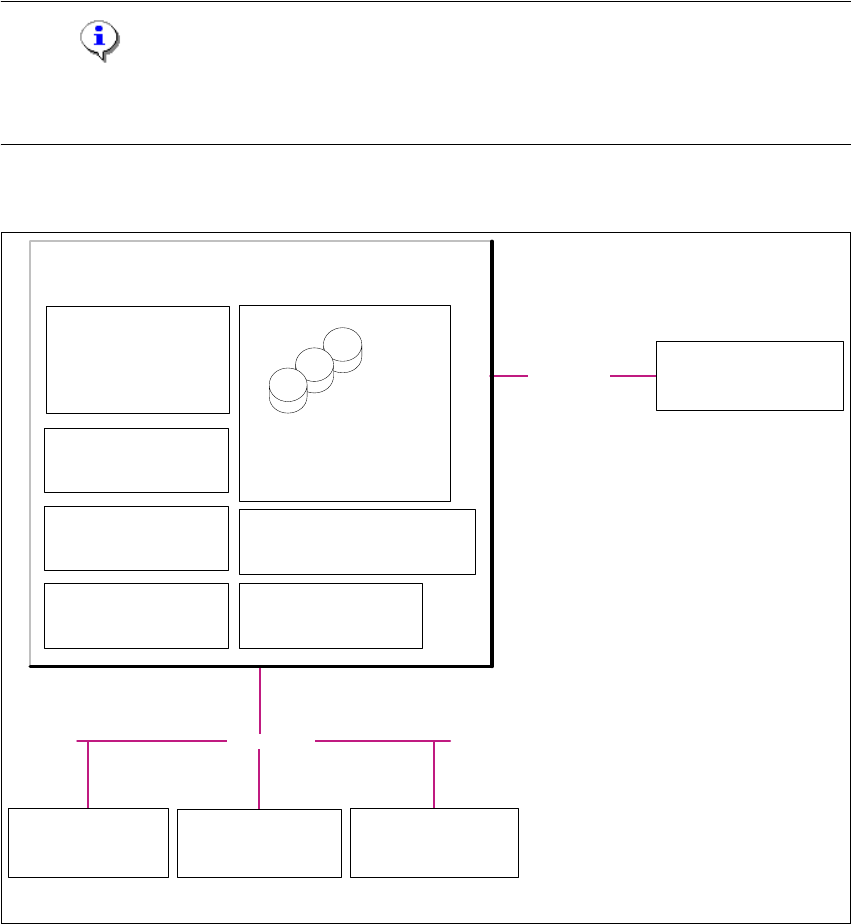
SIPLACE Explorer is installed on the existing SIPLACE line server, with all system components.
SIPLACE Pro and OIS/SIS are also installed on this SIPLACE line server. 2
NOTE
Please note that this installation variant only allows you to monitor one application with up to 7
machines- 2
The following overview shows an example of the "Single Line Layout" installation: 2
2
Fig. 2.3 - 3 Installation Variants: Single Line Layout
2
Customer LAN
- SIPLACE Pro Server
- SIPLACE Pro Desk
- Line Control Server /GUI
- OIS Server / OIS Client
- SIS Server
SIPLACE Explorer
Webpages:
- MS internet Explorer
- SIPLACE Pro DB
- SIPLACE Explorer DB
- SIPLACE Explorer Factory DB
- OIS DB
- SIS DB
SIPLACE Line Server
(already existing)
SIPLACE Explorer
Factory Host
SIPLACE Explorer Webserver:
-Tomcat
- Java 2SE
Report Generation :
- MSXM
- Excel
SQL Server
Customer Computer
SIPLACE Explorer Websites:
- MS Internet Explorer
SIPLACE Explorer
Runtime Environment
SIPLACE LAN
Station Computer:
- OIS Client
- SW Software, platform I
Multi Line
Station Computer:
- OIS Client
-SW Software, platform II
Station Computer:
- OIS Client
- SW Software, platform III