00195425-01.pdf - 第21页
Ins tall ati on and Confi gur ation G uid e SI PLA CE Exp lorer 2 Sys tem Comp onen ts an d Con fig urati ons Edi tion 05 /2007 E N 2.3 S tan dard In stal latio n of SI P LA CE Explo rer 21 2.3. 3 Single Lin e Layo ut Th…
2 System Components and Configurations Installation and Configuration Guide SIPLACE Explorer
2.3 Standard Installation of SIPLACE Explorer Edition 05/2007 EN
20
2
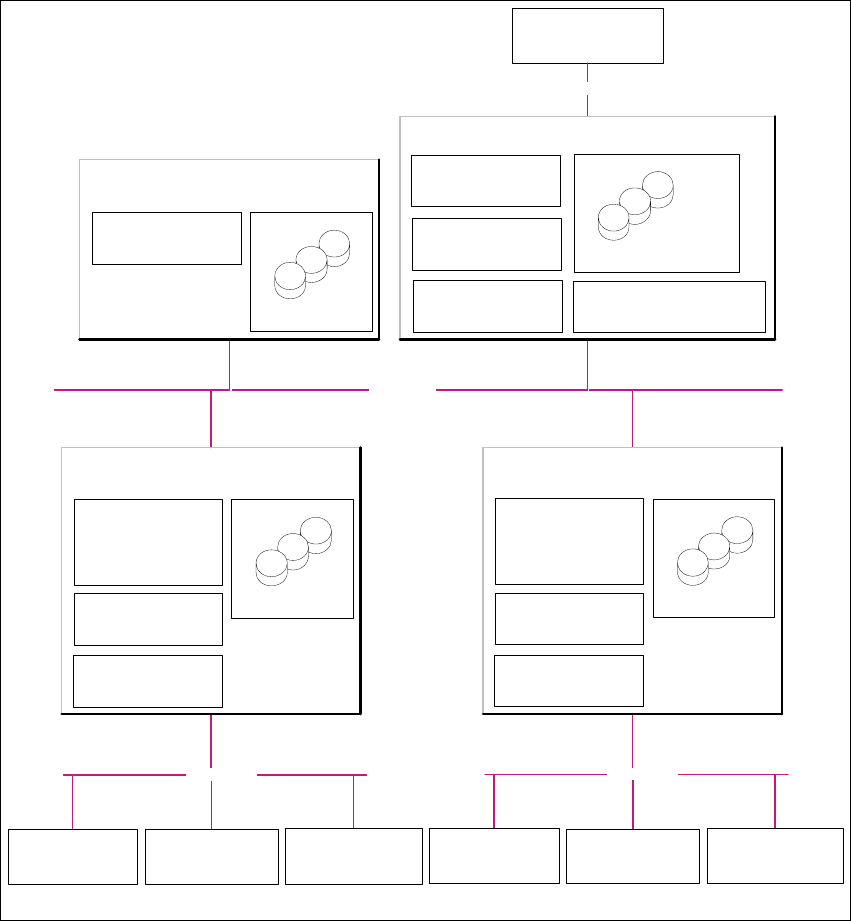
Fig. 2.3 - 2 Installation Variants: Factory Layout Dl
Customer LAN
- Line Control Server /GUI
- SIPLACE Pro Desk
- OIS Server/ OIS Client
- SIS Server
SIPLACE Explorer
Webpages:
- MS internet Explorer
- OIS DB
- SIS DB
SIPLACE Line Server
(already existing)
SIPLACE Explorer
Webpages:
- MS internet Explorer
SIPLACE Explorer Server
SIPLACE Explorer
Factory Host
SIPLACE Explorer Webserver:
- Tomcat
- Java 2SE
Report Generation :
- MSXM
- Excel
SQL Server
- SIPLACE Explorer DB
- SIPLACE Explorer Factory DB
SQL Server
- SIPLACE Pro Server
- SIPLACE Pro Desk
- SIPLACE Pro DB
Factory- Server
(already existing)
SQL Server
Customer Computer
SIPLACE Explorer Websites:
- MS Internet Explorer
Customer LAN
SIPLACE Explorer
Runtime Environment
SIPLACE LAN
Station Computer:
- OIS Client
- SW Software, platform I
Multi Line "A"
Station Computer:
- OIS Client
- SW Software, platform II
Station Computer:
- OIS Client
- SW Software, platform III
- Line Control Server /GUI
- SIPLACE Pro Desk
- OIS Server/ OIS Client
-SIS Server
SIPLACE Explorer
Webpages:
- MS internet Explorer
-OIS DB
-SIS DB
SIPLACE Line Server
(already existing)
SQL Server
SIPLACE Explorer
Runtime Environment
SIPLACE LAN
Station Computer:
- OIS Client
- SW Software, platform I
Multi Line "B"
Station Computer:
- OIS Client
- SW Software, platform II
Station Computer:
- OIS Client
- SW Software, platform III
Installation and Configuration Guide SIPLACE Explorer 2 System Components and Configurations
Edition 05/2007 EN 2.3 Standard Installation of SIPLACE Explorer
21
2.3.3 Single Line Layout
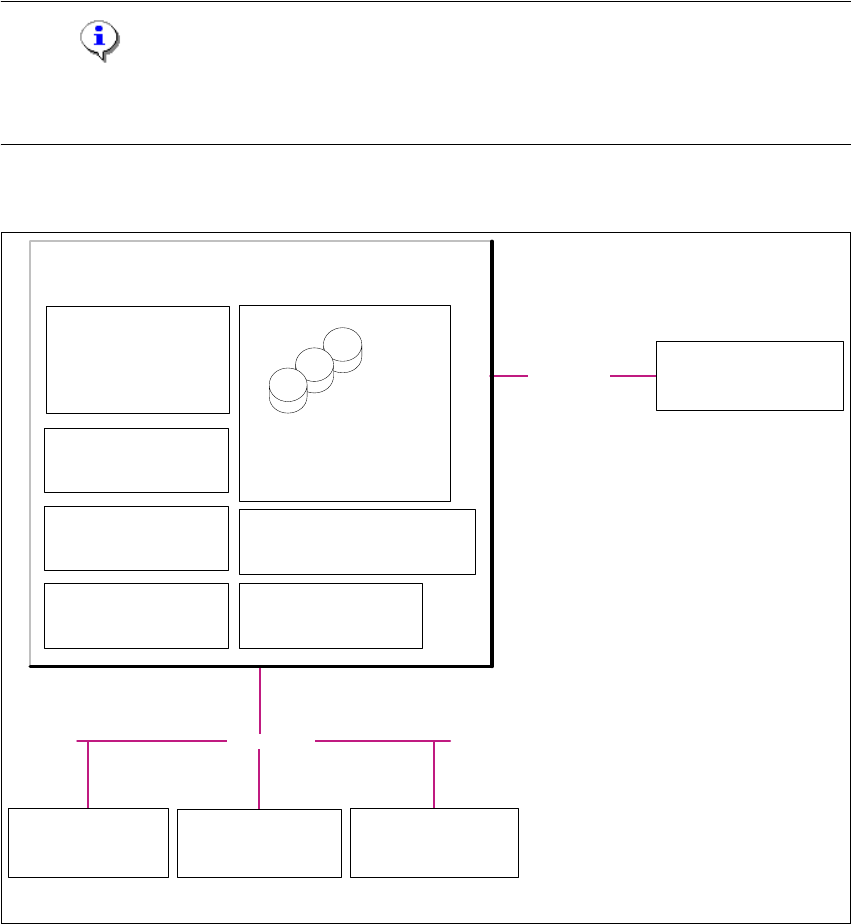
The Single Line Layout installation variant supports exactly one multi line. 2
SIPLACE Explorer is installed on the existing SIPLACE line server, with all system components.
SIPLACE Pro and OIS/SIS are also installed on this SIPLACE line server. 2
NOTE
Please note that this installation variant only allows you to monitor one application with up to 7
machines- 2
The following overview shows an example of the "Single Line Layout" installation: 2
2
Fig. 2.3 - 3 Installation Variants: Single Line Layout
2
Customer LAN
- SIPLACE Pro Server
- SIPLACE Pro Desk
- Line Control Server /GUI
- OIS Server / OIS Client
- SIS Server
SIPLACE Explorer
Webpages:
- MS internet Explorer
- SIPLACE Pro DB
- SIPLACE Explorer DB
- SIPLACE Explorer Factory DB
- OIS DB
- SIS DB
SIPLACE Line Server
(already existing)
SIPLACE Explorer
Factory Host
SIPLACE Explorer Webserver:
-Tomcat
- Java 2SE
Report Generation :
- MSXM
- Excel
SQL Server
Customer Computer
SIPLACE Explorer Websites:
- MS Internet Explorer
SIPLACE Explorer
Runtime Environment
SIPLACE LAN
Station Computer:
- OIS Client
- SW Software, platform I
Multi Line
Station Computer:
- OIS Client
-SW Software, platform II
Station Computer:
- OIS Client
- SW Software, platform III
2 System Components and Configurations Installation and Configuration Guide SIPLACE Explorer
2.3 Standard Installation of SIPLACE Explorer Edition 05/2007 EN
22