00195425-01.pdf - 第38页
3 In stalli ng SIP LAC E Expl orer Ins tall ati on and Confi gur ation Guid e SIPL ACE E xplo rer 3. 2 U pd ate In stal la tio n of SIP LA CE E xpl ore r 2.2 Ed iti on 05/2 00 7 EN 38 → In this case, you can either ent e…
Installation and Configuration Guide SIPLACE Explorer 3 Installing SIPLACE Explorer
Edition 05/2007 EN 3.2 Update Installation of SIPLACE Explorer 2.2
37
3
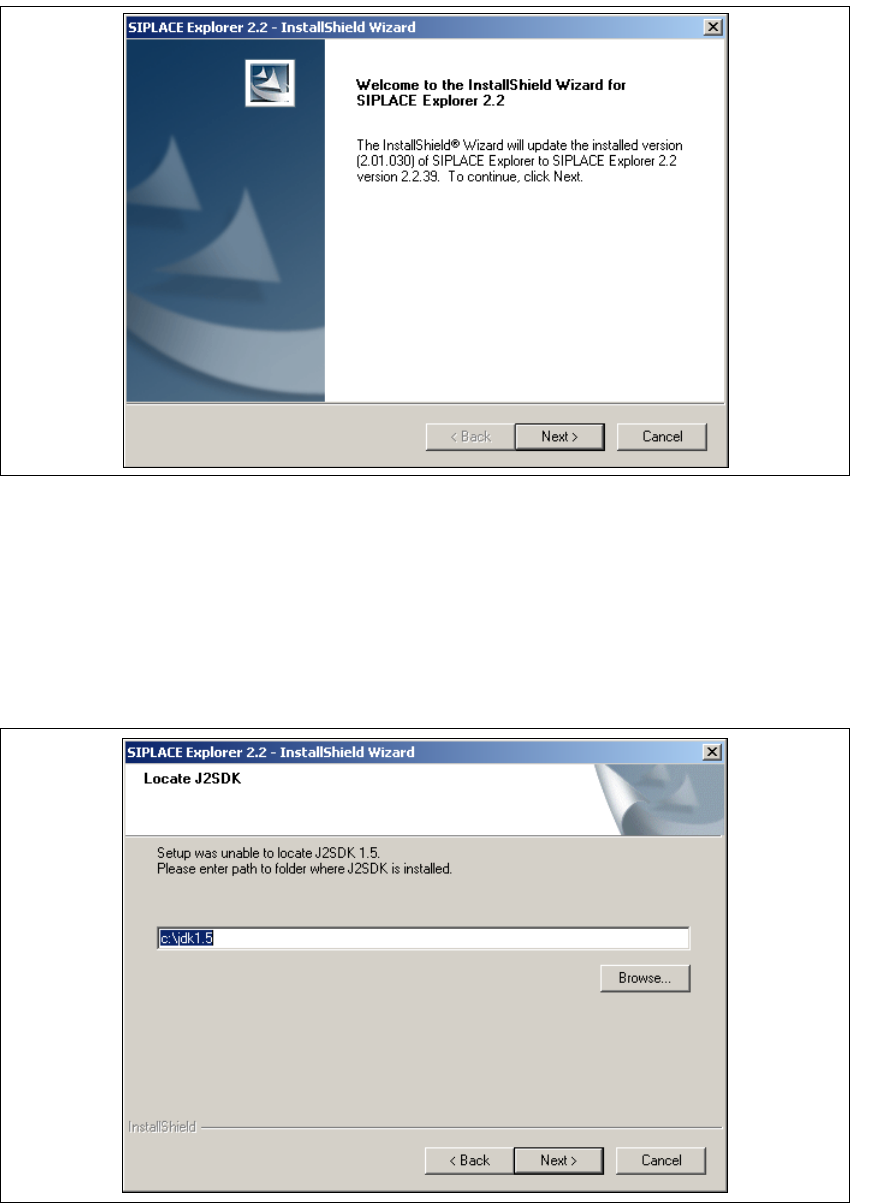
Fig. 3 - 14 SIPLACE Explorer welcome
→ Exit all other programs and then click on Next.
→ Before you can run SIPLACE Explorer, J2SE Runtime Environment 5.0. update 7 or higher
must be installed on your PC. If it is already installed on your PC, installation will begin
automatically.
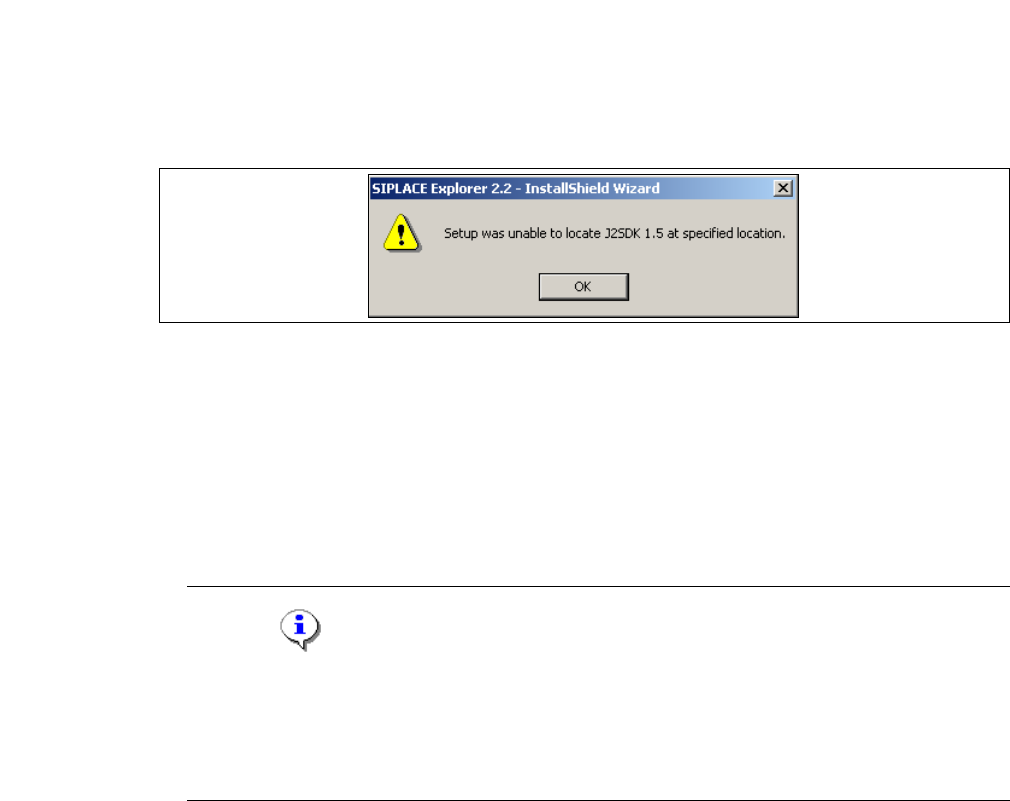
→ However, if the installation procedure is unable to find J2SE RTE 5.0.07, the Locate J2SDK
dialog box will appear on your screen.
3
Fig. 3 - 15 SIPLACE Explorer setup - locate JAVA 2 SDK
3 Installing SIPLACE Explorer Installation and Configuration Guide SIPLACE Explorer
3.2 Update Installation of SIPLACE Explorer 2.2 Edition 05/2007 EN
38
→ In this case, you can either enter the path to the J2SE Runtime Environment 5.0 folder directly
into the text field or click on the Browse button and use the Open File dialog box to find the
J2SE Runtime Environment 5.0 folder.
→ If you failed to correctly specify the path to the folder in which J2SE Runtime Environment 5.0
is installed, you will see the following message.
3
Fig. 3 - 16 SIPLACE Explorer setup - unable to locate J2SE
→ Click OK to return to the previous screen. SIPLACE Explorer requires J2SE Runtime
Environment 5.0 to be installed prior to installation of SIPLACE Explorer.
→ At this point, you can either try to specify the J2SE Runtime Environment 5.0 folder again, or
click Cancel to exit the installation of SIPLACE Explorer.
→ If you have selected Cancel, install the version of J2SE Runtime Environment 5.0 included on
the Support Media DVD and then restart the installation of SIPLACE Explorer.
NOTE
If you have the J2 Runtime environment (not J2SE Runtime Environment 5.0) - available from
Sun Microsystems at http://java.sun.com/j2se - installed on your system, the website
generated by the SIPLACE Explorer Website Builder will not function properly as it is based
on JSP, which requires J2SE Runtime Environment 5.0. 3
→ The installation of SIPLACE Explorer 2.2 will be continued once J2SE Runtime Environment
5.0 has been localized. The Setup Status dialog box will open.
Installation and Configuration Guide SIPLACE Explorer 3 Installing SIPLACE Explorer
Edition 05/2007 EN 3.2 Update Installation of SIPLACE Explorer 2.2
39
→ The actual installation of SIPLACE Explorer V2.2 will begin.
3
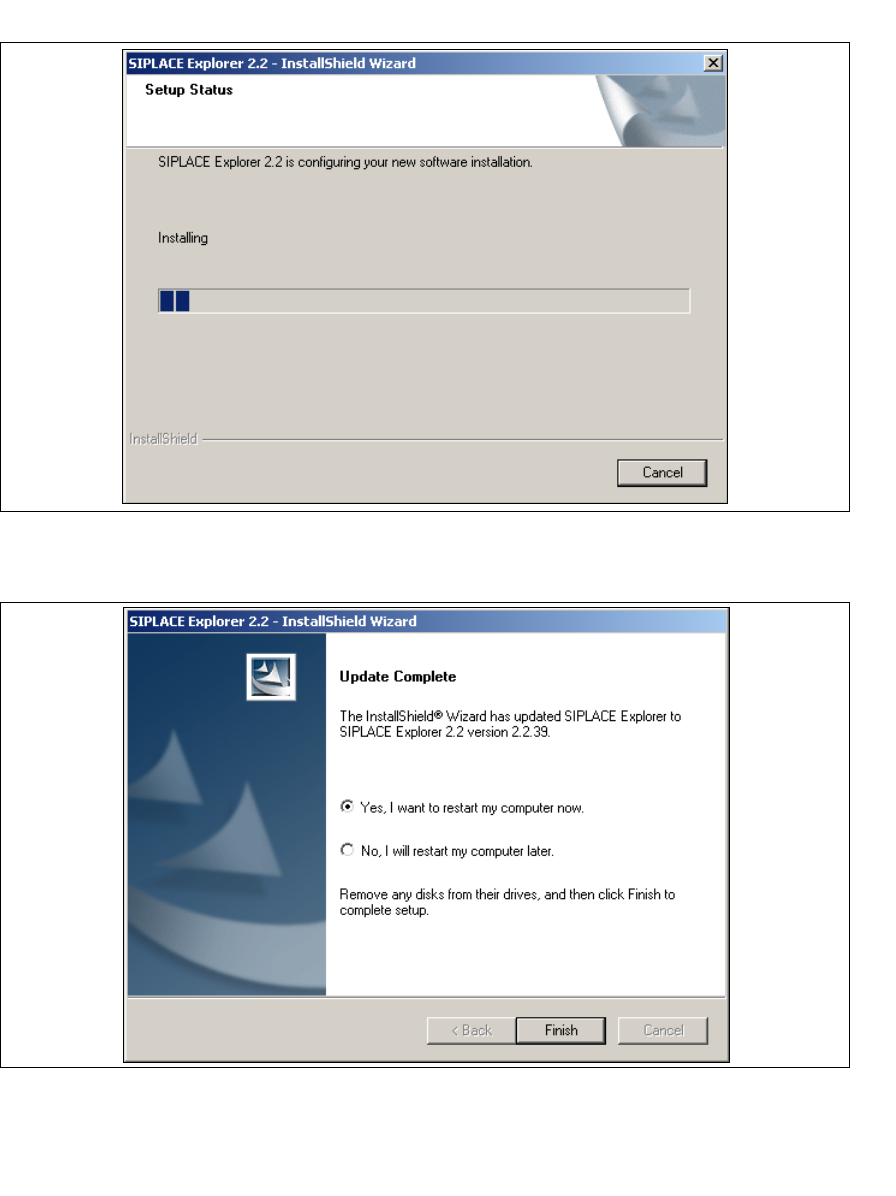
Fig. 3 - 17 SIPLACE Explorer setup - setup status
→ Once the installation procedure has finished, the following dialog box will open.
3
Fig. 3 - 18 SIPLACE Explorer Setup - Installation complete
→ Click on Finish. After you have rebooted your computer, the update version of SIPLACE
Explorer 2.2 will be available for use. Follow the instructions at “Starting SIPLACE Explorer” on
page 40.