SIPLACE D4 规格说明书英文版 - 第26页
26 SIPLACE Software SIPLACE offers ho listic solu- tions based on modular soft- ware tools for SM T machine, line and production manage- ment: the SIPLACE software suite . Product definition, opti- mization and line con …

25
Vision Sensor Technology
PCB Position Recognition
Bad Board Position Recognition
Ink spot criteria
Methods • Synthetic fiducial recognition method
• Mean grayscale value
• Histogram method
•Template matching
Shapes and sizes of fiducials/structures for
synthetic fiducials
other methods
For dimensions of synthetic fiducials, see page 24
min. 0.3 mm
max. 5 mm
Masking material good coverage
Recognition time depends on the method: 20 ms - 200ms
Description
In the cluster technology
each subpanel is assigned an
ink spot. If this is present
during the measurement via
the PCB vision module, the
corresponding subpanel is
populated.
With this function it is pos-
sible to eliminate costs due to
unnecessary population of
faulty subpanels.
Technical data for PCB position recognition
PCB fiducials
Local fiducials
Library memory for recognition
of bad panels
up to 3 (subpanels and multiple panels)
up to 6 for the Long board option (Optional PCB fiducials
are output by the optimization.)
up to 2 per PCB (may be of different type)
up to 255 fiducial types per subpanel
Image analysis Edge detection method (Singular feature) based on gray-
scale values
Lighting method Front lighting
Fiducial recognition time 0.1 s
Field of vision 5.78 x 5.78 mm

26
SIPLACE Software
SIPLACE offers holistic solu-
tions based on modular soft-
ware tools for SMT machine,
line and production manage-
ment: the SIPLACE software
suite.
Product definition, opti-
mization and line control
Fast, fault-free introduction
of products and optimum
utilization of production lines
are essential to maximize
production output. The pro-
grams from the SIPLACE soft-
ware suite allow you to easily
program products, fine-tune
the programs you have
created and then find the
balance for them within your
SMT production lines.
Production monitoring &
process control
To achieve the production
targets that are set, it is
important to constantly mon-
itor and check the production
facilities. The SIPLACE soft-
ware suite contains monitor-
ing products tailored to suit
the user group. These signal
immediately if limits are
exceeded on the machine or
the production line.
Set-up verification &
traceability
Set-up errors lead to series
errors. The user-friendly
SIPLACE software programs
help you to avoid such errors,
and thus ensure high quality
in your electronics produc-
tion.
The benefits of the SIPLACE
software suite at a glance:
• Fast programming and
error detection
• Reduces changeover times
and stoppages
• Ensures optimum utiliza-
tion of your production
line's productivity
• Real-time information
from the production area
• Incredibly fast distribution
of information
• Optimum use of resources
• Timely notification when
production materials need
to be re-ordered
• Coordination of mainten-
ance
Example times for SIPLACE Pro
Average time for programming a PCB 10 minutes
Minimum line optimization time < 1 minute
27
SIPLACE Software
SIPLACE software product Standard Option
Product definition,
optimization and
line control
SIPLACE Pro
A single application for all programming tasks
X
SIPLACE CAD
Fast and easy data conversion
X
SIPLACE SiCluster
Fully automatic product grouping
X
SIPLACE EDM
Straightforward data management for placement programs
X
Production moni-
toring & process
control
SIPLACE OIS
Operator Information System
X
SIPLACE Explorer
Line monitoring system
X
SIPLACE Maintenance Manager
Intelligent software for coordinating maintenance
X
Set-up verification
& traceability
SIPLACE Setup Center
Avoids set-up errors with reliable set-up verification
X
SIPLACE Traceability
Traceability of the placement processes
X
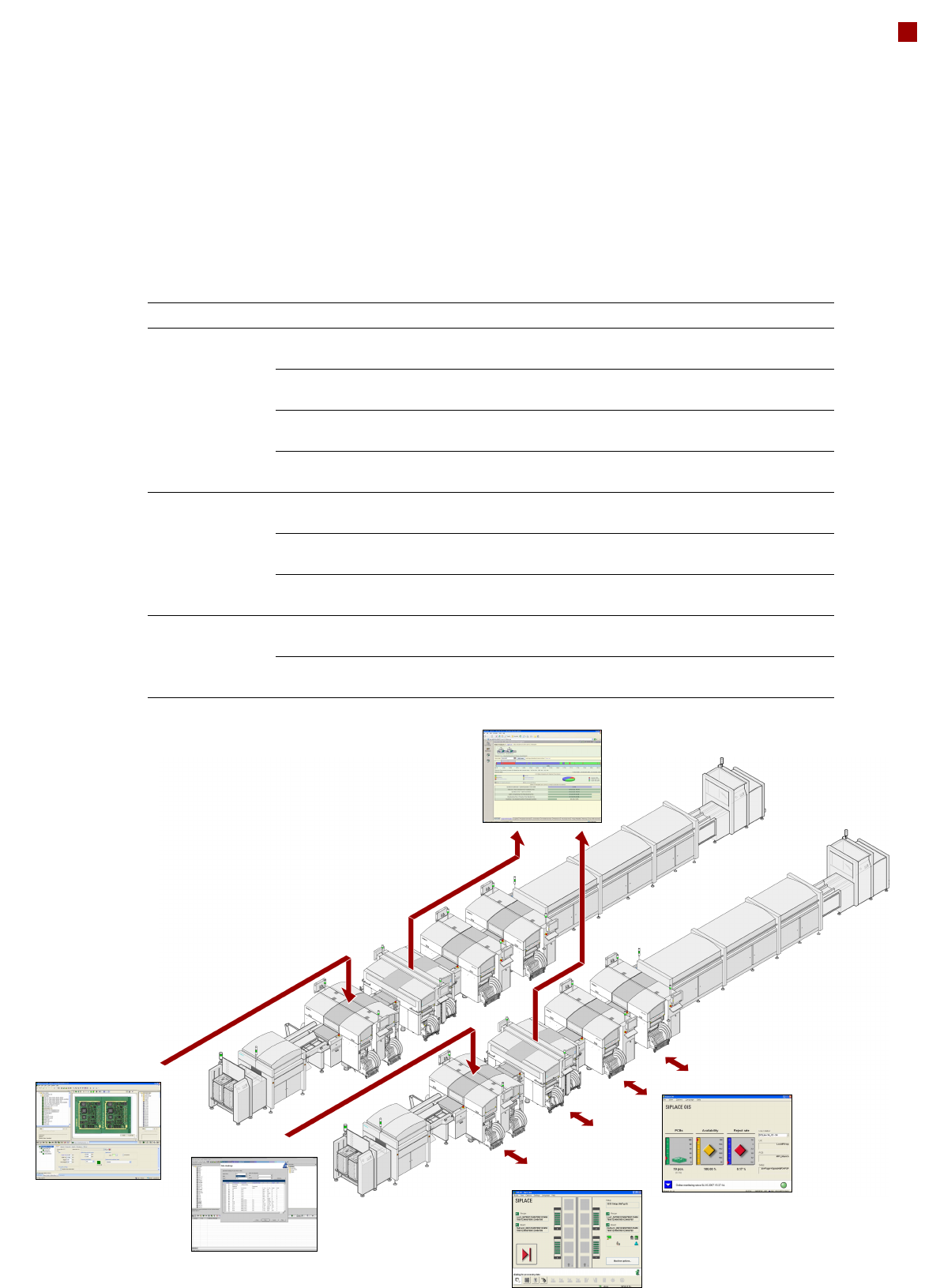
Production monitoring:
SIPLACE Explorer
Product definition:
SIPLACE Pro
Station
monitoring:
SIPLACE OIS
Station control:
SIPLACE station software
Product definition:
SIPLACE Pro