00900002-01_UM_ASM-ProcessLens_EN.pdf - 第34页
2 Safety 2.5 Safety features 34 Instruction Guide ASM ProcessLens 02/2017 2.5.2 Switches and buttons on the machine 2.5.2.1 Position of switches and buttons on the machine Fig.27: Position of buttons and switches 1 Star…

2 Safety
2.5 Safety features
Instruction Guide ASM ProcessLens 02/2017 33
Function
The front protective hood cannot be opened (it is locked) unless the user actively presses the soft-
ware button "Open front door" from the ASM SPI GUI inspection software.
► Close the front protective hood and press the software button "Open front door".
► Press the START button (see item 1 in fig. "Position of buttons and switches" [}34]).
The software sequence for the START button as follows:
●
The software program will check if the front protective hood is closed from the safety door lock
close status and the EMERGENCY STOP button status.
●
If the front protective hood is closed and the EMERGENCY STOP button is not activated, the
software will lock the safety door lock and reset the safety controller.
●
The software will check the safety relay interlock is cleared before enabling the motors.
If the front door opens, the power supply to the axes will be immediately interrupted. The axes stop
moving.
See also
2 2.5.2.1 "Position of switches and buttons on the machine" [}34]
2 Safety
2.5 Safety features
34 Instruction Guide ASM ProcessLens 02/2017
2.5.2 Switches and buttons on the machine
2.5.2.1 Position of switches and buttons on the machine
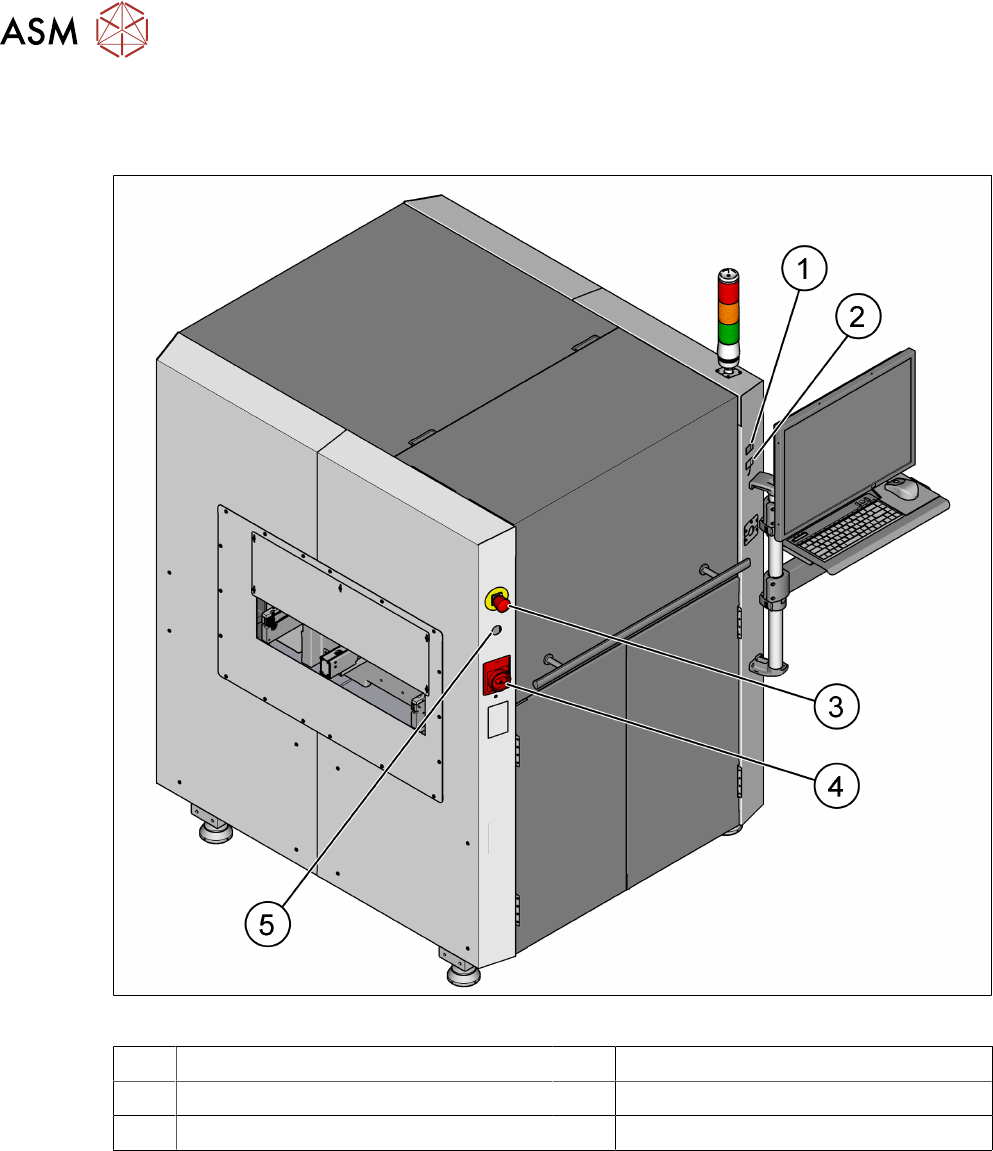
Fig.27: Position of buttons and switches
1 Start button (green) 2 Stop button (black)
3 EMERGENCY STOP button 4 Main switch
5 Key switch
2 Safety
2.5 Safety features
Instruction Guide ASM ProcessLens 02/2017 35
2.5.2.2 Description of functions
Main power switch in ON position
After switching on the main power switch, 24 V DC and 240 V AC are present.
Main power switch in OFF position
(see 2.5.2.1 "Position of switches and buttons on the machine" [}34])
The main power switch disconnects the single phase from the power supply.
DANGER
Death, serious injury or considerable damage may result if these machines are
handled incorrectly
► Always follow the applicable accident prevention and safety regulations (particularly
DIN EN 60204, part 1 or IEC 60204, part 1) and the safety regulations in your own
country.
► The safety door to the power supply must ONLY be opened by appropriately qualified
and trained personnel.
Start button, green
(see 2.5.2.1 "Position of switches and buttons on the machine" [}34])
After switching on the main power switch and having started the inspection software press the start
button to set ASM ProcessLens into regular inspection mode. Do the same if the EMERGENCY
STOP had been engaged and is now released or if the protective hood had been opened and is
now closed.
Stop button, black
(see 2.5.2.1 "Position of switches and buttons on the machine" [}34])
This button is used to stop the machine and will perform the following tasks:
●
Stop the production operations and puts the machine in idle mode.
●
The control power is still present.
EMERGENCY STOP button with forced locking
(see 2.5.2.1 "Position of switches and buttons on the machine" [}34])
The EMERGENCY STOP button is red and latches in the ON position when pressed. When you
press the EMERGENCY STOP button, the switching contact of safety interlock module opens.
The signalling contact of the EMERGENCY STOP button opens.
NOTICE
The inspection cycle is interrupted and can then either be continued or cancelled once the
machine is working correctly again.
NOTICE
ASM ProcessLens electrical diagrams
For details, please refer to the ASM ProcessLens electrical diagrams.