00900002-01_UM_ASM-ProcessLens_EN.pdf - 第72页
5 Working with the machine 5.1 Controls and displays 72 Instruction Guide ASM ProcessLens 02/2017 5.1 Controls and displays 5.1.1 Overview Fig.44: Controls and displays 1 Tower lamp with buzzer 2 LCD monitor 3 Keyboard …
5 Working with the machine
Instruction Guide ASM ProcessLens 02/2017 71
5 Working with the machine
For detailed description, please refer to the following documentations:
●
ProcessLens Recipe Generation [Item No.: 00900063-xx]
●
ProcessLens Technical Training [Item No.: 00900064-xx]
●
SPC Basic Training [Item No.: 00900065-xx]
●
SPC Advanced Training [Item No.: 00900066-xx]
●
Operator Manual ASM ProcessLens [Item No.: 00900067-xx]
CAUTION
Qualified or adequately trained personnel
► No one may start up, operate or otherwise work on the machine unless they have the
relevant qualification. Using the machine not as prescribed, could endanger life and
limb, and result in material damage. You will find further information about this in sec-
tion 1.1.5 "Failure to use as prescribed" [}9].
► The qualification must be proven by means of training courses or instructions for the
personnel. The instructions are to be given by personnel trained and authorized by
ASM SMT Solutions Team. For an overview of the training courses, refer to section
1.2 "Qualification and training of personnel" [}10].
5 Working with the machine
5.1 Controls and displays
72 Instruction Guide ASM ProcessLens 02/2017
5.1 Controls and displays
5.1.1 Overview
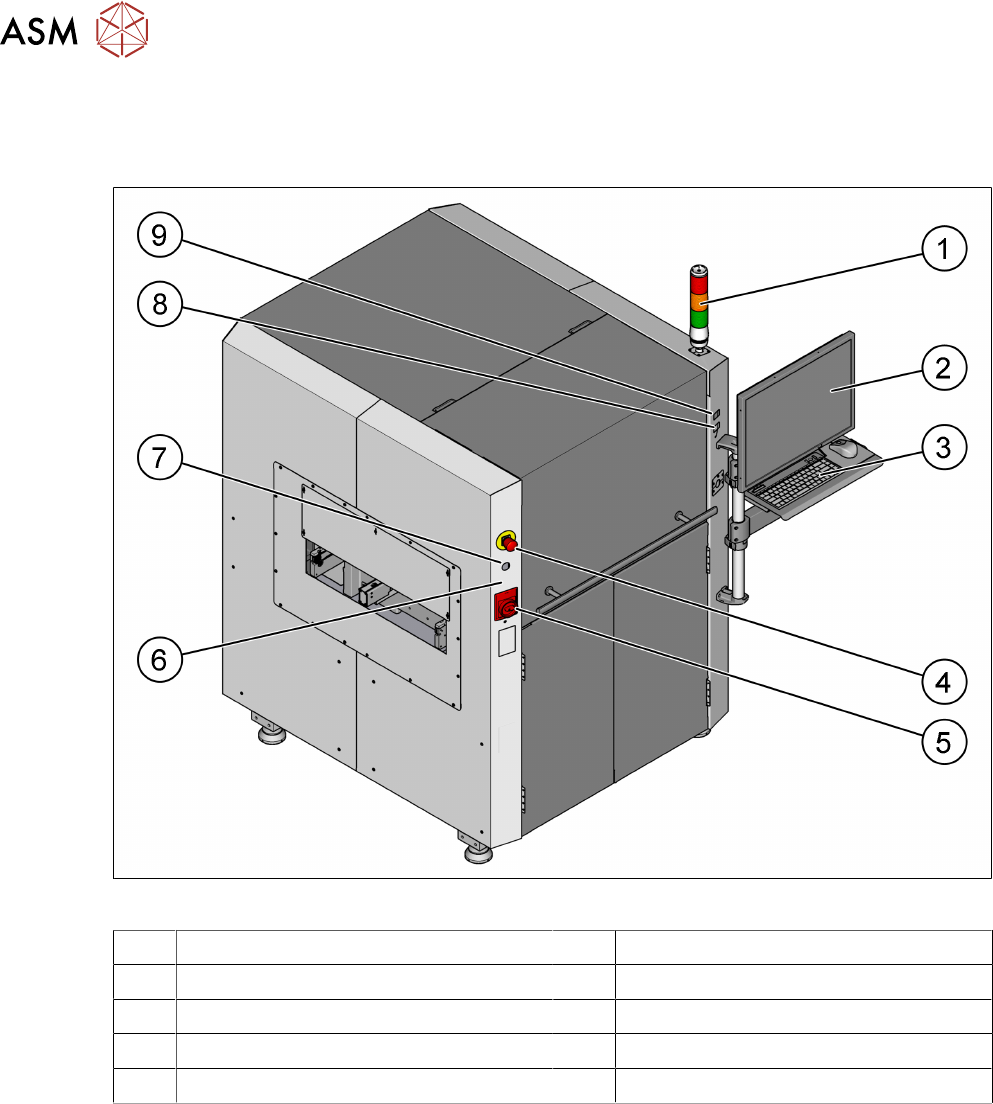
Fig.44: Controls and displays
1 Tower lamp with buzzer 2 LCD monitor
3 Keyboard and mouse 4 EMERGENCY STOP button
5 Main switch 6 Machine idle lamp
7 Key switch 8 Start button (green)
9 Stop button (black)
5 Working with the machine
5.1 Controls and displays
Instruction Guide ASM ProcessLens 02/2017 73
5.1.2 Description
All the controls can be reached by a 1.40 m tall person.
Programmable tower lamp with buzzer
(see fig. "Controls and displays" [}72])
The programmable tower lamp is used to signal operating statuses and malfunctions of the
machine. The buzzer indicates when an alert has occurred. The sequence of colors of the tower
lamps is red - amber - green.
The programmable tower lamp functionality allows the operator to assign a combination of the fol-
lowing tower lamps conditions to machine events:
Condition Possible states Frequency of flashes
Green On
Off
Pulse
Pulse Frequency (ms)
Amber On
Off
Pulse
Pulse Frequency (ms)
Red On
Off
Pulse
Pulse Frequency (ms)
Buzzer On
Off
Pulse Frequency (ms)
LCD monitor
(see fig. "Controls and displays" [}72])
There is a flat LCD monitor at the front side of the ASM ProcessLens machine. A LCD monitor with
a touch-sensitive surface (touchscreen) as an option is available.
Keyboard
(see fig. "Controls and displays" [}72])
The keyboard and mouse are located beneath the monitor.
CAUTION
Risk of collision of personnel with monitor and keyboard holder
Risk of collision of the front hood with the arm where the monitor, keyboard and mouse are
mounted.
Key switch ON/OFF
(see fig. "Controls and displays" [}72])
Turn on the control power manually and switch the conveyor into pass through mode when the PC
is down.
► Close the GUI program.
► Switch off the machine by the main switch.
► Wait for 30 sec and then switch on the machine at the main switch.
► Turn the key switch to the left and release to turn on the control power.
► Turn the key switch to the right.
The conveyor set to pass through running mode.
Main power switch in ON position
(see fig. "Controls and displays" [}72])
After switching on the main power switch, 24 V DC and 240 V AC are present.