00198608-02_SM_CP20P2_Kunde_EN.pdf - 第20页
3 Component camera, Z axis and component sensor 3.3 Replacing the Z axis cover 20 Service Manual SIPLACE SpeedStar (C&P20 P2) 01/2019 Removal CAUTION Sensitive lenses The transmitter and receiver unit lenses on the c…
3 Component camera, Z axis and component sensor
3.3 Replacing the Z axis cover
Service Manual SIPLACE SpeedStar (C&P20 P2) 01/2019 19
3.3 Replacing the Z axis cover
Parts
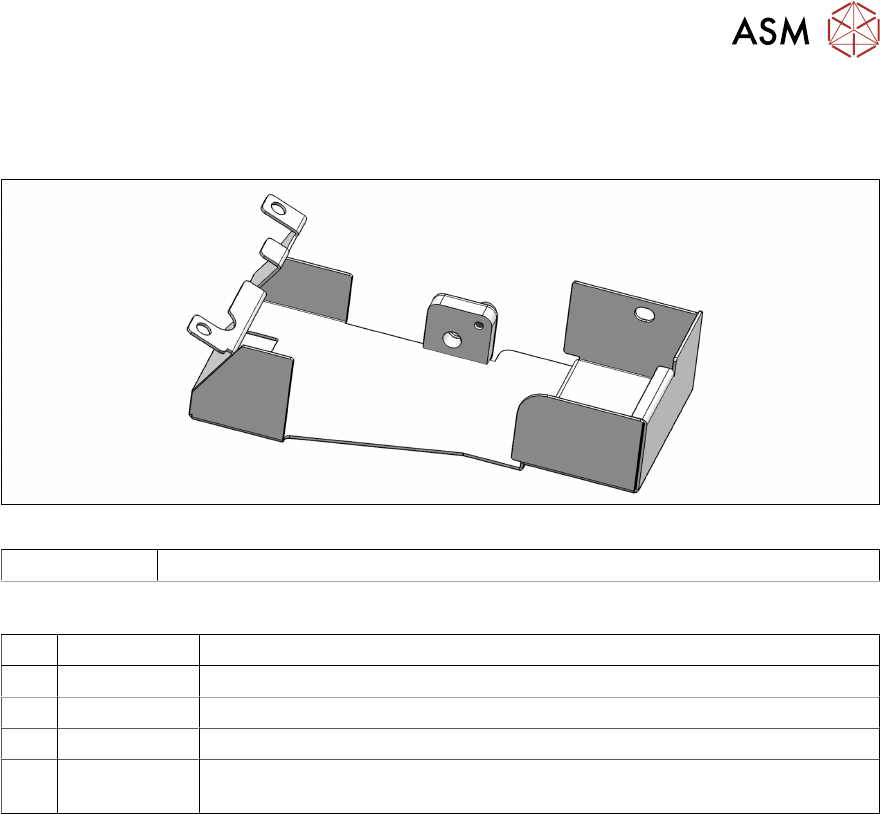
Fig.13: Z axis cover
03146048Sxx Bottom cover assembly C&P20P2
Equipment and tools
T07 03078400-xx Torque Screwdriver ESD 1.0-5.0 Nm
T47 00386253-xx Torque screwdriver ESD 0.4-1.0 Nm
T97 03075862-xx Torque Allen swap blade 1.5 mm TX8
T98 03171857-xx Torque Allen swap blade 1.5 mm TX10
T --- Tools for removing/fitting and calibrating the placement head, if needed
(see also the service manual for your machine)
Preparation
► Remove the head from the machine. For details about removing and fitting the placement
head, refer to the service manual for your machine.
Fit the head on the head mount [03056231‑xx].
3 Component camera, Z axis and component sensor
3.3 Replacing the Z axis cover
20 Service Manual SIPLACE SpeedStar (C&P20 P2) 01/2019
Removal
CAUTION
Sensitive lenses
The transmitter and receiver unit lenses on the component sensor are highly sensitive.
► Make sure that you do not damage or contaminate the lens system.
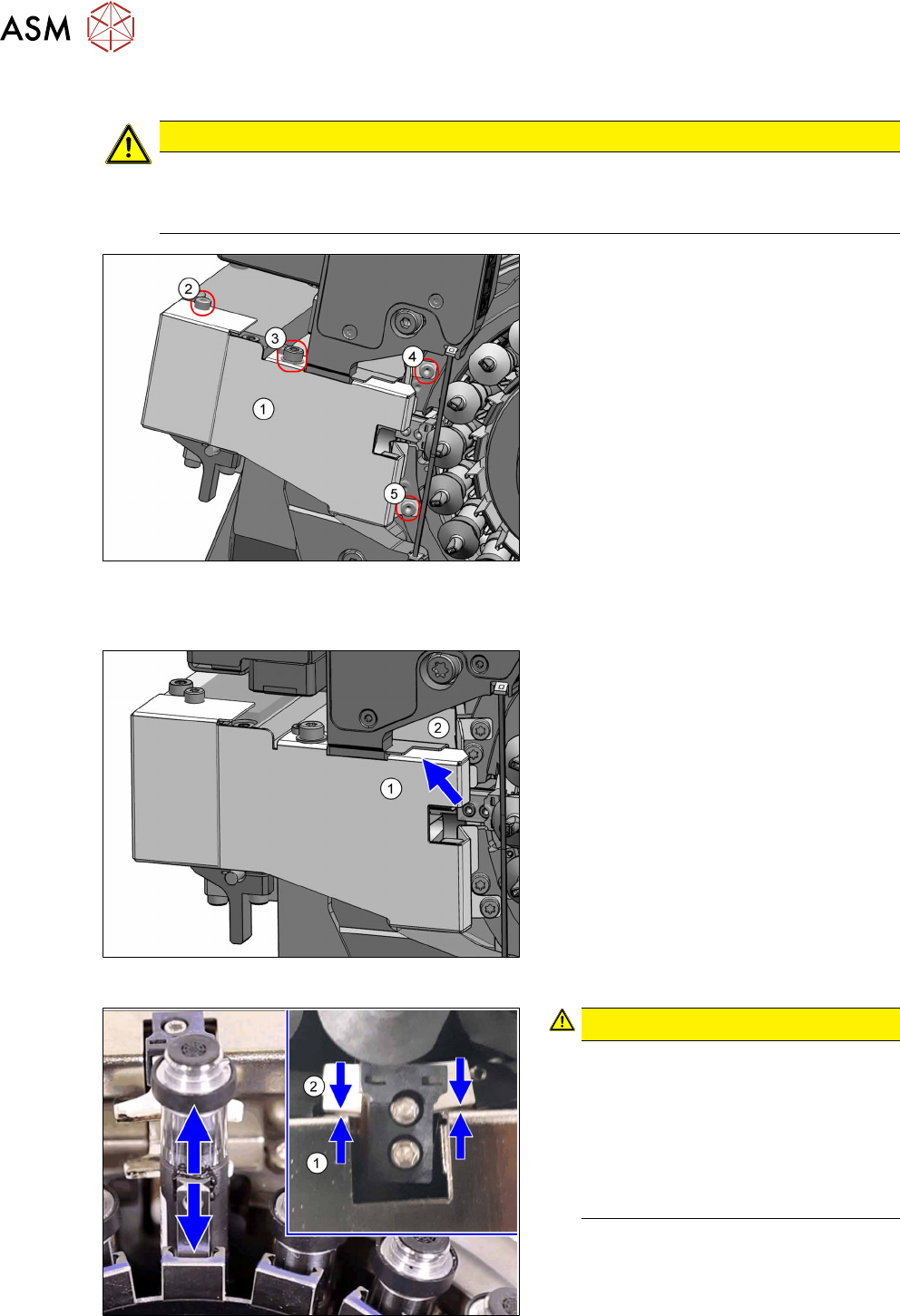
Fig.14: Fastening screws
► Remove the four fastening screws(2)
to(5) and then take the Z axis cover(1)
off.
Installation
Fig.15: Covers
► Place the Z axis cover(1) on the head.
Make sure that the Z axis cover is
under the component protection(2).
Fig.16: Checking the spacing
CAUTION!
Pay attention to the gap size (1)
During the following assembly of the
Z axis cover, pay attention to the gap
size between the Z axis cover (1) and
the jaws(2).
The jaws may not touch the Z axis
cover. If they do, realign the Z axis
cover.
.
3 Component camera, Z axis and component sensor
3.3 Replacing the Z axis cover
Service Manual SIPLACE SpeedStar (C&P20 P2) 01/2019 21
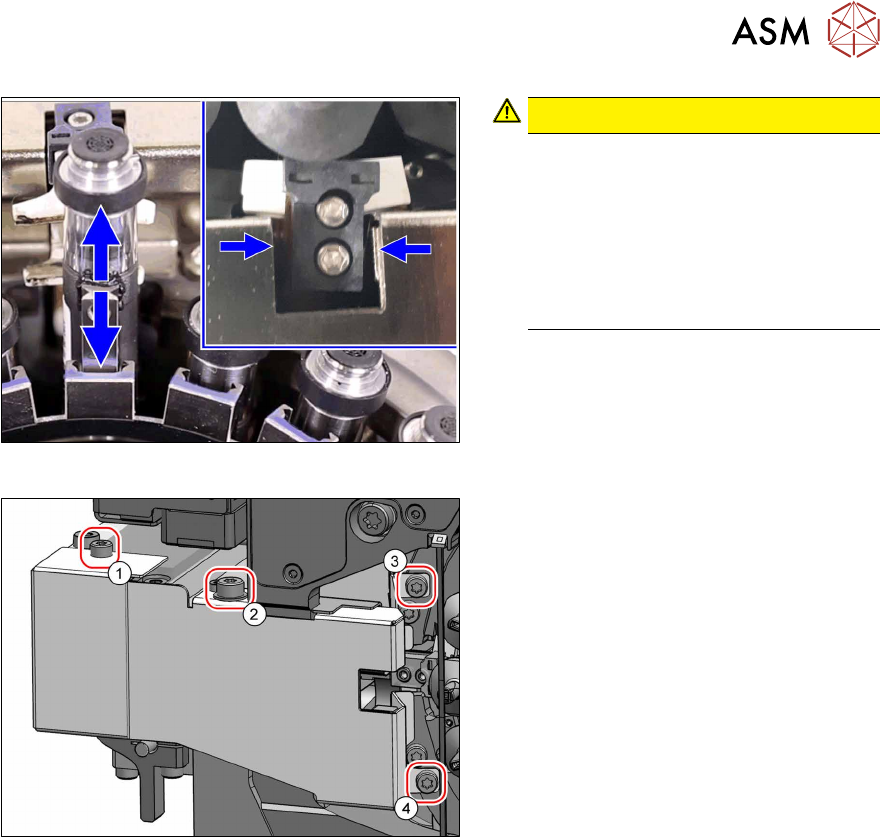
Fig.17: Checking the spacing
CAUTION!
Pay attention to the gap size (2)
During the following assembly of the
Z axis cover, pay attention to the gap
size on the left and right of the Z axis.
If the gap on the left and right is not
the same size, loosen the two screws
on the raceway ((3) and (4), see
below) and realign the Z axis cover.
.
Fig.18: Screws fastening the Z axis cover
► Fasten the Z axis cover with the four
screws. Pay attention to the different
sizes of screws, to the torques and the
gap sizes (see above).
1. Cheese head screws (TX8, 0.7Nm)
2. Cheese head screws (TX10, 1.3Nm)
3. Cheese head screws (TX8, 0.7Nm)
4. Cheese head screws (TX8, 0.7Nm)