00198608-02_SM_CP20P2_Kunde_EN.pdf - 第87页
11 Software functions 11.5 Zero Point Calibration of Pressure Control Valve Service Manual SIPLACE SpeedStar (C&P20 P2) 01/2019 87 Fig.127: Sensors and Functions menu (using the example of a CPP) ► Click the button.…
11 Software functions
11.3 Optical Nozzle Query (Nozzle Scanning)
86 Service Manual SIPLACE SpeedStar (C&P20 P2) 01/2019
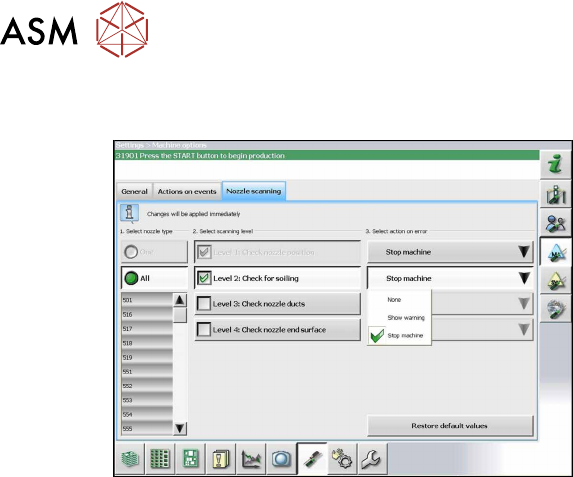
11.3 Optical Nozzle Query (Nozzle Scanning)
Fig.126: Nozzle scan
The nozzle scan can be enabled or disabled
in the software. Different scanning levels
and the corresponding actions for the errors
in individual nozzle types can be defined.
11.4 Calibrating the digital PRV
The digital PRV is part of the placement head and generates the vacuum and the blast air for the
pickup and placement process. The zero point calibration of the digital PRV must be performed on
initial startup by the customer and then checked again after replacement of the digital PRV or the
placement head and recalibrated if necessary.
The zero correction adjusts the pressure control valve to the ambient pressure.
11.5 Zero Point Calibration of Pressure Control Valve
The initialization (zero correction) of the pressure control valve (PRV) is performed at the same
time as the machine reference run.
To allow for the pressure control valve to work optimally, perform the following calibration steps in
the station software.
Perform this calibration in the following cases:
●
When exchanging the pressure control valve
●
When exchanging the placement head
●
When removing the placement head for maintenance and installing that same one afterwards
●
When error message 42466 is issued: Pressure control valve did not attain pressure threshold
for starting the Z axis.
Performing the calibration
ü Make sure that a calibration nozzle 6235 is inserted in segment 1 of the placement head.
► Switch over to the operator level Machine Service.
11 Software functions
11.5 Zero Point Calibration of Pressure Control Valve
Service Manual SIPLACE SpeedStar (C&P20 P2) 01/2019 87
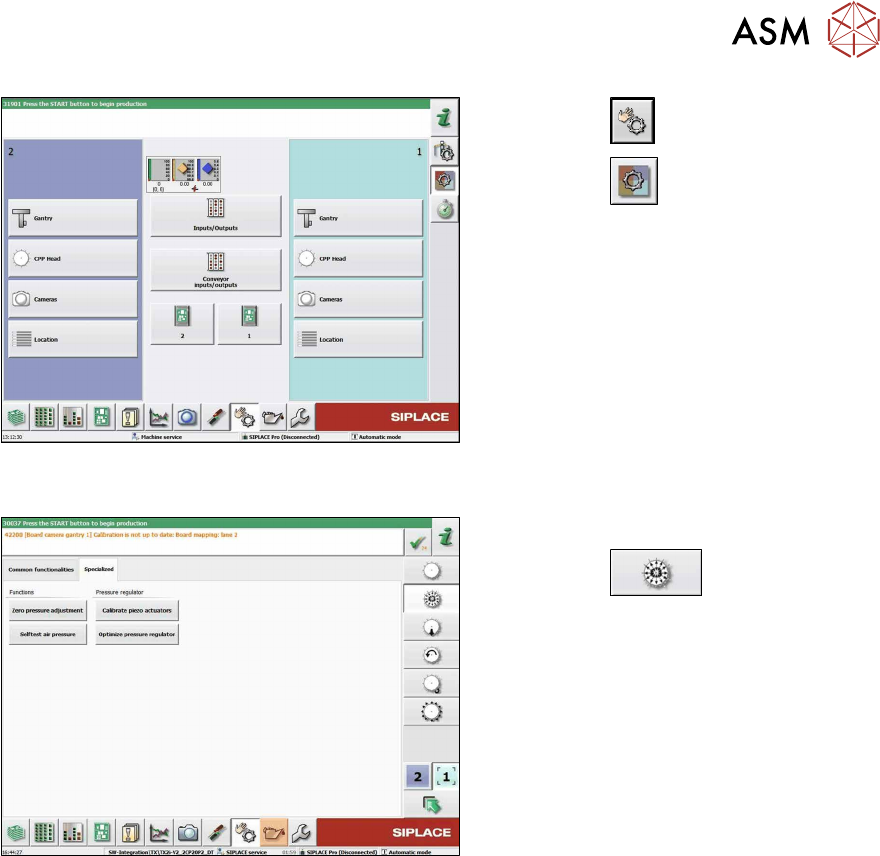
Fig.127: Sensors and Functions menu (using the example
of a CPP)
► Click the
button.
► Click the
button.
Fig.128: Set pressure to zero
► Select the placement heads affected.
► Click the
button.
► Go to the Specialized tab.
► Click on the Zero pressure adjust-
mentbutton.
► Click on the Calibrate piezo actuators
button.
► Click on theOptimize pressure regu-
lator button.
► Checking the embedded software and performing a download if needed (see LINK).

11 Software functions
11.5 Zero Point Calibration of Pressure Control Valve
88 Service Manual SIPLACE SpeedStar (C&P20 P2) 01/2019