1OM-1086-002.pdf - 第231页
5. 1 "TEST Opn. Mode" T ab An operation mode can be set for automatic operation. • • • • • Sheet Layout When the [TEST Opn. Mode] tab is pressed at the "OPN. MODE" window (submenu), the following tab …

Table 2E3
Tabs Description
TEST Opn. Mode This tab sheet enables the operator to set the machine in the
"PRINT", the "PASS", or the "TEST" mode.
Operation Mode This tab sheet enables the operator to set the position where
the dummy P.C.B. should be placed, the number of P.C.B.’s
to be printed (two-way printing) right after cleaning opera-
tion, the printing pressure which is prompted to cause an er-
ror in it, etc.
Printing Condition This tab sheet enables the operator to set the length of sol-
der paste in travelling direction of the squeegee and the mar-
gin for printing.
Auto Stop Setting This tab sheet enables the operator to set the number of
printing operations to issue an advance notice regarding the
end of squeegee life and the number of printing operations
to stop the automatic operation due to the end of squeegee
life.
0211-005
Chapter 2 5-23 Tg0582-PM-D1
5. "OPN. MODE" Submenu
5.1 "TEST Opn. Mode" Tab
An operation mode can be set for automatic operation.
••
••
• Sheet Layout
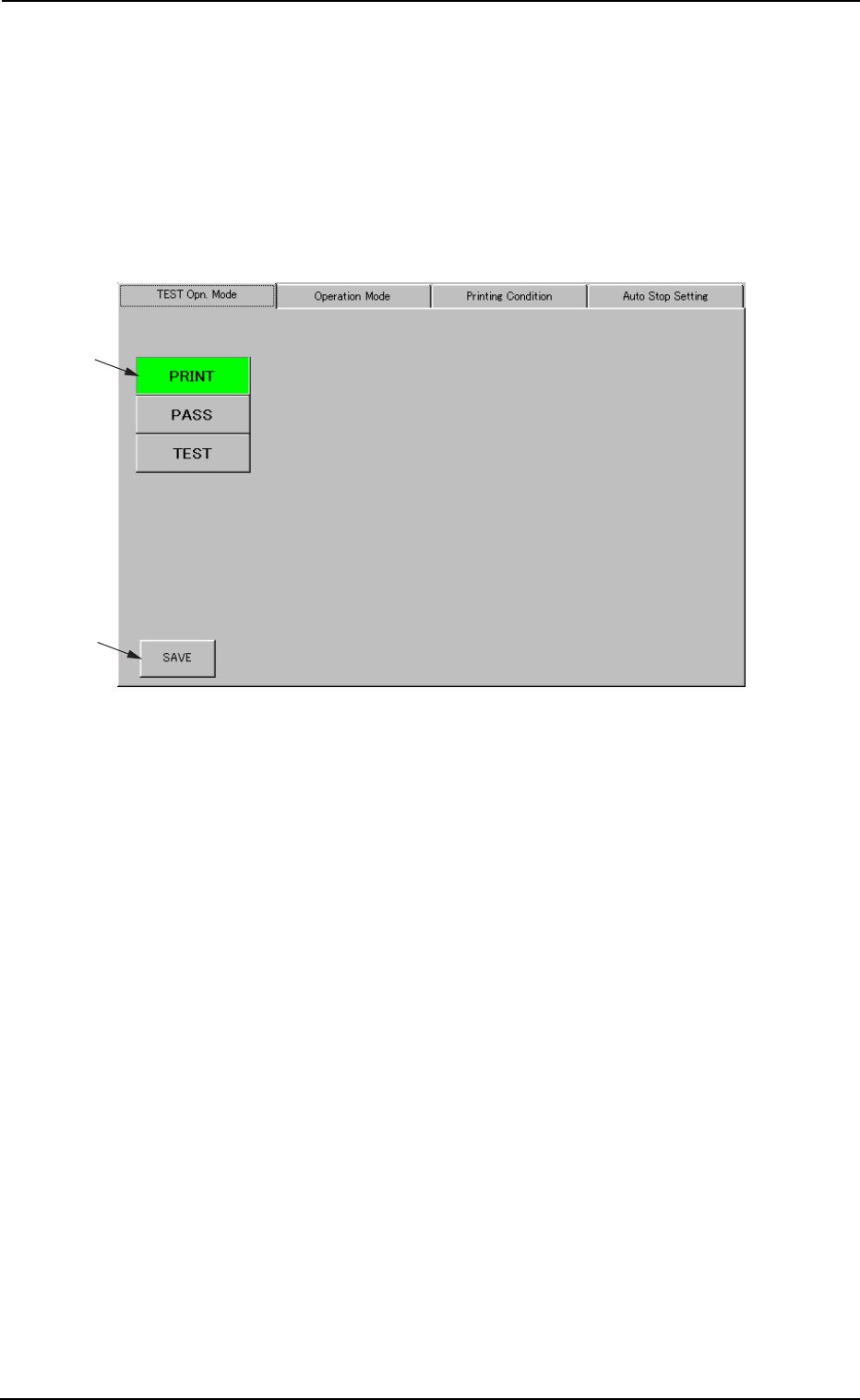
When the [TEST Opn. Mode] tab is pressed at the "OPN. MODE"
window (submenu), the following tab sheet appears inside the win-
dow.
Fig. 2E15-2 "TEST Opn. Mode" Tab Sheet
••
••
• Sheet Composition
*1 Operation mode Buttons
PRINT : The operation mode is changed to "PRINT".
PASS : The operation mode is changed to "PASS".
TEST : The operation mode is changed to "TEST".
*2 [SAVE] Button
Press this button after specifying the operation mode (described in
"*1").
The specified operation mode is saved on the machine side.
5.1 "TEST Opn. Mode" Tab
0211-005 Chapter 2 5-24 Tg0582-PM-D1
*1
*2
5.2 "Operation Mode" Tab
This tab sheet enables the operator to set the position where the dummy
P.C.B. should be placed, the number of P.C.B.’s to be printed (two-way
printing) right after cleaning operation, the printing pressures which cause
an error when the pressure reaches out of the specified ones, etc.
• Sheet Layout
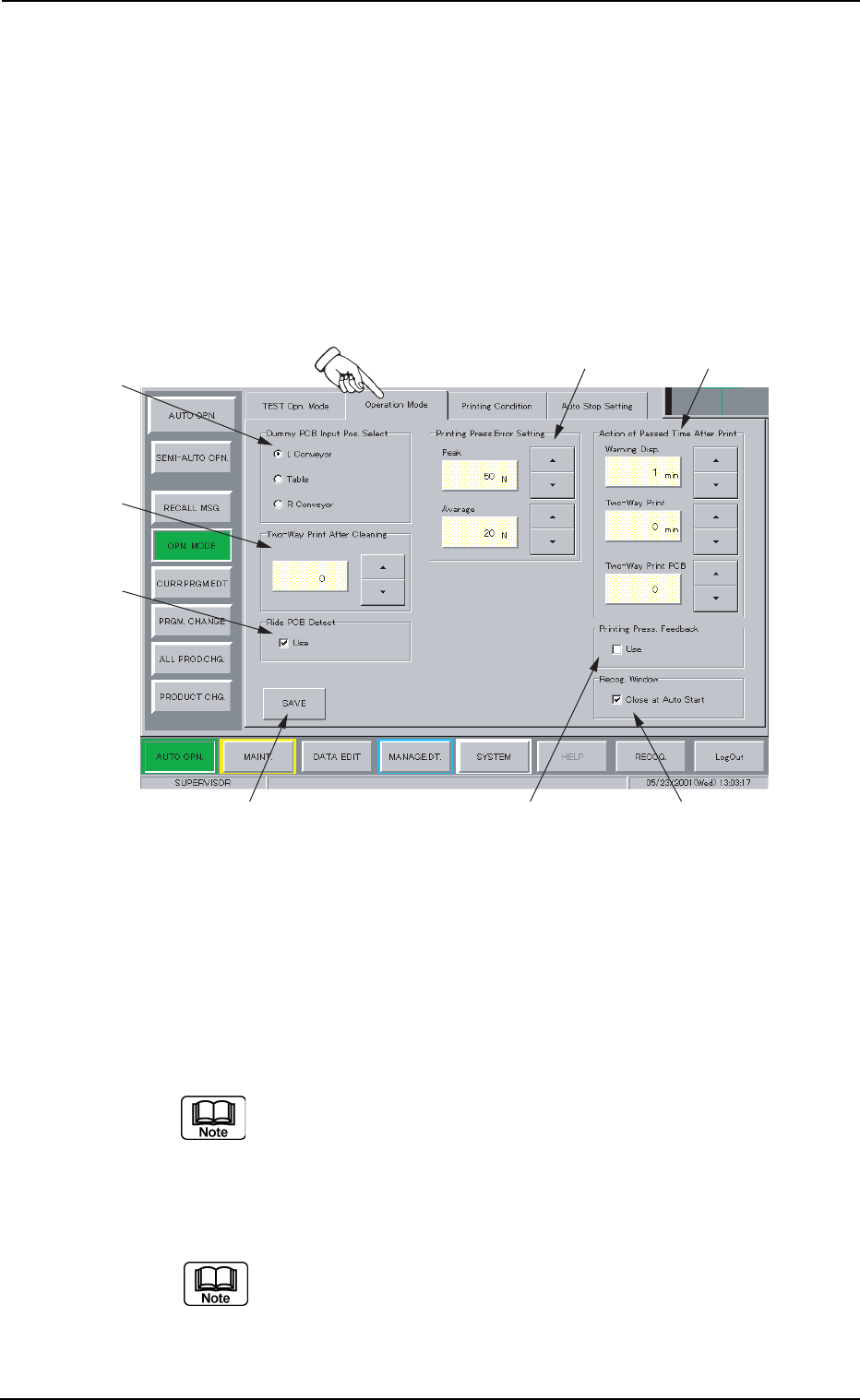
When the [Operation Mode] tab is pressed at the "OPERATION
MODE" window (submenu), the following tab sheet appears.
• Sheet Composition
*1 Dummy PCB Input Pos. Select
This enables the operator to select a position where the dummy
P.C.B. (P.C.B. used for teaching and testing) should be placed
manually.
Turn on the option button of the selected item. A dot (•)
appears inside the circle.
*2 Two-Way Print After Cleaning
This enables the operator to set the number of P.C.B.’s to be printed
(two-way printing) right after cleaning.
Press the up arrow on the right side of the spinner to make
the number change in increments of one. Pressing the
down arrow makes the number change in decrements of
one.
0211-005
Chapter 2 5-25 Tg0582-PM-D1
5.2 "Operation Mode" Tab
Fig. 2E16 "Operation Mode" Tab Sheet
*3 *5
*1
*2
*4
*8
*7
*6