1OM-1086-002.pdf - 第236页
5.4 "Auto Stop Setting" T ab This tab sheet enables the operator to set the number of printing opera- tions to issue an advance notice regarding the end of squeegee life and the percentage of printing operation…
5.3 "Printing Condition" Tab
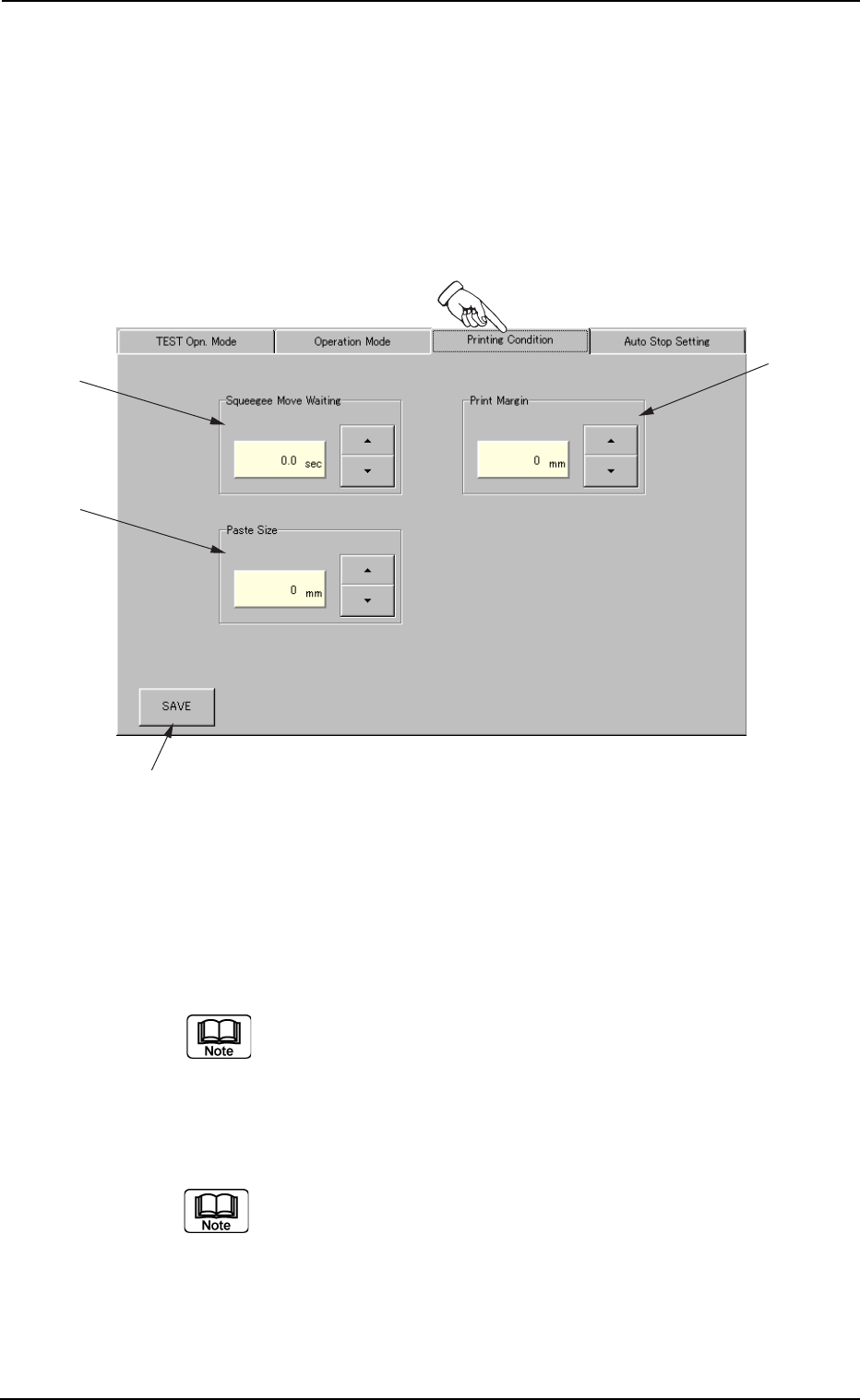
This tab sheet enables the operator to set the length of solder paste in
travelling direction of the squeegee and the margin for printing.
• Sheet Layout
When the [Printing Condition] tab is pressed in the "OPERATION
MODE" window (submenu), the following tab sheet appears.
Fig. 2E17 "Printing Condition" Tab Sheet
• Sheet Composition
*1 Squeegee Move Waiting
*2 Paste Size
Set the length of solder paste in travelling direction of the squee-
gee.
Press the up arrow on the right side of the spinner to make
the number change in increments of one. Pressing the
down arrow makes the number change in decrements of
one.
*3 Print Margin
Set the distance (overshoot) to move the squeegees out of the
printing range at the end of printing.
Press the up arrow on the right side of the spinner to make
the number change in increments of one. Pressing the
down arrow makes the number change in decrements of
one.
*4 [SAVE] Button
Press this button when the above-described settings *1 and *2 are
completed.
The set values are saved on the machine side.
0211-005
Chapter 2 5-28 Tg0582-PM-D1
*3
*1
*4
*2
5.3 "Printing Condition" Tab
5.4 "Auto Stop Setting" Tab
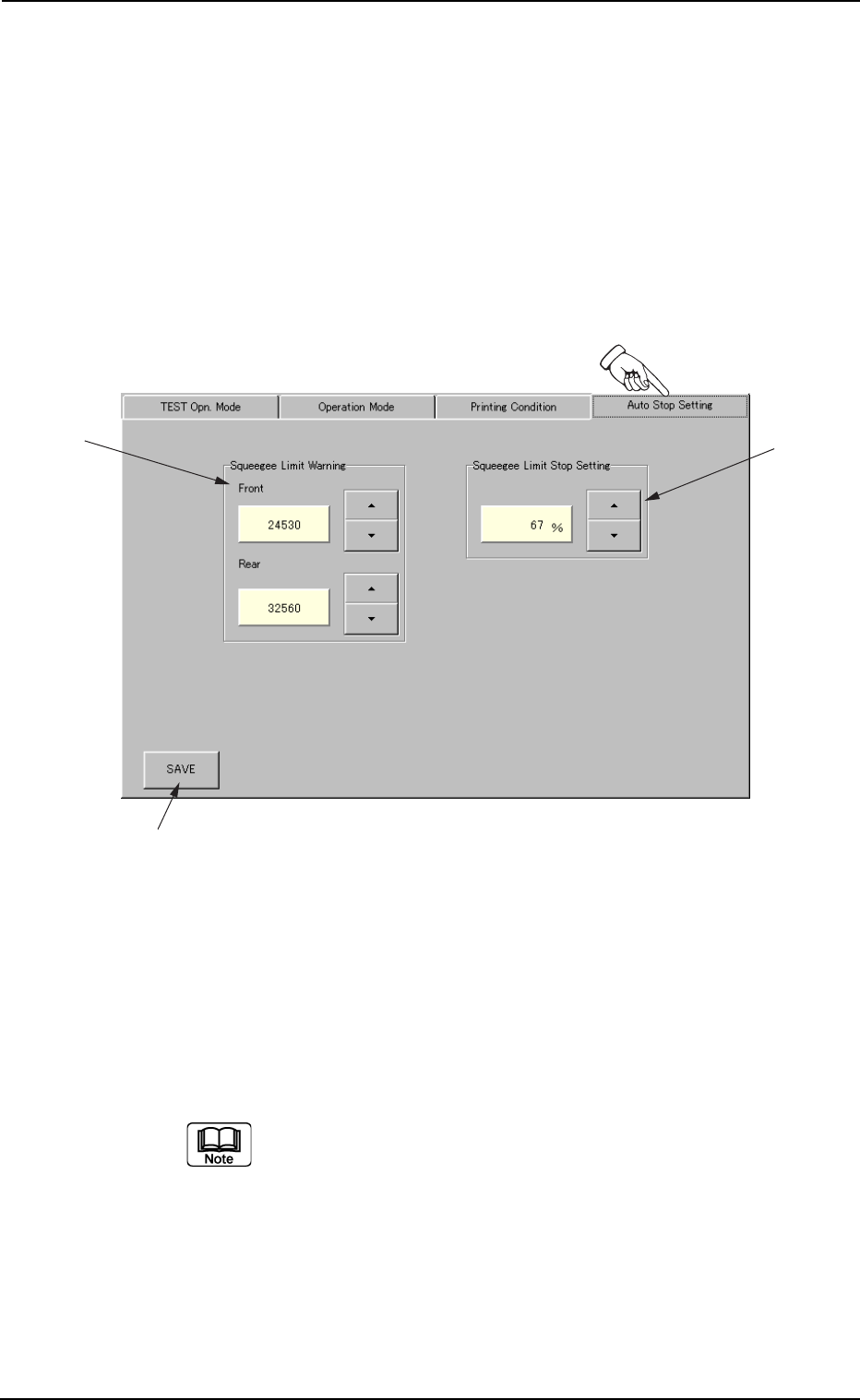
This tab sheet enables the operator to set the number of printing opera-
tions to issue an advance notice regarding the end of squeegee life and
the percentage of printing operations to stop the automatic operation
due to the end of squeegee life.
• Sheet Layout
When the [Auto Stop Setting] tab is pressed at the "OPERATION
MODE" window (submenu), the following tab sheet appears.
Fig. 2E19 "Auto Stop Setting" Tab Sheet
• Sheet Composition
*1 Squeegee Limit Warning
This enables the operator to set the number of printing operations
to issue an advance notice regarding the end of the front and rear
squeegees’ life.
Press the up arrow on the right side of the spinner to make
the number change in increments of one. Pressing the
down arrow makes the number change in decrements of
one.
5.4 "Auto Stop Setting" Tab Sheet
*2
*1
*3
0211-005 Chapter 2 5-29 Tg0582-PM-D1

*2 Squeegee Limit Stop Setting
This enables the operator to set the percentage of printing opera-
tions to stop the automatic operation due to the end of squeegee
life.
The rate (percentage) can be determined, regarding the life speci-
fied in *1 (Squeegee Limit Warning) as 100%.
Press the up arrow on the right side of the spinner to make
the number change in increments of one. Pressing the
down arrow makes the number change in decrements of
one.
*3 [SAVE] Button
Press this button when the above-described settings *1 and *2 are
completed. The set values are saved on the machine side.
0211-005
Chapter 2 5-30 Tg0582-PM-D1
5.4 "Auto Stop Setting" Tab Sheet