1OM-1086-002.pdf - 第245页
9. 1 "Screen Cleaning" T ab This tab sheet can be used to move the screen frame and the squee- gees for manual cleaning and perform the start operation of automatic cleaning. • Sheet Layout When the [Screen Cln…
Table 2E5
Tabs Description
Paste Scrap This tab sheet enables the operator to perform paste knead-
ing operation and move each unit to the printing position.
Conv. Wd. This tab sheet enables the operator to change the conveyor
width to the target value and perform the inching operation.
2Cam. Auto Calibration This tab sheet enables the operator to perform the dual cam-
era automatic calibration.
9. "PRODUCT CHANGE" Submenu
0211-005 Chapter 2 5-37 Tg0582-PM-D1
9.1 "Screen Cleaning" Tab
This tab sheet can be used to move the screen frame and the squee-
gees for manual cleaning and perform the start operation of automatic
cleaning.
• Sheet Layout
When the [Screen Clng.] tab is pressed in the "PRODUCT CHANGE"
window (submenu), the following tab sheet appears.
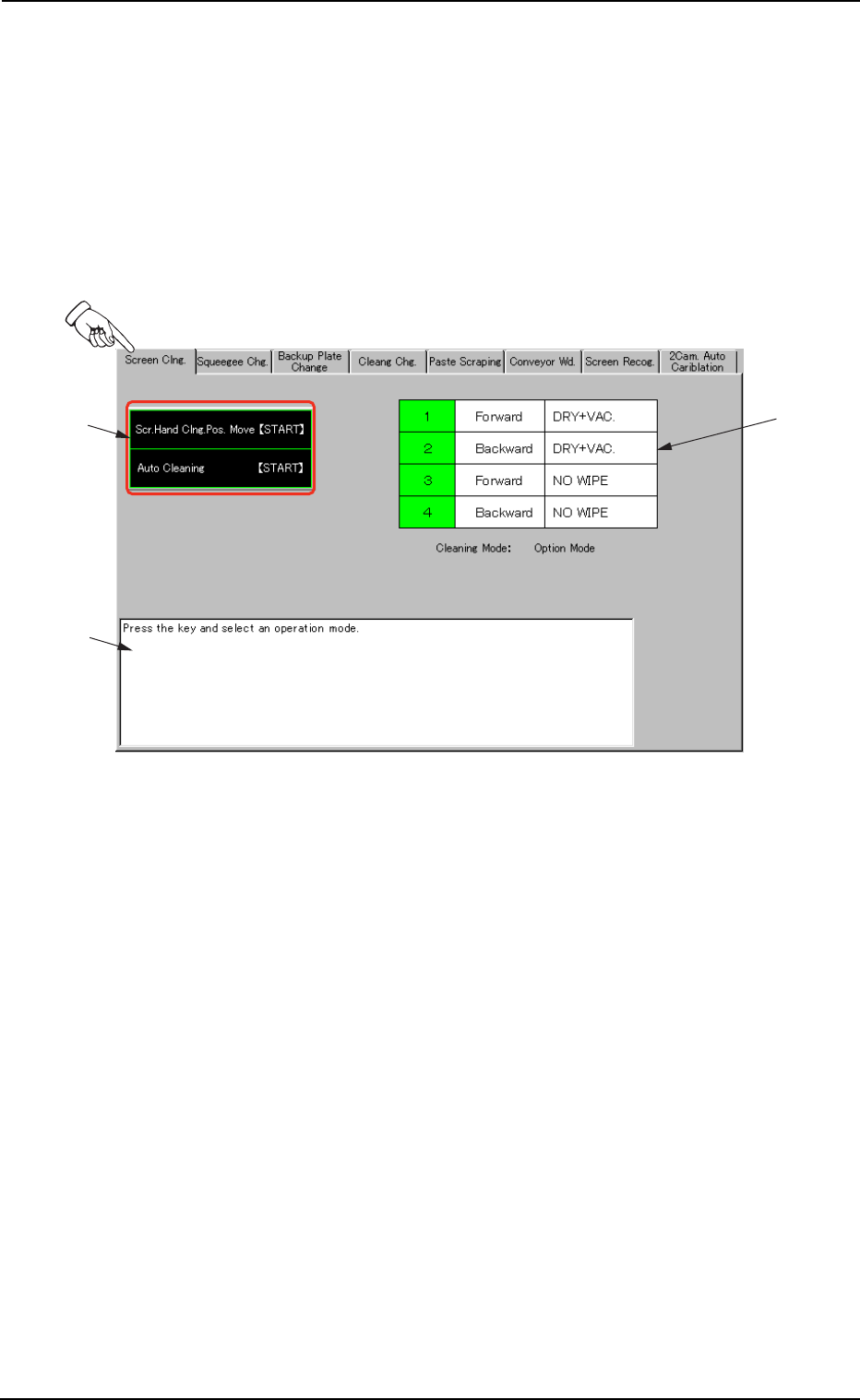
Fig. 2E26 "Screen Cleaning" Tab Sheet
• Sheet Composition
*1 Operation Buttons
The "Screen Clng" tab sheet is provided with the following opera-
tion buttons.
[Scr.Hand Clng.Pos. Move (START)] Button
When this button is pressed, the background color turns blue.
When the [START] button on the operation panel is pressed sub-
sequently, the screen frame moves forward (front side) to secure a
space for manual cleaning and the squeegees move backward
(rear side).
[Auto Cleaning (START)] Button
When this button is pressed, the background color turns blue.
When the [START] button on the operation panel is pressed sub-
sequently, the cleaning operation starts.
*2 Message
A message is issued, giving a guideline of the operations related
to the above-described buttons *1.
*3 Cleaning Mode
Displayed are the cleaning modes and sequences.
9.1 "Screen Cleaning" Tab
*1
*2
*3
0211-005 Chapter 2 5-38 Tg0582-PM-D1
9.2 "Squeegee Change" Tab
This tab sheet enables the operator to move the squeegees and the
screen for squeegee cleaning or replacement and perform the paste
removal operation.
• Sheet Layout
When the [Squeegee Chg.] tab is pressed in the "PRODUCT
CHANGE" window (submenu), the following tab sheet appears.
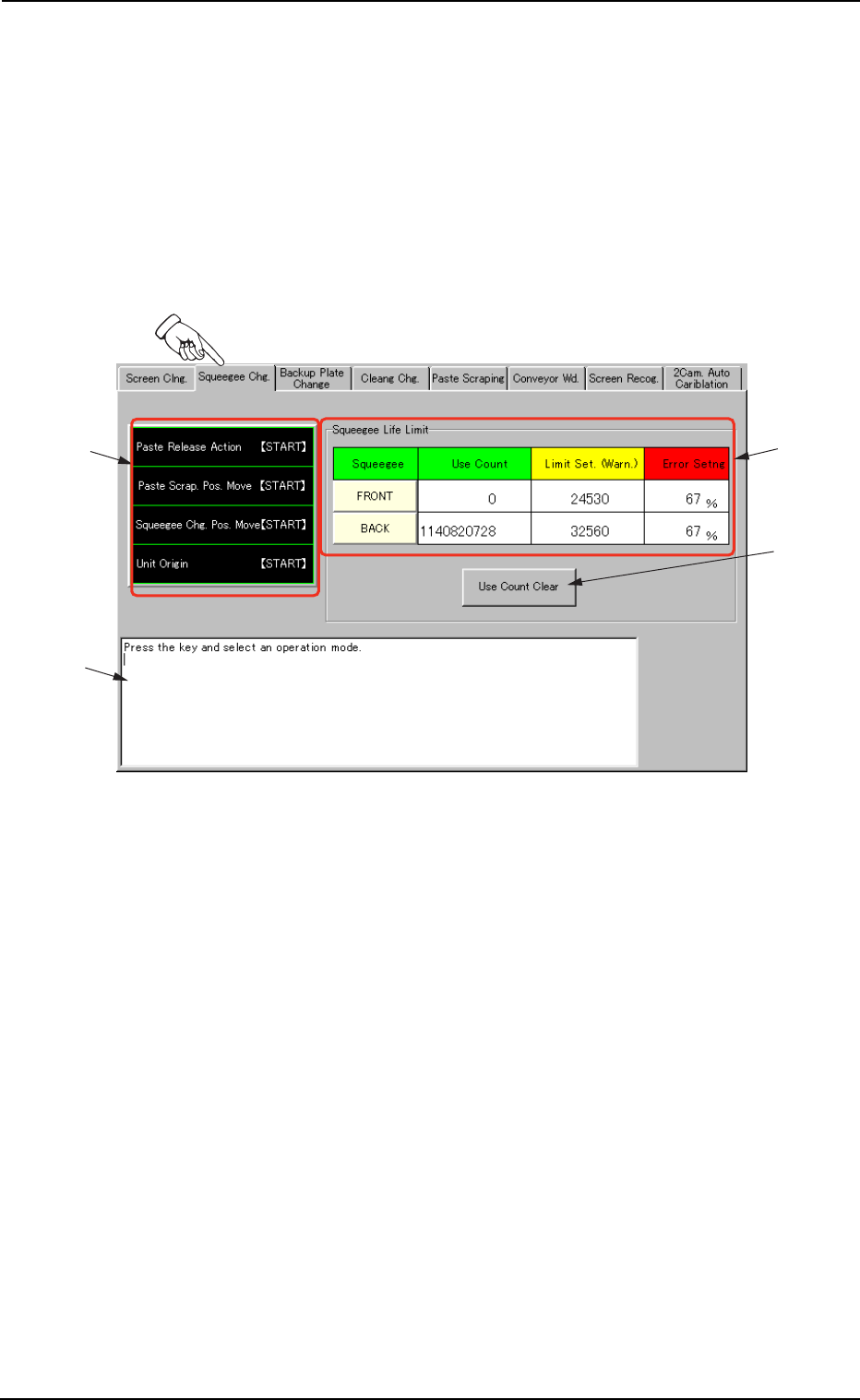
Fig. 2E27 "Squeegee Change" Tab Sheet
• Sheet Composition
*1 Operation Buttons
The "Squeegee Chg" tab sheet is provided with the following but-
tons.
[Paste Release Action (START)] Button
When this button is pressed, the background color turns blue.
When the [START] button on the front operation panel is pressed
subsequently, solder paste on the squeegees is removed from the
squeegees and adheres to the screen.
9.2 "Squeegee Change" Tab
*1
*2
*4
*3
0211-005 Chapter 2 5-39 Tg0582-PM-D1