1OM-1086-002.pdf - 第257页
021 1-005 Chapter 2 5 - 50 Tg0582-PM-D1
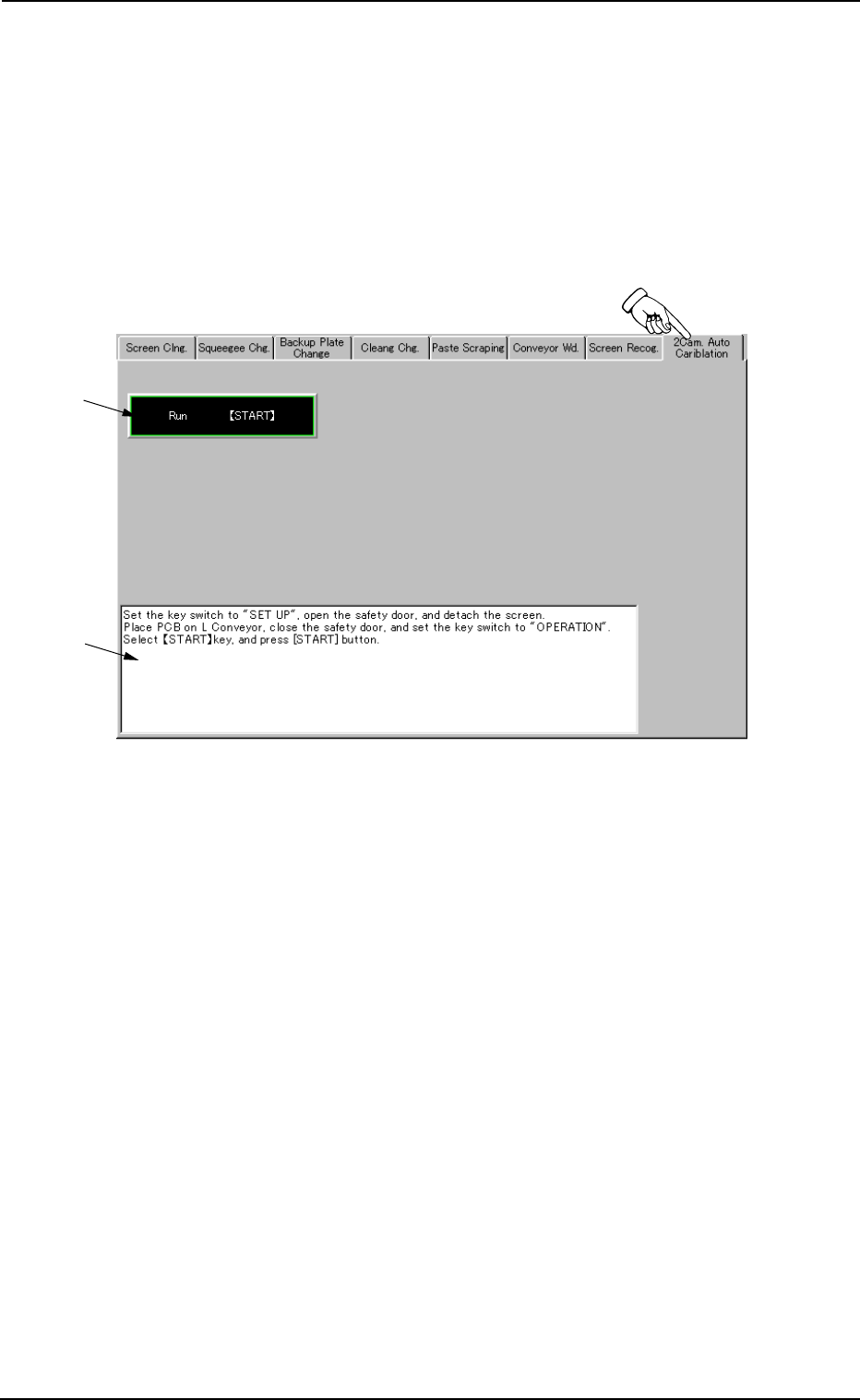
9.8 "2 Camera Auto Calibration" Tab
This tab sheet enables the operator to perform the dual camera auto-
matic calibration.
• Sheet Layout
When the [2Cam. Auto Calibration] tab is pressed in the "PRODUCT
CHANGE" window (submenu), the following tab sheet appears.
Fig. 2E36 "2 Camera Auto Calibration" Tab Sheet
• Sheet Composition
*1 [Run (START)] Button
When this button is pressed, the background color turns blue.
When the [START] button on the front operation panel is pressed
subsequently, the dual camera automatic calibration starts.
*2 Message
A message is issued, giving a guideline of the operations related
to the above-described button.
9.8 "2 Camera Auto Calibration" Tab
*1
*2
0211-005 Chapter 2 5-49 Tg0582-PM-D1

0211-005 Chapter 2 5-50 Tg0582-PM-D1

Section 6
Menus for Maintenance
0211-005 Chapter 2 6-1 Tg0582-PM-D1
This section describes the functions and operations in
each window (window which opens after a menu button
is pressed at the "MAINTENANCE" window).