1OM-1086-002.pdf - 第272页
4.3 "Print Block" T ab This tab sheet can be used to perform the manual operation of the printing section. • Sheet Layout When the [Print Block] tab is pressed in the "MANUAL SUB-SYS- TEM" window (sub…

[PCB Clamp (For.-Back.)] Button
When this button is pressed, the P.C.B. horizontal clamping unit
starts moving forward or backward.
PCB Warpage Protection (UP-DOWN)] Button
When this button is pressed, the P.C.B. top holder starts moving
up or down.
[PCB Stopper Up/Down (UP-DOWN)] Button
When this button is pressed, the P.C.B. stopper starts moving up
or down.
Vacuum Plate (ON-OFF)] Button
When this button is pressed, the P.C.B. is picked up by vacuum or
released.
*2 Status
Displayed is how each unit is working.
4.2 "Table Block" Tab
0211-005 Chapter 2 6-14 Tg0582-PM-D1
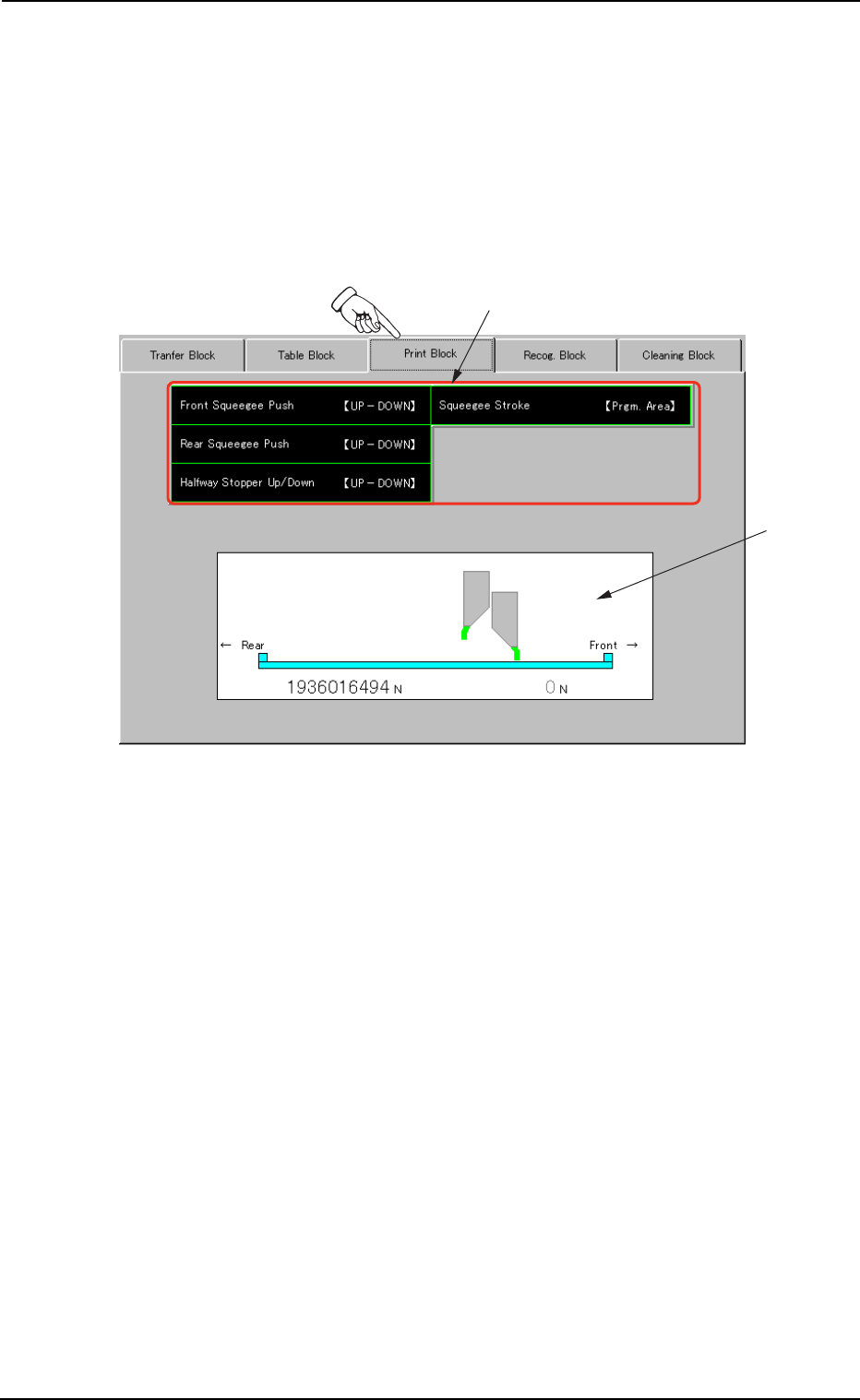
4.3 "Print Block" Tab
This tab sheet can be used to perform the manual operation of the
printing section.
• Sheet Layout
When the [Print Block] tab is pressed in the "MANUAL SUB-SYS-
TEM" window (submenu), the following tab sheet appears.
Fig. 2F11 "Print Block" Tab Sheet
• Sheet Composition
*1 Unit Select Buttons
When a button is pressed, the background color turns blue, indi-
cating that the unit is selected.
When the [START] button on the front operation panel is pressed,
the selected unit starts moving. When the button is released, the
unit stops moving and is reset to the original position.
[Front Squeegee Push (UP-DOWN)] Button
When this button is pressed, the front squeegee starts moving up
or down between the origin and temporary origin positions.
[Rear Squeegee Push (UP-DOWN)] Button
When this button is pressed, the rear squeegee starts moving up
or down between the origin and temporary origin positions.
4.3 "Print Block" Tab
*1
*2
0211-005 Chapter 2 6-15 Tg0582-PM-D1

[Halfway Stopper Up/Down (UP-DOWN)] Button
When this button is pressed, the squeegee holder starts moving
up or down between the origin and halfway positions.
[Squeegee Stroke (Prgm. Area)] Button
When this button is pressed, the squeegees start moving forward
or backward according to the settings of the pattern program.
*2 Status
Displayed is how each unit is working.
4.3 "Print Block" Tab
0211-005 Chapter 2 6-16 Tg0582-PM-D1