1OM-1086-002.pdf - 第317页
7.1.1 Procedure for P .E.C. Recognition T est (1) Position the P .C.B. to be tested on the table. Set a P .C.B. to the dummy P .C.B. input location specified in the "Operation Mode" tab sheet ("OPN. MODE&q…

7.1
"
P.E.C. Recog. Test
"
Tab
0211-005 Chapter 2 6-59 Tg0582-PM-D1
*6 "Auto Gain Adj."
It can be determined whether or not the automatic gain adjustment
should be made during P.E.C. recognition test.
*7 "#1" Tab
When this tab is pressed, the corresponding tab sheet appears. It
contains the data for P.E.C. Fiducial Mark #1 in the current pattern
program.
*8 "#2" Tab
When this tab is pressed, the corresponding tab sheet appears. It
contains the data for P.E.C. Fiducial Mark #2 in the current pattern
program.
*9 [Data Save] Button
When this button is pressed, the data for the specified P.E.C. rec-
ognition mark is saved in the current pattern program.

7.1.1 Procedure for P.E.C. Recognition Test
(1) Position the P.C.B. to be tested on the table.
Set a P.C.B. to the dummy P.C.B. input location specified in the
"Operation Mode" tab sheet ("OPN. MODE" Window). After that,
select the [P.C.B. Clamp (START)] button and press the [START]
button
The P.C.B. is positioned and the camera moves to an area over
the P.E.C. recognition mark.
(2) Set various parameters for the P.E.C. recognition test.
Refer to "7.1.2 Editing of Parameters for P.E.C. Recognition Moni-
tor" for details.
(3) Press the [Camera X-Y Move] button. The "P.E.C. Recog. Camera
Move Opn. Scrn." window opens. Move the P.E.C. recognition cam-
era such that the P.E.C. recognition mark for the P.E.C. recognition
test enters inside the visual field of the camera (recognition range).
Refer to "7.1.3 Camera Movement Operation" for details.
(4) Select the [Recog. Test Exec. (START)] button and press the
[START] button on the front operation panel.
The machine performs the P.E.C. recognition test.
• After the recognition is completed normally, the camera moves
until the P.E.C. recognition mark is located at the center on the
camera monitor.
• When recognition is "NG (No Good)", a recognition error mes-
sage is issued.
The P.E.C. recognition test can be performed repeatedly.
The location of the P.E.C. recognition mark can be changed
for confirmation by moving the P.E.C. recognition camera
(manual alignment).
(5) When the [Unit Return (START)] button is selected and the [START]
button on the front operation panel is pressed, the shaft of the
P.E.C. recognition camera is zeroed and the P.C.B. returns to the
dummy P.C.B. input location.
7.1
"
P.E.C. Recog. Test
"
Tab
0211-005 Chapter 2 6-60 Tg0582-PM-D1
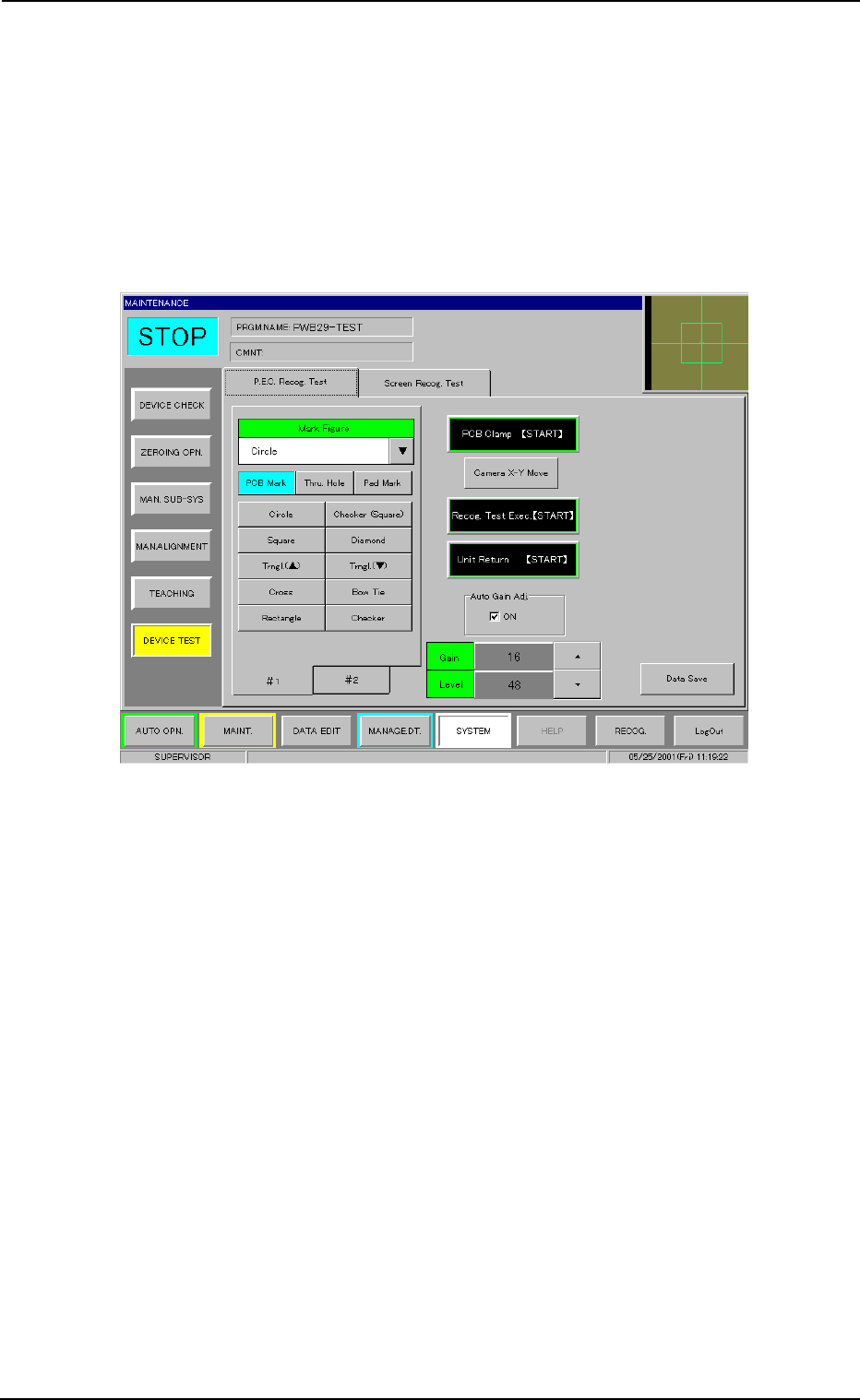
7.1.2 Editing of Parameters for P.E.C. Recognition Monitor
Various parameters can be set for P.E.C. recognition test.
(1) Mark Figure
Press the [ ▼ ] button.
The tab sheet changes as follows (Fig. 2F48). Some selection but-
tons appear, enabling you to specify a mark figure.
Fig. 2F48
When the fiducial mark of the P.C.B. to be produced is a P.C.B. mark,
press the [PCB Mark] button.
The window (Fig. 2F48) appears.
0211-05
Chapter 2 6-61 Tg0582-PM-D1
7.1
"
P.E.C. Recog. Test
"
Tab