1OM-1086-002.pdf - 第88页
0509-006 Chapter 1 2 - 8 Tg0582-PM-D1 After the end of operations, be sure to open the " Login T ype Selection " window . If you keep the currently active window open for a long period of time without opening t…
1.3 Exiting from Operation Window
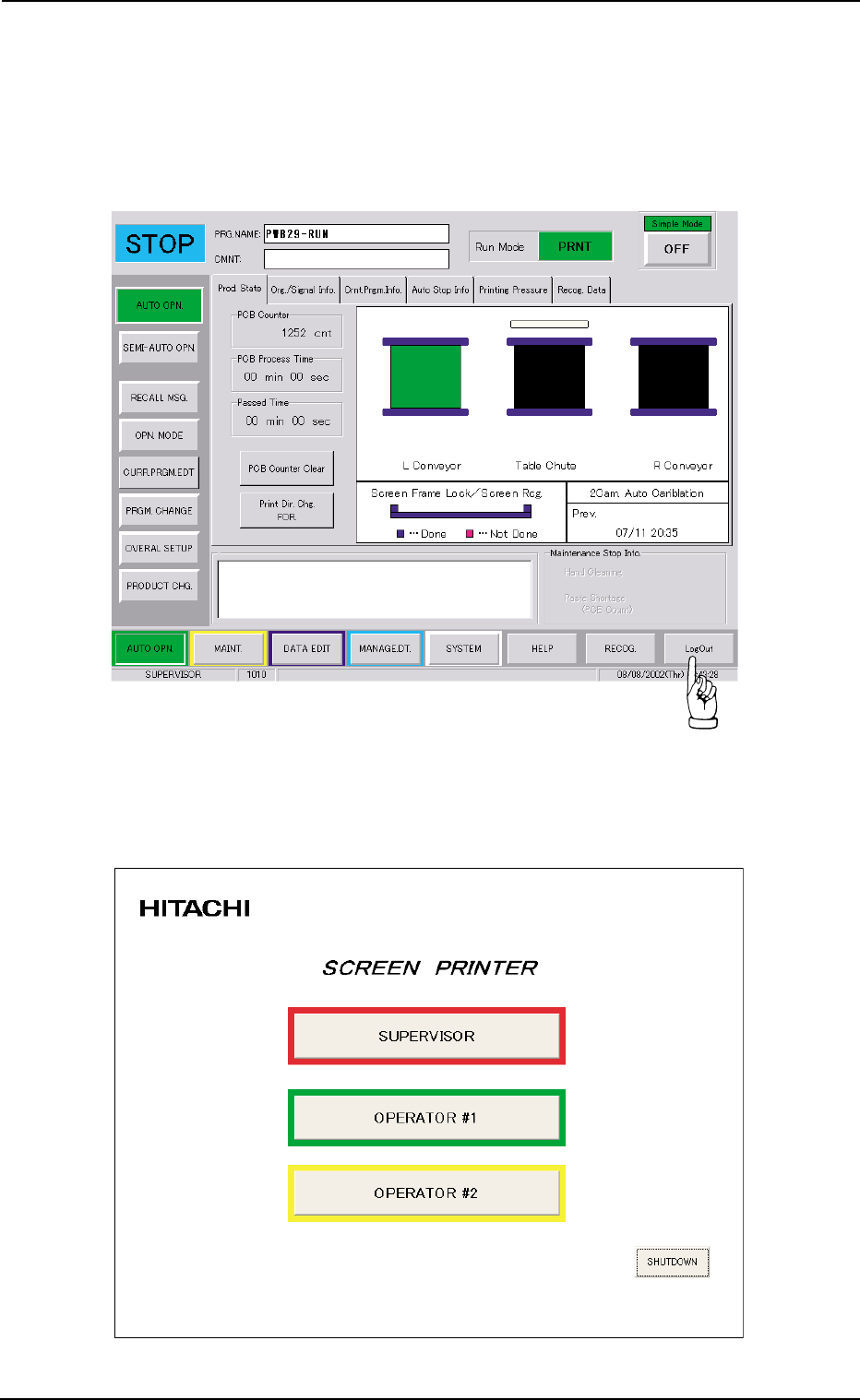
(1) To exit from an operation window ("AUTO OPERATION" or "MAIN-
TENANCE" window), press the [LogOut] button located at the bot-
tom right of the window.
Fig. 1B4
(2) The window for "Log In" type selection opens.
Fig. 1B5
1.3 Exiting from Operation Window
0509-006 Chapter 1 2-7 Tg0582-PM-D1
0509-006 Chapter 1 2-8 Tg0582-PM-D1
After the end of operations, be sure to open the "Login
Type Selection
" window.
If you keep the currently active window open for a long
period of time without opening the
"Login Type Selec-
tion
" window, the password’s security function becomes
meaningless.
Especially when the system is logged on to by a highly
authorized personnel such as
"Supervisor", be sure to
return to the
"Login Type Selection" window.
WARNING
1.3 Exiting from Operation Window

0211-005 Chapter 1 2-9 Tg0582-PM-D1