444CEMM1 - 第122页
Page 1-60 Check Every 140 Hours (Once a Week) 1-4-8 Cleaning the Forced-Chip-Ejecting Unit 444C-E-MMA01-A08-04 1 . T urn OFF the power supply . 2 . Disengage a catch, open a cover , and remove a brush. 3 . Shake off the …
Page 1-59
REGULAR
MAINTENANCE
1
Check Every 140 Hours (Once a Week)
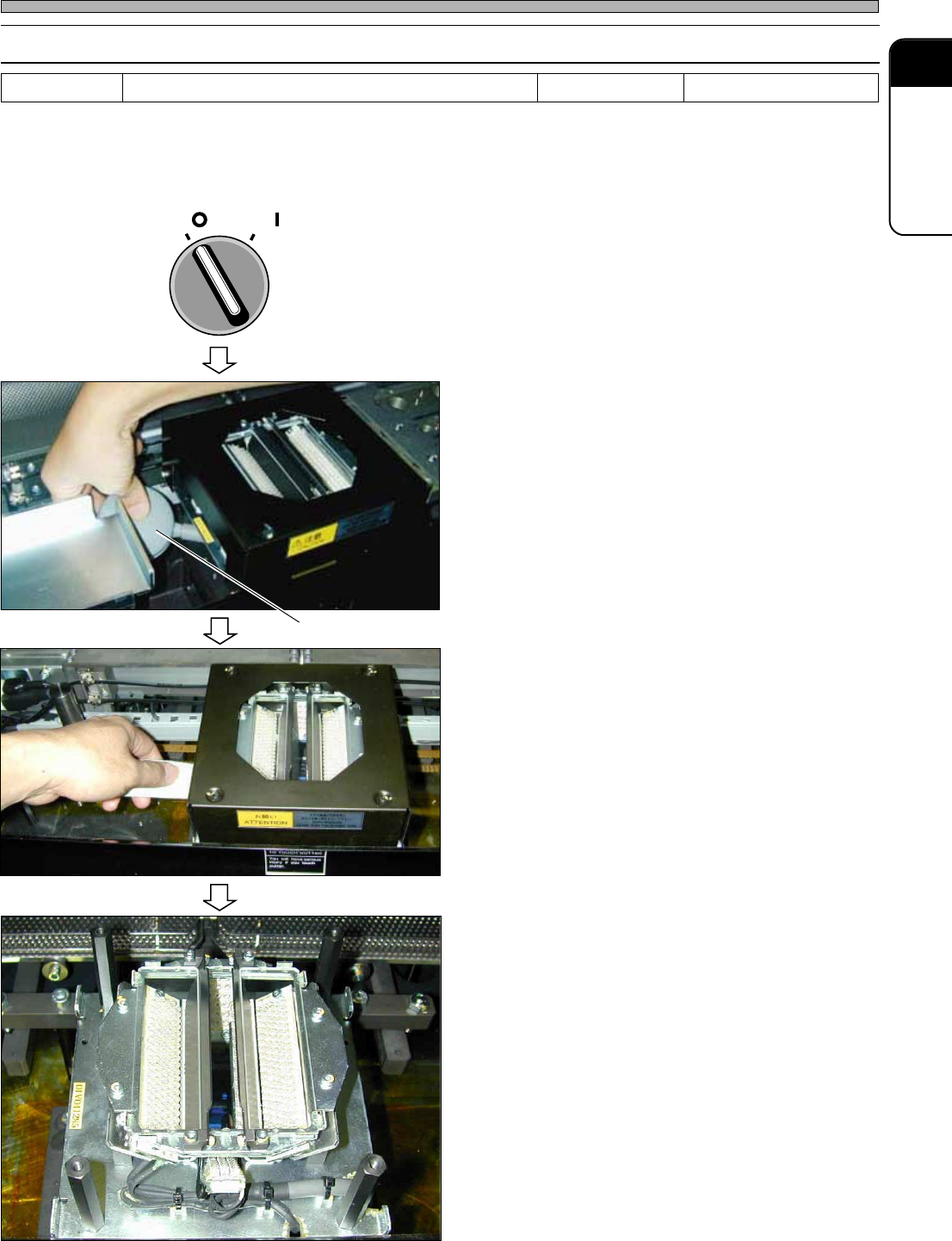
1-4-7 Cleaning the Line Camera Lens
If such as chips and dust adhere to the lens of the line camera, a nozzle looks as if it tapered or a
recognition error of chip components can occur.
1. Turn OFF the power supply.
∗ Because the cooling fan located under the
lighting is rotating, turn OFF the power supply.
2. Open the safety cover.
3. Ensure that the head and nozzle do
not lower. While holding the center of
the beam, press it inside gently.
4. Blow away the dust from between the
illumination and the line camera by
using the blower brush.
• Blow away the dust from the left side or the
front side.
Tools Blower brush Required time 5 minutes
OFF ( )
ON ( )
SERVO
444C-490P
Blower brush
444C-E-MMA01-A08-06
5. Wind a cloth around a stick or such a
thin plate as a ruler, and then wipe the
lens face.
∗ At this time, removing the NG chip discharge
box and its mount will make this work easy.
6. Clean the lighting cover glass.
∗ If the inside of the cover glass of the lighting is
heavily stained, detach the black lighting cover,
remove the cover glass holder, and then wipe
the inside of the glass with a cloth. (Be careful
not to apply forces to the glass.)
444C-518P
444C-519P
Page 1-60
Check Every 140 Hours (Once a Week)
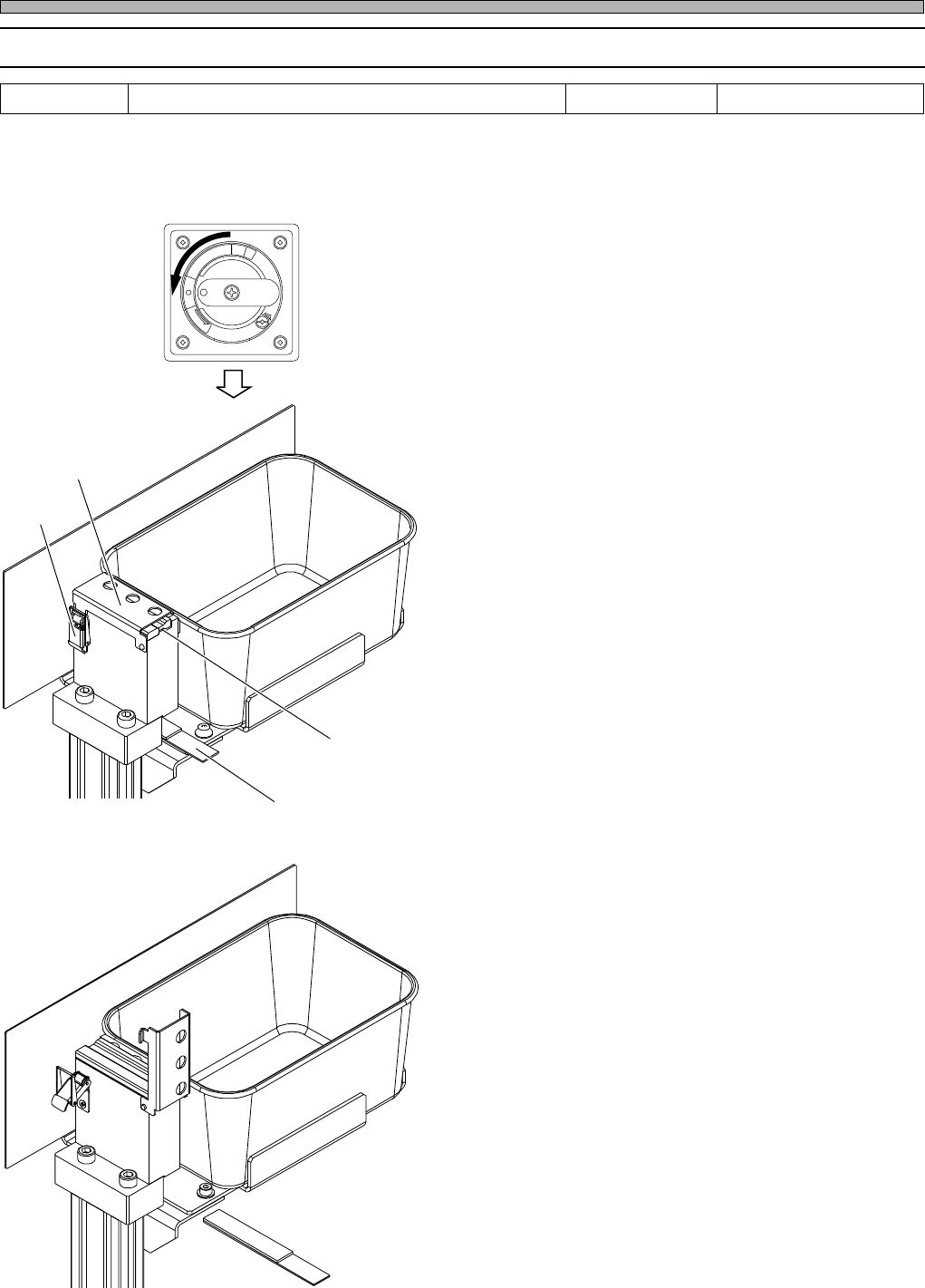
1-4-8 Cleaning the Forced-Chip-Ejecting Unit
444C-E-MMA01-A08-04
1. Turn OFF the power supply.
2. Disengage a catch, open a cover, and
remove a brush.
3. Shake off the chips and foreign bod-
ies adhering to the brush.
4. Put the brush back on, close the
cover, and engage the catch.
5. Remove the chips adhering to a mag-
net.
6. Put it back into its original position
with the magnet surface facing up-
ward.
R
E
L
E
A
S
E
T
R
I
P
O
F
F
O
N
R
E
S
E
T
5 minutes
Required time
Tools
∗ The forced-chip-ejecting unit is standard equipment for DS, but an option for DH.
Brush
Catch
Magnet
Cover
444C-465E
444C-466E
Page 1-61
REGULAR
MAINTENANCE
1
1-5 Check Every 560 Hours (Once a Month)
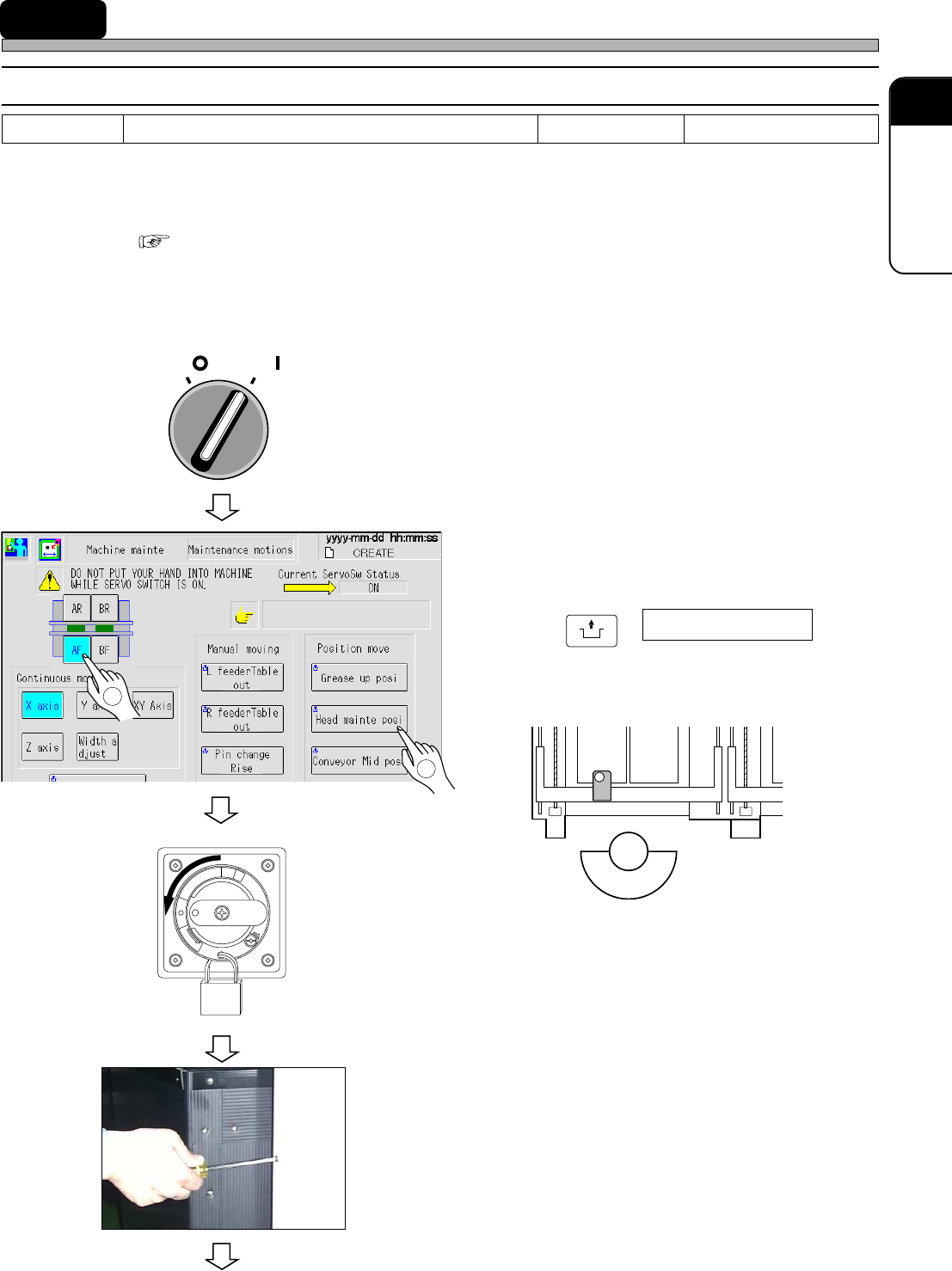
1-5-1 Cleaning the Lubricating the Transfer Head
Clean and lubricate the nozzle shaft support bearing and check the vacuum pressure at the nozzle
tip. Dirt on the nozzle shaft support bearing may cause wrong operation and pickup. Leakage in the
air pass will also cause wrong pickup.
∗ For DU/DHU specifications, it is necessary to remove the feeder base cover for the maintenance.
“1-2-3 Setting and Removing the Feeder Base Cover (Only for DU/DHU Specifications)”
1. Cleaning and lubricating the nozzle shaft support bearing
1. Ensure that the safety cover is
closed, and turn on the servo switch.
2. Select the operation table.
3. Press
UNLOCK
+ Head mainte posi .
• The transfer head moves to the maintenance
position.
4. Turn OFF the power.
∗ Lock the main switch. A worker should carry
the key. (DU/DHU only)
5. Open the cover at the lower right of
the machine rear side.
∗ Remove the screw by using a Philips driver.
To the next page
444C-E-MMA01-A08-04
444C-419E
Tools
Philips driver, cotton bud, syringe, and vacuum gauge
Required time 30 minutes
2
1
OFF ( )
ON ( )
SERVO
R
E
L
E
A
S
E
T
R
I
P
O
F
F
O
N
R
E
S
E
T
444C-401P
444C-457E
444C-EEn-MpMmMm-011